GPS Status Information
P/N 7010-0628
1-19
Monitor Satellites and Enter the Mask
To monitor the current distribution of satellites or enter the mask
angle for satellites, press the GPS status button, then tap the
Satellites tab on the GPS status dialog box.
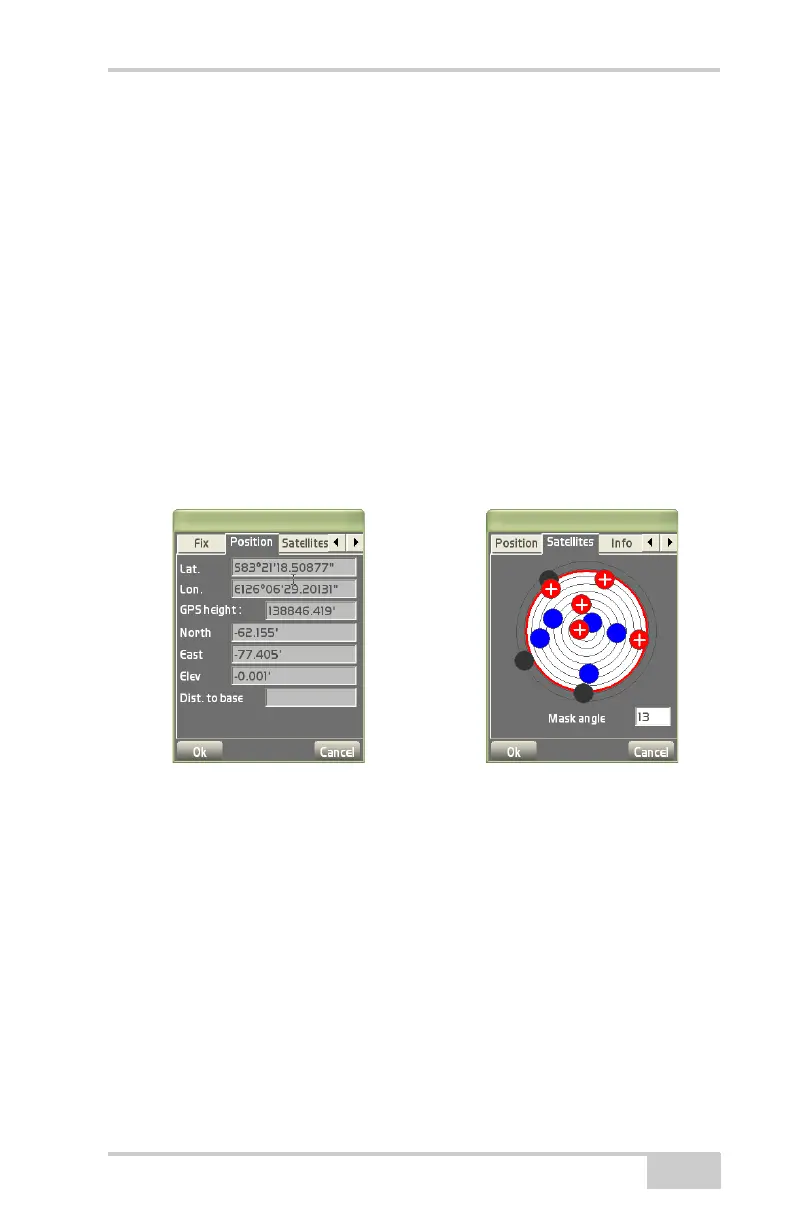
The Satellites tab displays the following information (Figure 1-23).
• Satellite plot – displays used and unused satellites, and the
current mask angle.
– Blue dots: GPS satellites
– Red-with-cross dots: GLONASS satellites
– Black dots: unused satellites
– Red mask circle: satellites inside will be used for positioning
• Mask – enters and sets the mask angle for the job.
Figure 1-23. Position and Satellites Tabs
View Receiver Information or Reset Receiver
To view the receiver’s ID number and firmware version, press the
GPS status button, then tap the Info tab on the GPS status dialog
box. Use the left/right arrows to navigate to the Info tab.
The Info tab displays the following (Figure 1-24 on page 1-20):
• Identification information, firmware revision, and radio link
information (type, latency, and quality) for the receiver.
• Reset receiver – press to clear all data and reset all settings stored
for the GPS+ receiver.



 To Next Page