Connecting to SiteLink-3D
P/N 7010-0628
2-51
marked (Figure 2-70 on page 2-52). Any type of file can be sent.
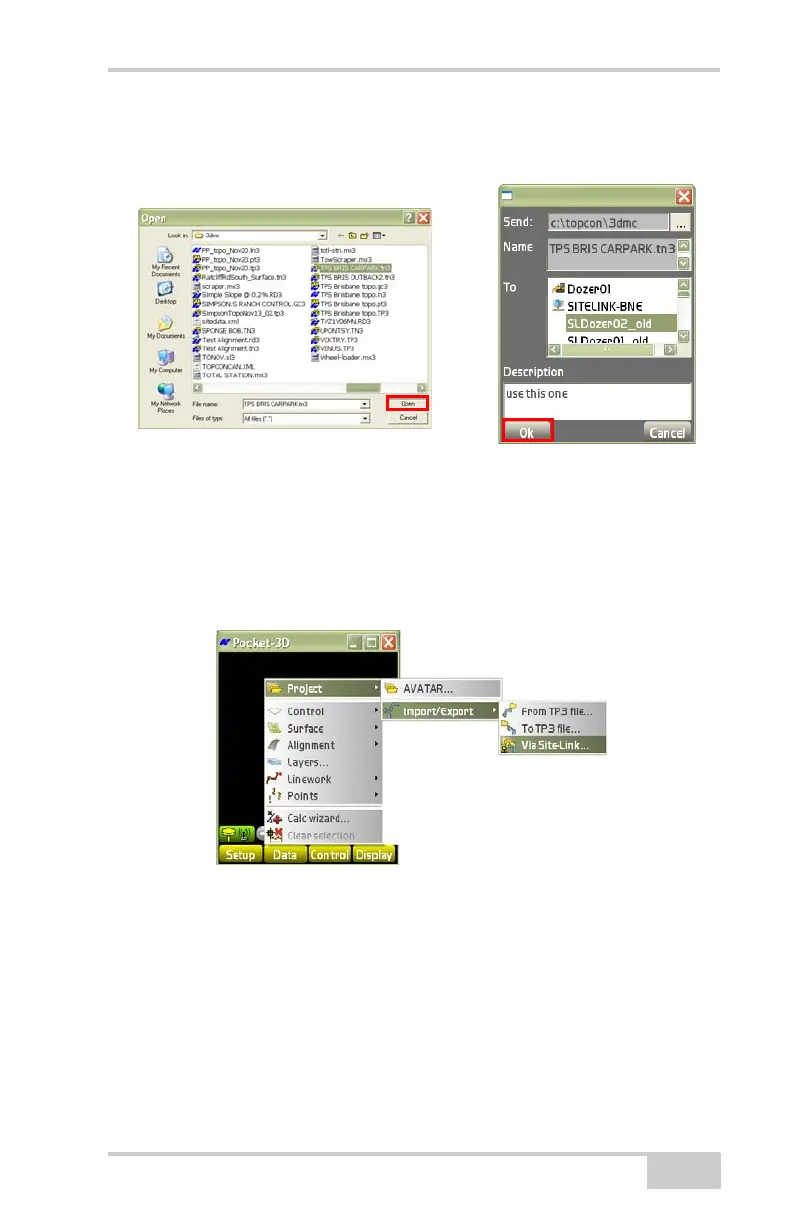
5. Press Ok to send the file to the machine operator on the jobsite.
Figure 2-68. Send Any File
Exporting a Project File Via Site-Link
1. Press DataProjectImport/ExportVia Site-Link
(Figure 2-69).
Figure 2-69. Select Project File Via Site-Link
The Pocket-3D confirmation dialog box displays (Figure 2-70 on
page 2-52).
2. If you press Yes on the Pocket-3D confirmation dialog box, do
the following:
•On the import/export To: dialog box, highlight to select the
desired project file for import/export (
Figure 2-70 on
page 2-52).



 To Next Page