Setup Menu
Pocket-3D Reference Guide
2-52
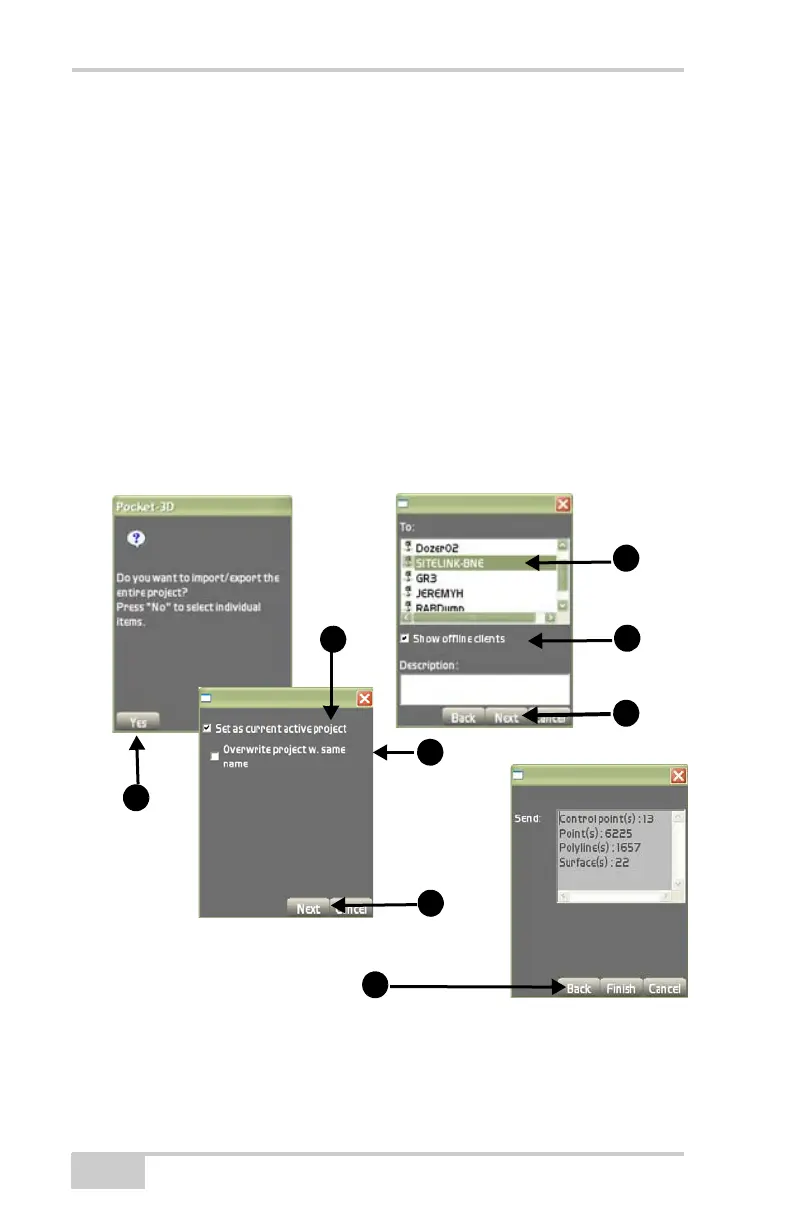
• Check mark the Show offline clients box to display both
online and offline clients and enter a description if you prefer
(optional), then press Next.
3. On the project selection dialog box, check mark the Set as
Current active project box only if you want to overwrite the other
client’s current project(
Figure 2-70).
If this the box is unchecked, the file goes to the clients “in box”
where he can later retrieve the file by pressing Copy
From
Inbox.
4. On the project selection dialog box, check mark the Overwrite
project w/same name box if the project name is the same as one
that already exist (
Figure 2-70), then press Next.
5. Press Finish to save and return to the Main Screen.
Figure 2-70. Import-Export Control Data
6. If you press No on the Pocket-3D confirmation dialog box, do
the following to select individual items:



 To Next Page