Data Menu
Pocket-3D Reference Guide
3-18
Conversion Formats
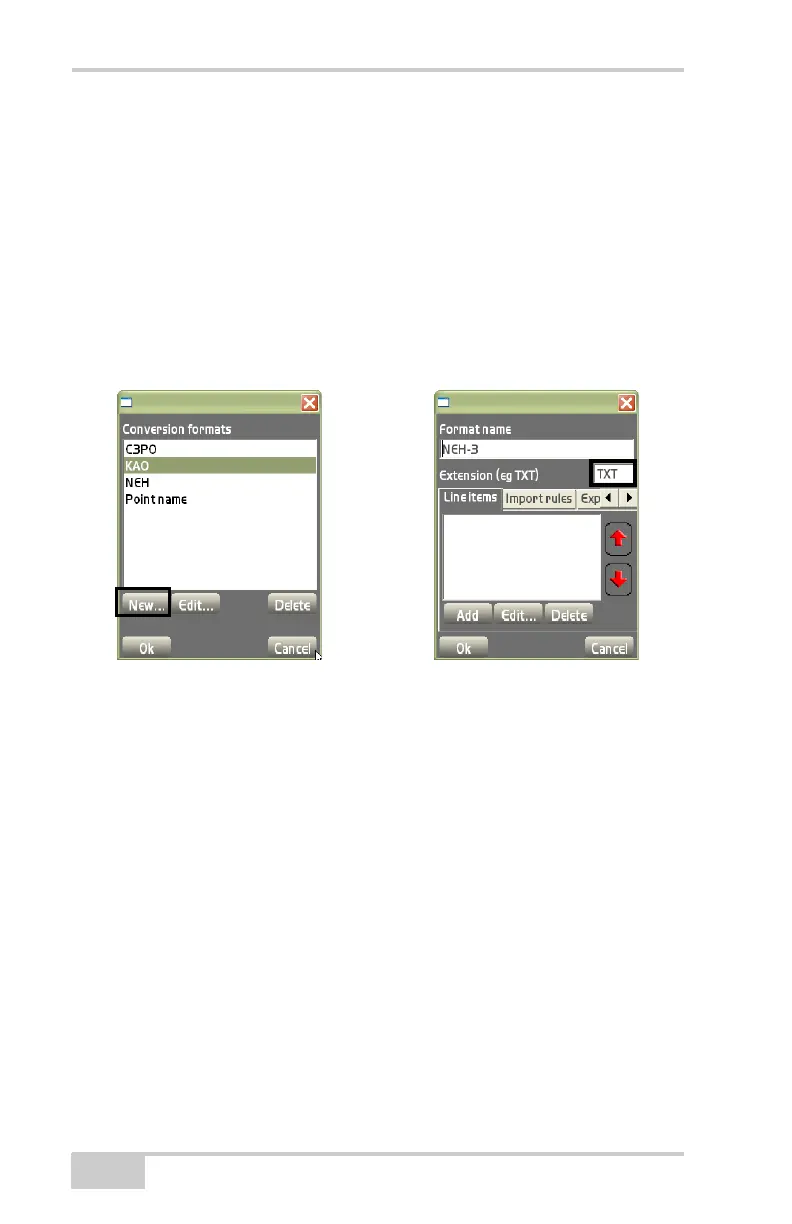
On the Conversion formats dialog box displays (Figure 3-28), do the
following to create, edit, or delete a conversion format:
• New – on the conversion formats dialog box (Figure 3-28), press
to enter a conversion format. The Format name dialog box
displays (
Figure 3-28).
– Format name: enter the name of the conversion format.
– Extension (e.g.,TXT): enter an extension type. Only enter
generic ASCII formats; such as, .txt, .asc, .csv, etc.
Figure 3-28. Conversion Formats/Format Name Dialog Boxes
• Edit – on the Conversion formats dialog box, press Edit to
change the selected format. See the “New” bullet above for
details on the dialog box that displays.
• Delete – on the Conversion formats dialog box, press Delete to
remove the selected format.
The Line Items tab on the Format name dialog box adds, edits, or
deletes line items for the selected conversion format (
Figure 3-30 on
page 3-19).
• Add – on the Line items tab, press Add to add a line item and it’s
respective information (
Figure 3-29 on page 3-19), then press Ok
to save the information. Repeat this process for each line item.
– Type: select either Point name, Point description, Point
northing, Point easting, Point elevation, Point layer name,



 To Next Page