5.2 SONET Setup and Status
An OC-xx/STS-xx button in the navigation area of the Ports Setup screen
gives you access to the SONET setup for the transmitter and/or receiver of
the currently selected port.
Refer to SDH/SONET switching for switching to SONET.
Synchronous Optical Networking (SONET) refers to a standardized protocol that
transfers digital signals over optical fiber using lasers. At low transmission
rates data can also be transferred via an electrical interface.
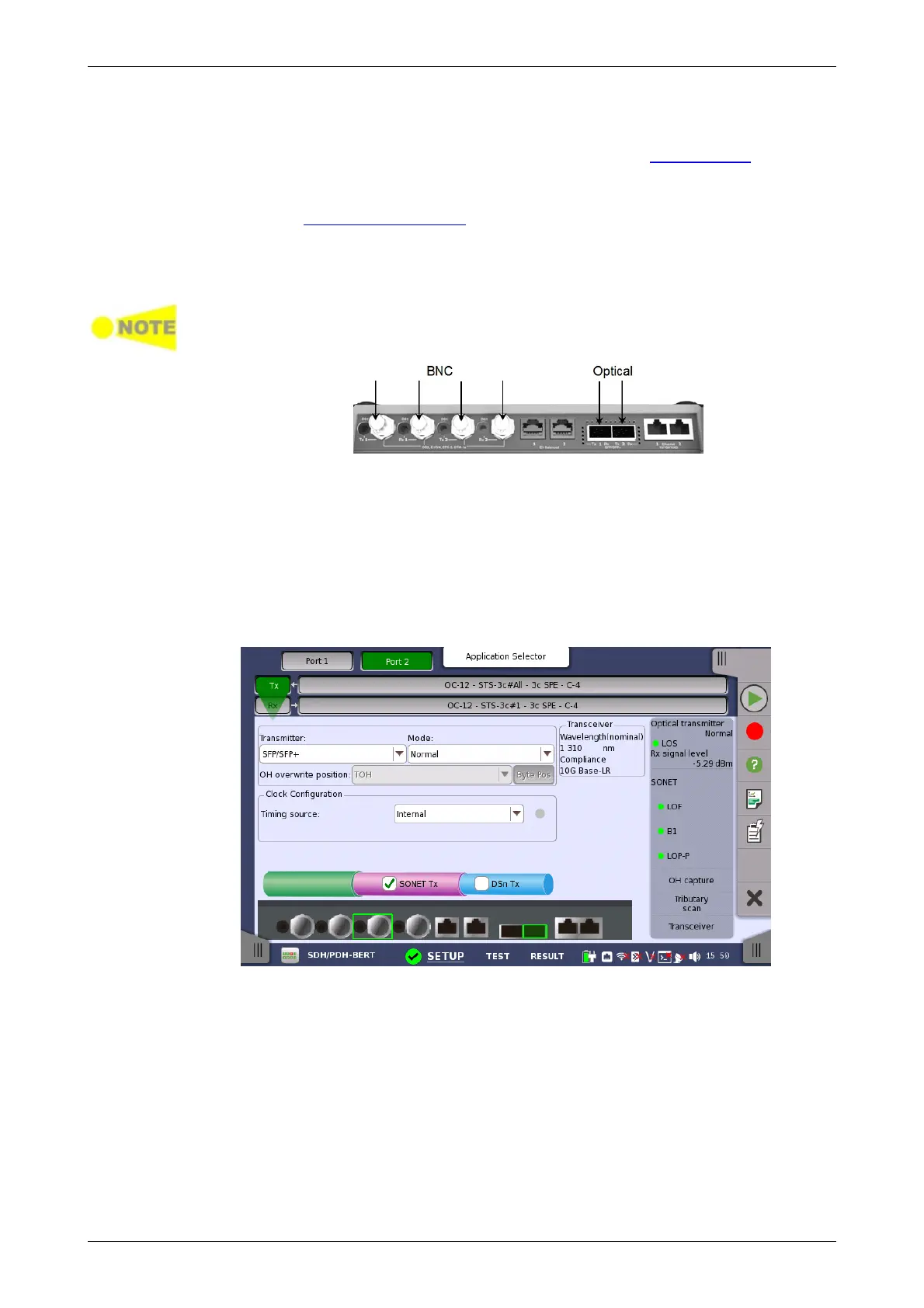
The SONET interface uses the electrical BNC connectors and the optical ports.
MU100010A Connector Panel
5.2.1 Transmitter Setup
5.2.1.1 Physical Setup
When the transmitter is set up with a SONET interface, selecting the Tx
button in the navigation area will launch the following screen. (Note that the
SONET Tx check box above the connector panel illustration is selected.)
This screen allows you to enable the optical or electrical interface of the
SONET transmitter. It can also be used to inspect the current status of the
selected port.
The configuration options available in the setup area of the screen are
described below. The status information is described in a separate section.
Transmitter
Use the Transmitter drop-down menus to select to the transmitter.
Mode
Use the Mode drop-down menus to select to the behavior of the transmitter.
OH overwrite position














 To Next Page