Single ended
network test
Frame Size
(Bytes)
Note that you cannot select 'Throughput and Frame Loss' and 'Throughput' /
'Frame Loss' at the same time.
This test is used when testing network by reflecting traffic back to the
Network Master. This requires a device to reflect the traffic back e.g. a
second Network Master.
If both ports are active, the test will require both ports to be linked and do a
dual 'Single ended network test'. Turn off one of the ports to only test on one of
the ports.
Testing in this mode
Throughput test
Frame Loss test
Throughput and Frame Loss test
Latency test
Burst test
Note that you cannot select 'Throughput and Frame Loss' and 'Throughput' /
'Frame Loss' at the same time.
6.9.2.2 Throughput
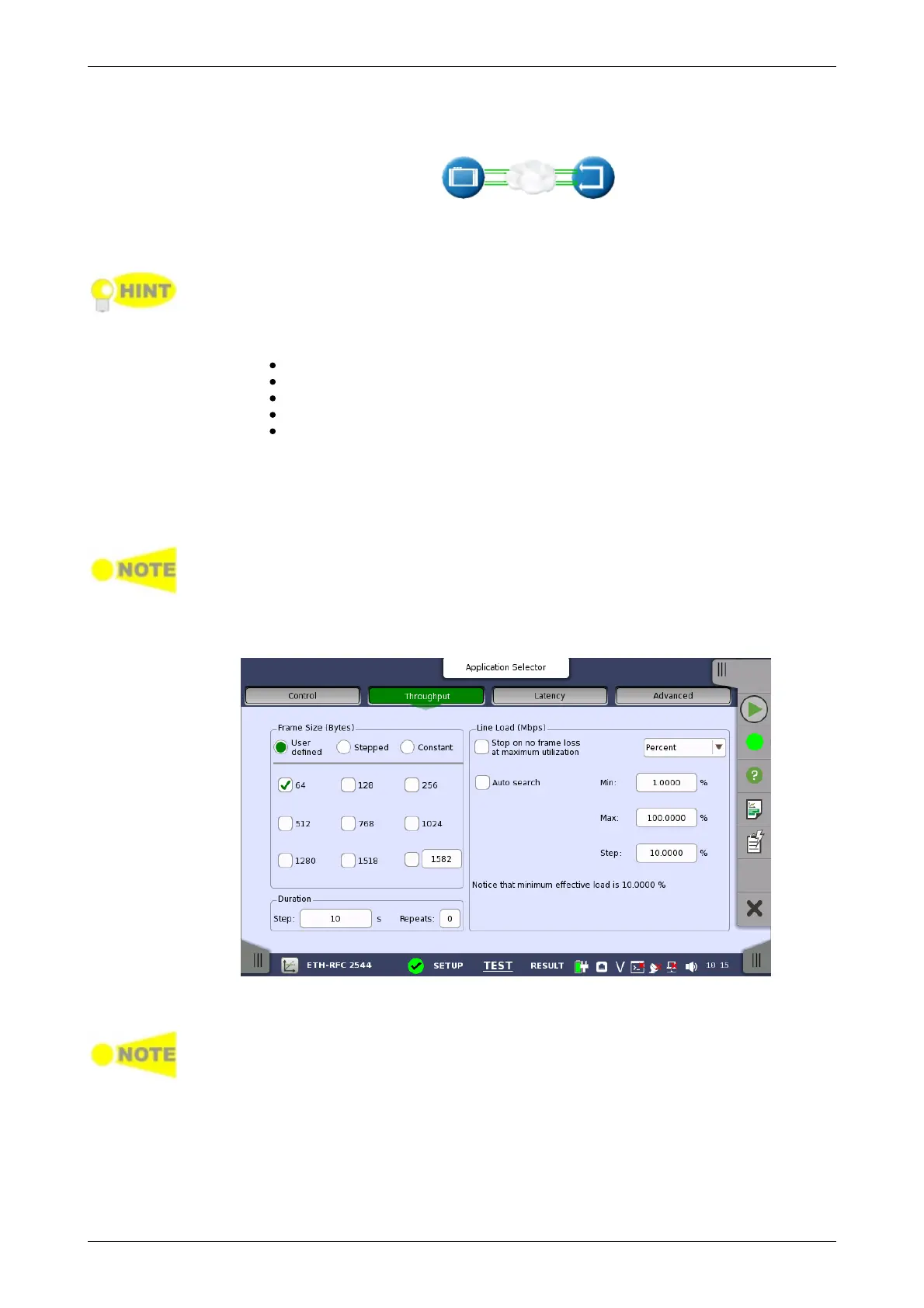
Only available if you have specified a Throughput test on the 'Control' of the Test
Setup screen.
Touching the Throughput button in the navigation area will display the
screen shown below.
This screen allows you to configure the following parameters related to an
RFC 2544 Throughput test:
The changes affect both Port 1 and Port 2 when the Switch/Router Test mode is
selected.
Frame size can be specified in 3 ways. Observe that the screen layout
changes depending on the type of Frame Size selected.














 To Next Page