Setup
Select this check box if you want the configuration frames to support
communication with CMA3000 and Network Master V2.X or older.
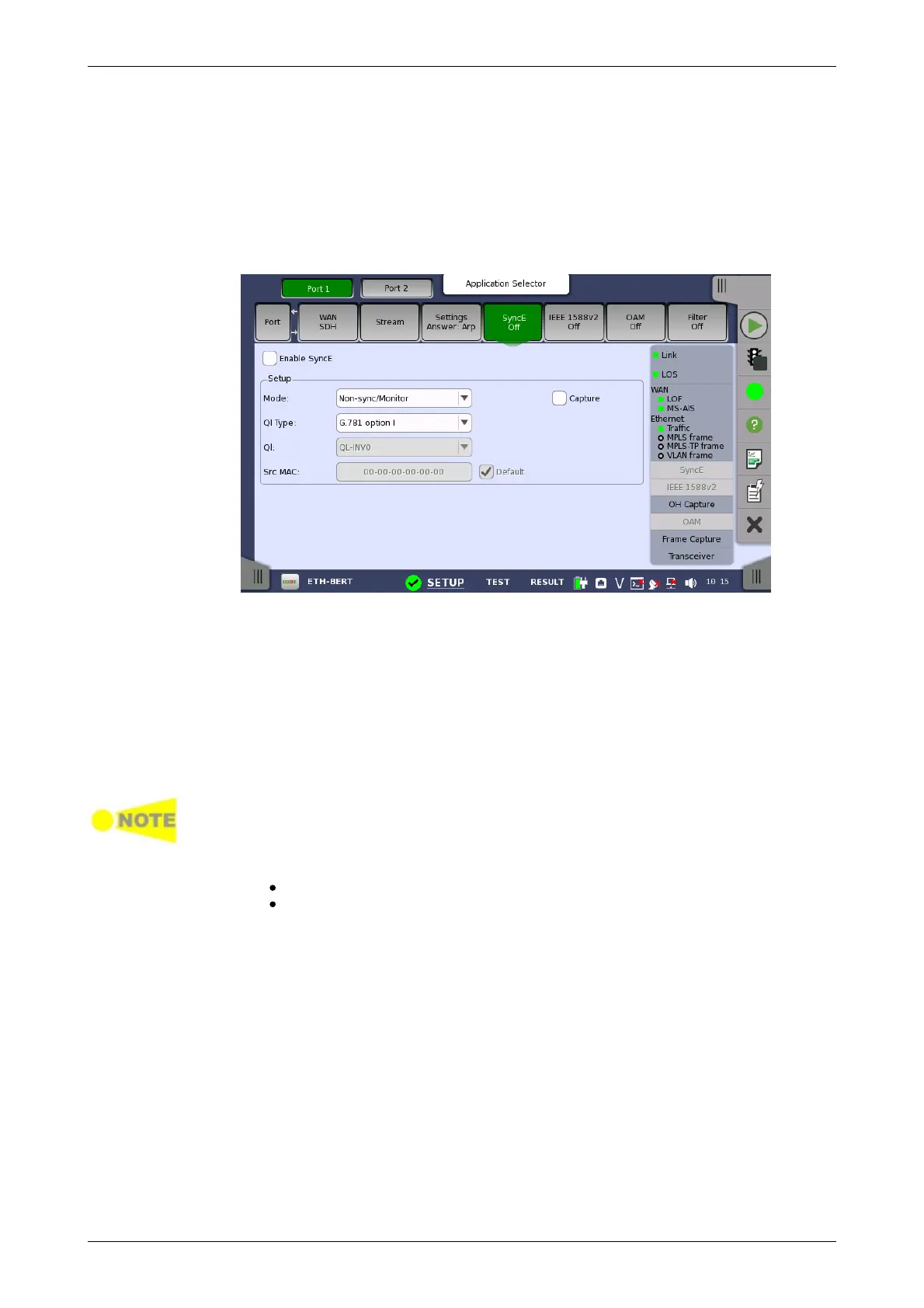
6.1.2.5 SyncE
Touching the SyncE button in the navigation area will display the screen
shown below.
The Follow button appears when the Port 2 settings can follow Port 1.
This screen allows you to configure the setup parameters related to
Synchronous Ethernet. It can also be used to inspect the current status of
the selected port.
The configuration options available in the setup area of the screen are
described below. The status information is described in a separate section.
Enable SyncE
Select this check box to enable statistics of the quality level reported in the
received ESMC (Ethernet Synchronization Messaging Channel) messages
and the generation of Sync Alarm when such messages are missing.
Due to the properties of 10 Mbps Ethernet, the transfer of SyncE timing cannot
be guaranteed at this rate.
Mode
Non-sync/Monitor: Does not transmit an ESMC message.
Synchronous: Forces the quality levels specified in QL to be
transmitted in an ESMC message every second.
Ql Type
Allows you to select a protocol/option. This changes the textual
representation of the quality levels on the result- and status pages.
Ql
Allows you to specify the quality level to be indicated in the transmitted
Ethernet signal.














 To Next Page