Duration
The Resolution field lets you specify the precision of the auto search. A
higher precision extends the duration of the test. Available resolutions are:
0.1, 1.0 and 10.0 %.
The check boxes are enabled except when selecting 'End to End network test'
on Control screen.
Step
Specify the approximate duration in time of each step of the test. It can be
set to a number of seconds (minimum 3 seconds).
Repeats
Specify the number of times the complete test will repeat. Valid range: 0 to
1000.
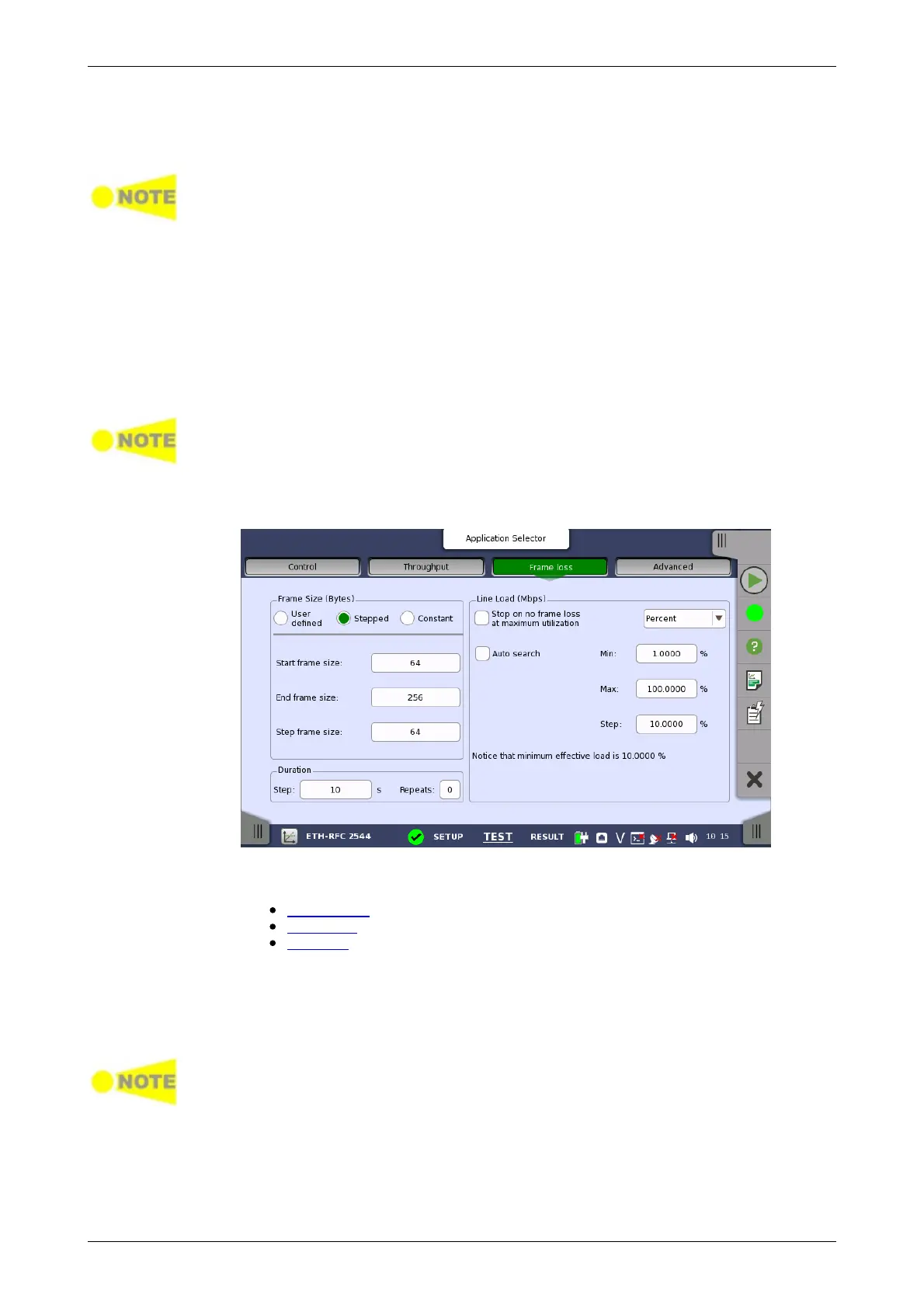
6.9.2.3 Frame Loss
Only available if you have specified a Frame Loss test on the 'Control' of the Test
Setup screen.
Touching the Frame loss button in the navigation area will display the
screen shown below.
This screen allows you to configure the following parameters related to an
RFC 2544 Frame Loss test:
Frame Size
Line Load
Duration
The parameters are identical to the ones described in the Throughput
section above.
6.9.2.4 Throughput and Frame Loss
Only available if you have specified a 'Throughput and Frame Loss' test on the
'Control' of the Test Setup screen. Use this test if you want to perform both a
Throughput test and a Frame Loss test while using the same test parameters for
both.
Touching the Throughput and frame loss button in the navigation area
will launch the screen shown below.














 To Next Page