Pattern: Pattern
CRC-6: Cyclic Redundancy Check 6
S-Bit: S-Bit Error
BPV: Bipolar Violation
Pattern Slip: Pattern slips
EXZ : Excessive zeros
5.4.3.4 Alignment
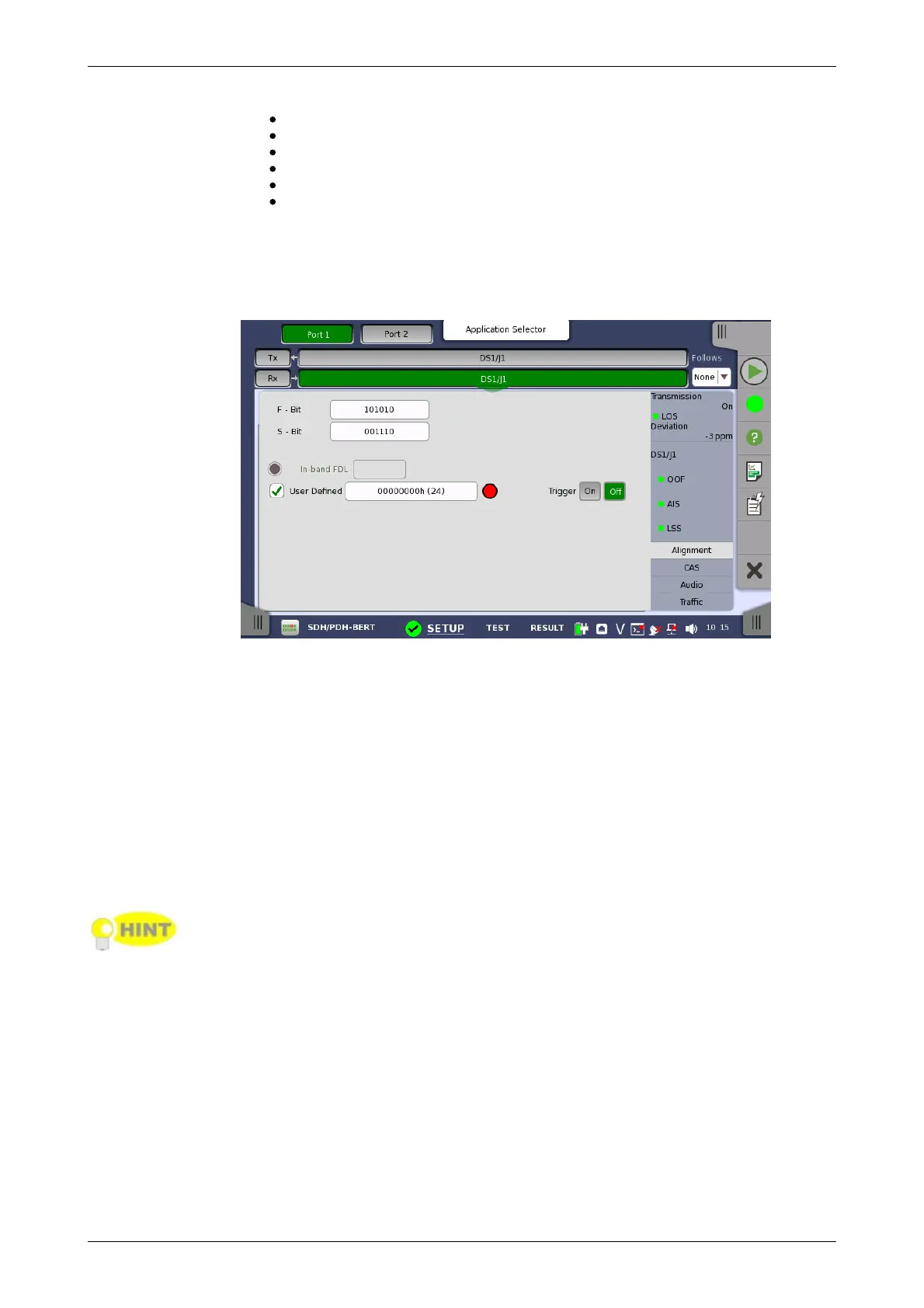
Touching the Alignment button in the status area of the Ports Setup
screen displays the status shown below.
This screen provides information on the frame alignment when available.
F-Bit and M-bit are displayed when the frame type is J1 or ESF.
F-Bit and S-bit are displayed when the frame type is SF/D4.
In-band FDL
Displays the In-band FDL (Facility Data Link) data.
Trigger
Set On to hold displaying FDL if In-band FDL matches. If set Off, the latest In-
band FDL is displayed.
User Defined
Select the check box to edit the user defined inband code. Touching the field
launches the pattern editor.
You can set the user defined inband code for the transmitter by the stimuli
setup in Application Toolbar.
5.4.3.5 CAS
Touching the CAS button in the status area of the Ports Setup screen
launches the status shown below.














 To Next Page