FAS
MFAS
SM
ODTU12 (PT=21) : Supports 1.25G Tributary Slot (TS).
ODTU2.ts : Supports ODUflex. One to eight TSs can be selected.
ODTU01 : Supports 1.25G Tributary Slot (TS).
Multiplexing 2
Applicable when there are three levels of multiplexing. Defines into which
higher order ODU is multiplexed.
None
ODTU01 : Supports 1.25G Tributary Slot (TS).
7.1.1.4 Overhead
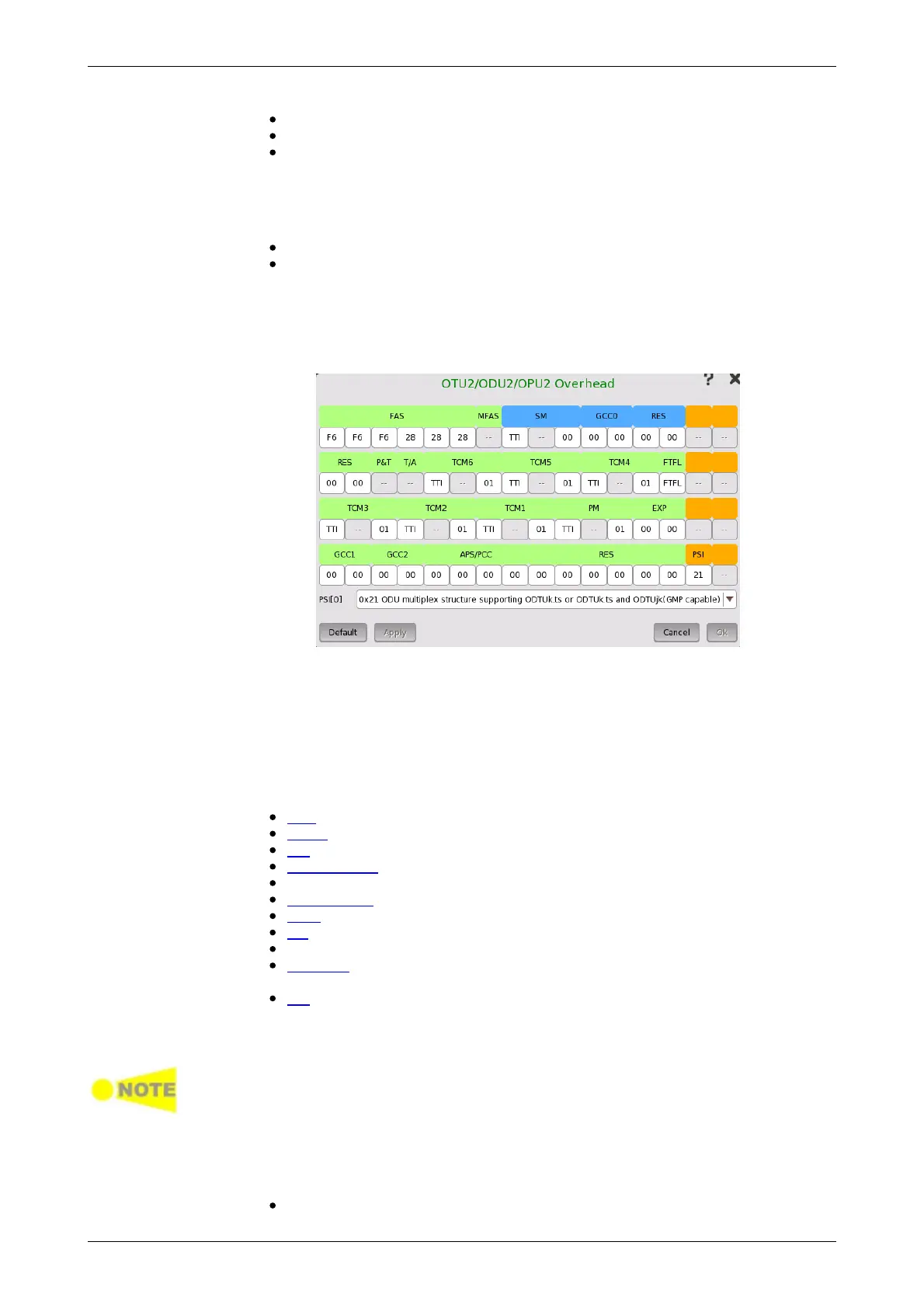
Touching an OH button in the setup area of the Ports Setup screen
launches a dialog box similar to the one shown below.
This dialog box presents detailed information about the overhead and allows
you to configure it. Blue fields are OTU overhead. Green fields except FAS
and MFAS are ODU overhead. Orange fields are OPU overhead.
The actual layout of the dialog box depends on which overhead you are
configuring. The description below provides a general description of the OTN
overhead.
The overhead consists of the following parameters:
FAS, which is the signal for the frame alignment.
MFAS, which is the signal for the multiframe alignment.
SM, which shows the Signal Monitoring.
GCC0-GCC2, which shows the General Communication Channel.
RES, which is the reserved for future international standardization.
TCM1-TCM6, which shows the Tandem Connection Monitoring.
FTFL, which shows the Fault Type and Fault Location.
PM, which shows the Path Monitoring.
EXP, which shows the bytes for experimental use.
APS/PCC, which shows the Automatic Protection Switching and Protection
Communication Control channel.
PSI, which shows the Payload Structure Identifier.
Default defined as: F6 F6 F6 28 28 28. To change a byte value, touch the
relevant byte button to launch the editor dialog box.
If FAS(s) value is changed, a receiver which received the signal with changed
FAS might be able not to detect the frame alignment.
This field counts the OTU frame number. The value changes from 0 through
255 cyclically.
SM consists of the following parameters:
TTI byte (Trail Trace Identifier)














 To Next Page