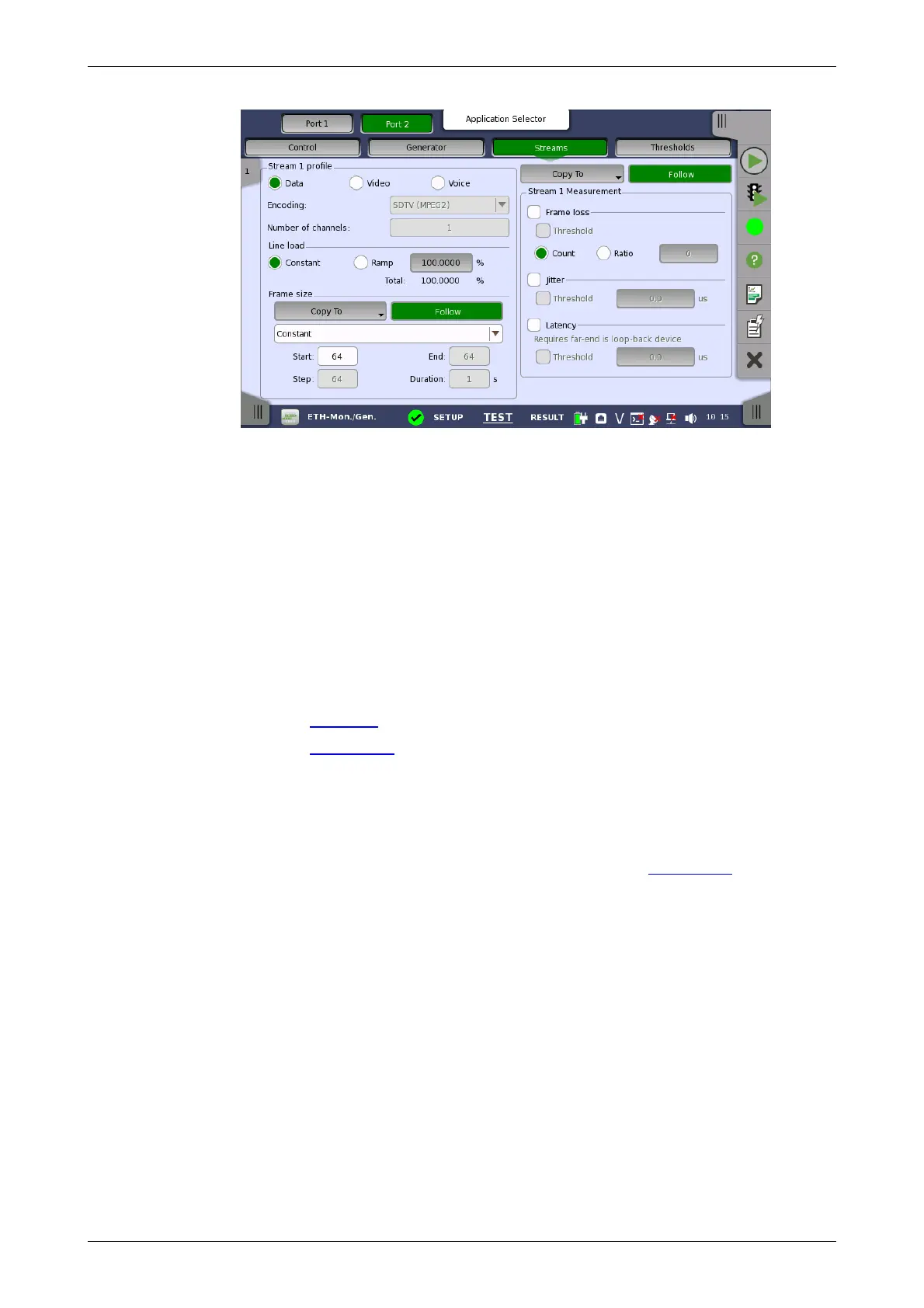
Line load
Stream selection
Stream X profile
Frame size
Stream X
measurement
This screen contains the parameters for specifying a profile and pattern for
each stream and for specifying which measurements are made.
Use the slide-out panel on the left-hand side of the screen to select the
relevant stream. Enable the stream by touching the button on the slide-out
panel.
Using the radio buttons, you can select the stream profile as either Data,
Video or Voice.
Encoding
Open the drop-down menu to select the relevant encoding type. The
available values depend on the selected profile type.
Number of channels
Specify the number of channels.
Refer to "Line load in BERT Test Setup subsection for the operation.
Refer to "Frame size in BERT Test Setup subsection for the operation.
Select one or more of the measurements (Frame loss, Jitter and Latency)
and then specify a threshold value for each.
6.5.2.4 Thresholds
For Total Frame Difference and Ethernet, refer to "Thresholds in BERT
Test Setup subsection for the operation.
6.5.3 Test Results
6.5.3.1 Summary
When you go to the test results of the Ethernet Monitor/Generate application,
the following screen is displayed.














 To Next Page