EasyManua.ls Logo

Dynon Avionics SkyView Classic - Page 390

Default Icon
573 pages
Print Icon
To Next Page IconTo Next Page
To Previous Page IconTo Previous Page
Loading...
SV-COM-C25 Installation and Configuration
16-8 SkyView System Installation Guide - Revision AA
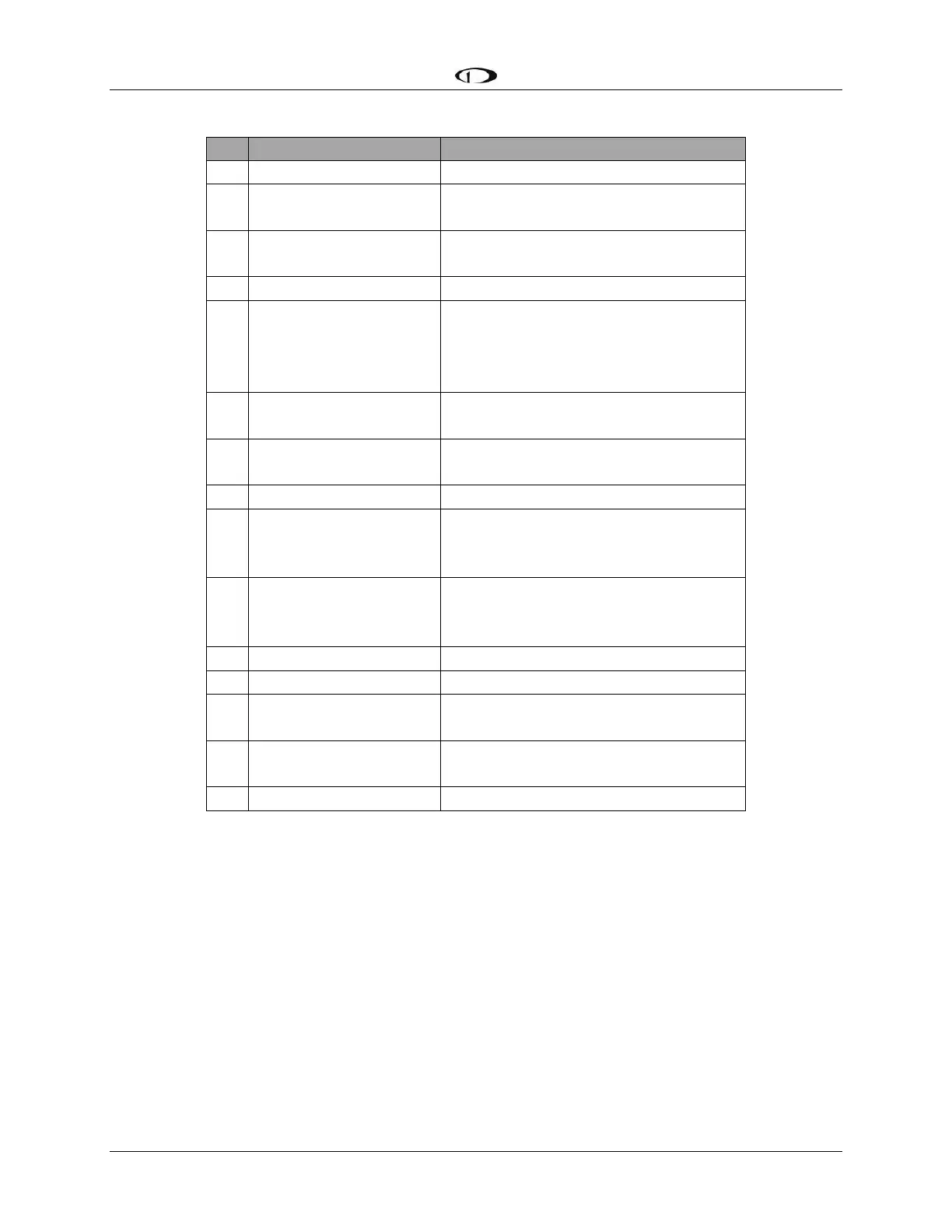
SV-COM-425 D15M Pinout
Pin
Function
Notes
1
MICROPHONE IN
SV-INTERCOM-2S Pin 25
2
MICROPHONE / PTT
GROUND
See diagram below.
3
SV-COM-PANEL
ENABLE
To SV-COM-PANEL Pin 6
4
GROUND OUT
Do not connect
5
PTT IN
SV-INTERCOM-2S Pin 12
or
Push Button Normally Open (PBNO)
to Ground (Pins 4, 11, or 15)
6
DATA TX to SV-COM-
PANEL
To SV-COM-PANEL Pin 4
7
SV-COM-PANEL
POWER
To SV-COM-PANEL Pin 1
8
POWER IN
10-30V DC @ 5A
9
PHONES GROUND
SV-COM-425 Pin 2
SV-INTERCOM-2S Pin 1
Shielded Cable shield of Pin 10
10
PHONES OUT
SV-INTERCOM-2S Pin 14
Shielded Cable center conductor of
Pin 10
11
GROUND OUT
Do not connect
12
GROUND IN
Connect to Ground Bus
13
SV-COM-PANEL
GROUND
SV-COM-PANEL Pin 2
14
DATA RX from SV-
COM-PANEL
SV-COM-PANEL Pin 5
15
GROUND OUT
Do not connect
Table 90 SV-COM-PANEL D15M Pinout
The following figure depicts how a single SV-COM-C25 is connected to an SV-INTERCOM-2S.

Table of Contents

Related product manuals