8
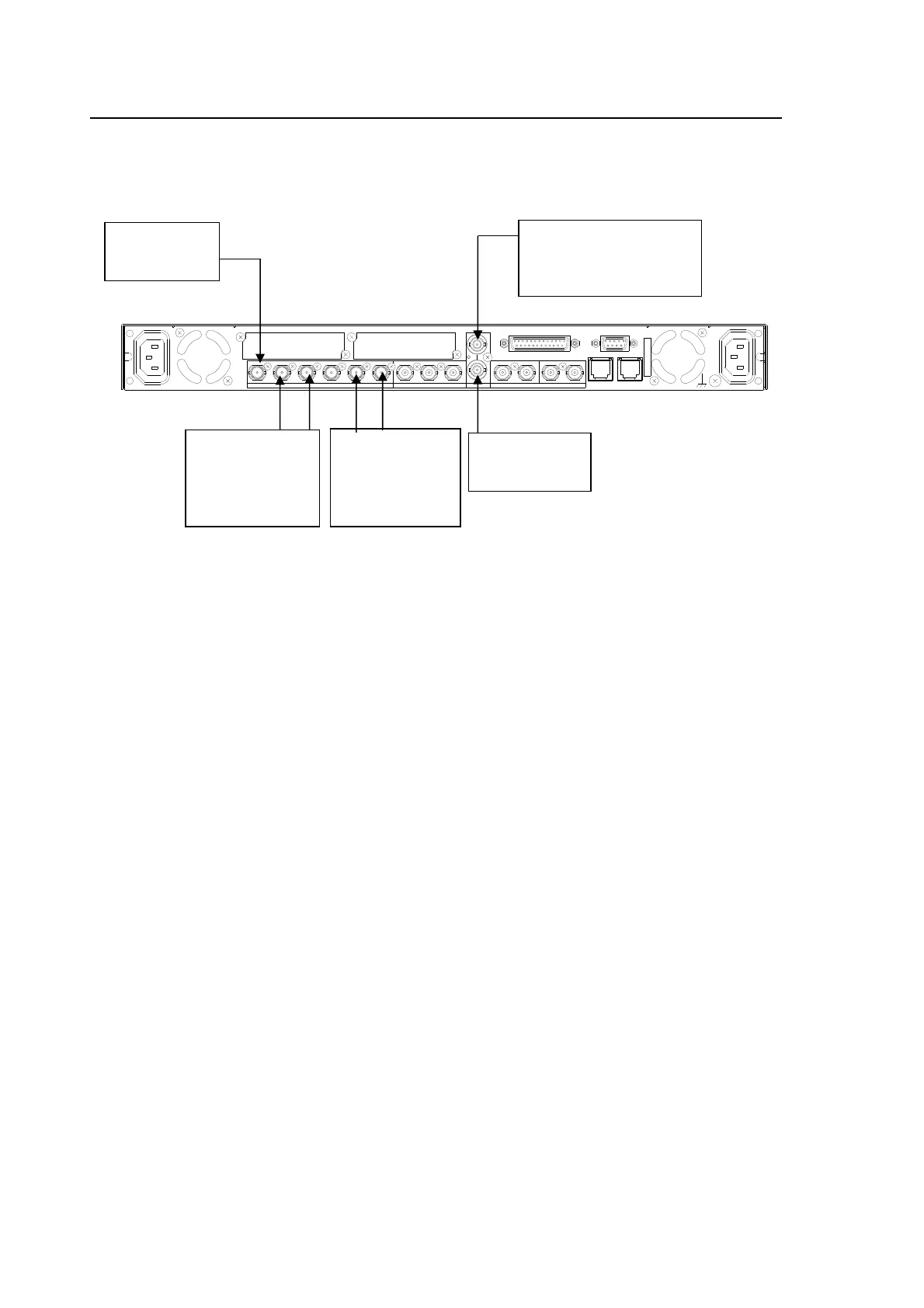
3-2. For HD/SD-SDI Simultaneous Output
It is possible to always output an HD-SDI signal from SDI OUT1/2, and an SD-SDI signal from
SDI OUT3/4 whether the input signal is HD or SD-SDI. (HD/SD-SDI output connector
assignments can be reversed, such as SD-SDI from SDI OUT 1/2 and HD-SDI from SDI OUT
3/4.)
Settings that need to be checked:
INSEL is set to SDI1 as described in section 5-7 “VIDEO INPUT SELECT (IN SEL)”.
CONV1 is set to 1080i as described in section 5-3-1 “CONV1 U/D MODE”. (To convert to
720p, set it to 720p.)
CONV2 is set to SD as described in section 5-4-1 “CONV2 U/D MODE”.
To convert to 4:3, set ASPECT in CONV2 U/D MODE to 4:3 F 4:3, and ASPECT in CONV1
U/C MODE to 16:9 P 4:3. Also set ASPECT in the 5-7-2 SD INPUT ASPECT menu to 4:3.
To enable automatic aspect ratio conversion according to the AFD data, select an automatic
conversion mode from among AFD(4:3), AFD-ALT(4:3), AFD(16:9) or AFD-ALT(16:9). Make
sure the AFD data is embedded into the input signal. Whether the AFD data is embedded or
not can be verified in the 5-15 AFD IN STATUS menu. If the input signal is 525/50 or 625/50,
S20163-3, VI (Video Index), and WSS (Wide-Screen Signalling) AFD formats are supported.
Select the type of AFD data to refer to in the 5-10-15 ANC DETECT SEL menu from S2016-3
AFD, RP186VI, and BT1119 WSS. Also set ANC MODE to DETAIL in the 5-10-15 ANC
DETECT SEL menu from S2016-3 AFD, RP186VI, and BT1119 WSS. Also set ANC MODE to
DETAIL in the 5-10-9 CONV1 ANC SET, and 5-10-10 CONV2 ANC SET menus.
SDI1/2 OUT SET is set to CONV1 as described in section 5-8 “VIDEO OUT SELECT (OUT
SEL)”.
SDI3/4 OUT SET is set to CONV2 as described in section 5-8 “VIDEO OUT SELECT (OUT
SEL)”.
Select a sync mode in the SYNCHRO menu as described in section 5-10-1 “FS MODE SET”.
SYNC FRMT is set to AUTO DET as described in section 5-10-1 “FS MODE SET”.
Adjust the HD output phase to match that of the reference signal as described in section
5-10-6 “HD PHASE”. (The SDI OUT1/2 output siganls will be adjusted.)
Adjust the SD output phase to match that of the reference signal as described in section
5-10-7 “SD PHASE SET”. (The SDI OUT3/4 output siganls will be adjusted.)
To embed AFD data into the FA-9500 output video signal, set ANC MODE to DETAIL in the
5-10-9 CONV1 ANC SET, and 5-10-10 CONV2 ANC SET menus, then select the AFD data
you wish to embed for each converter in the 5-10-16 ANC DATA EMBED menu.
AC100 - 240V 50/60 Hz IN 1
FAN2
SER. NO.
LAN2LAN1
REMOTE
DIGITAL AUDIO IN / OUT
7 / 85 / 63 / 41 / 2
ANALOG AUDIO
GENLOCK IN
COMPOSITE
OUT2OUT1IN
B
OUT4OUT3IN 2OUT2OUT1
SDI
IN1
A
FAN1
AC100 - 240V 50/60 Hz IN2
Reference signal
(BB or Tri-level sync signal
synchronized with the input
signal.)
Terminate at 75
ohm if not used.
Input an HD/
SD-SDI signal
to SDI IN1.
Outputs an
HD-SDI signal
synchronized with
the reference
signal from SDI
OUT1 and 2.
Outputs an
SD-SDI signal
synchronized with
the reference
signal from SDI
OUT3 and 4.



 To Next Page