32
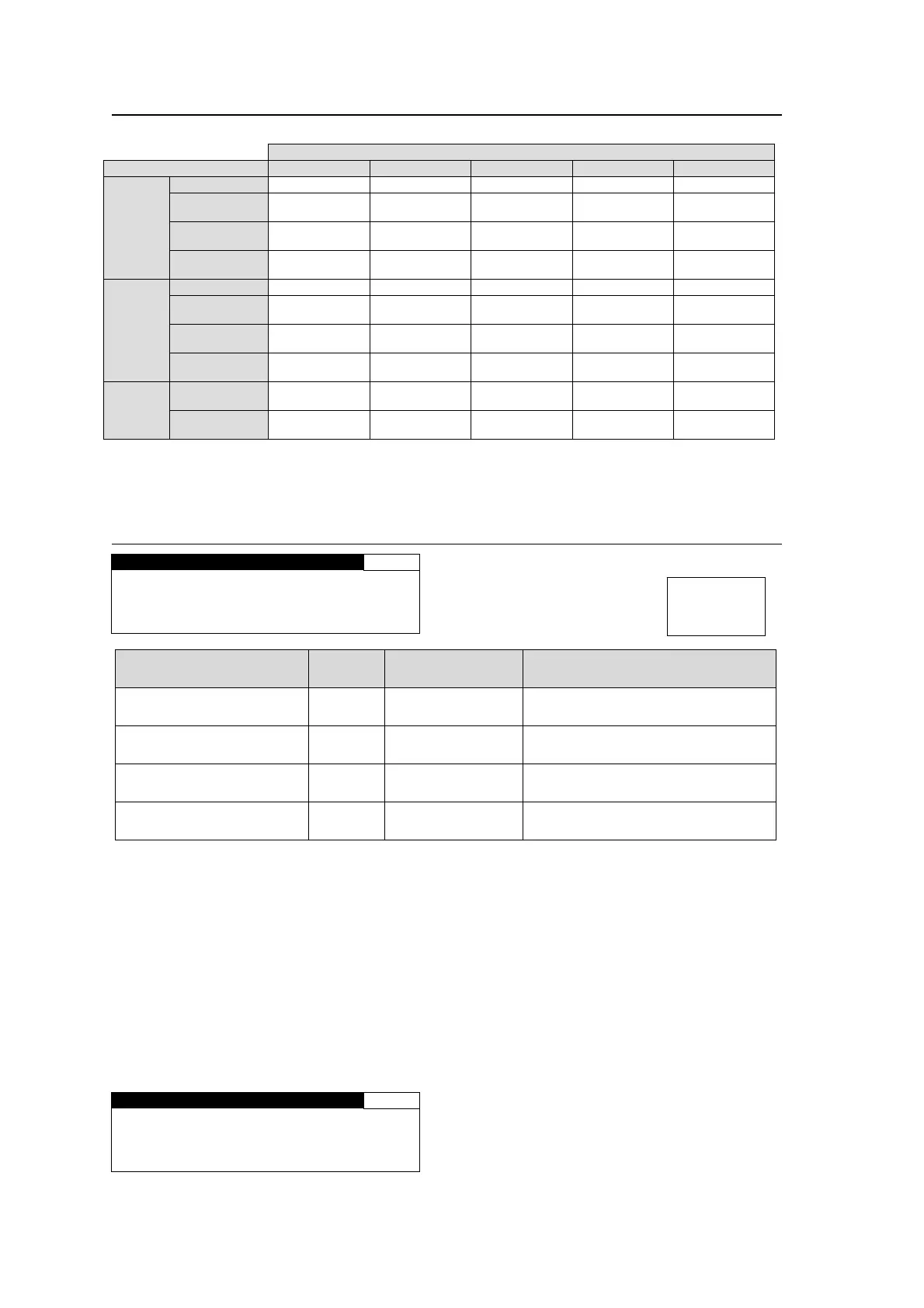
5-4-2. CONV2 Conversion Table
Possible Conversions in CONV2 for Input Signal Formats and Mode Selections
CONVERTER2 mode selection
Input signal SD 1080i 720p 1080PsF 1080p(3G)
NTSC
formats
525/60 525/60 1080/59i 720/59p 1080/23PsF 1080/59p
1080/59i 525/60 1080/59i 720/59p
1080/59i
(BY-PASS)
1080/59p
720/59p 525/60 1080/59i 720/59p
720/59p
(BY-PASS)
1080/59p
1080/59p 525/60 1080/59i 720/59p
1080/59p
(BY-PASS)
1080/59p
PAL
formats
625/50 625/50 1080/50i 720/50p 1080/24PsF 1080/50p
1080/50i 625/50 1080/50i 720/50p
1080/50i
(BY-PASS)
1080/50p
720/50p 625/50 1080/50i 720/50p
720/50p
(BY-PASS)
1080/50p
1080/50p 625/50 1080/50i 720/50p
1080/50p
(BY-PASS)
1080/50p
Other
formats
1080/23PsF 525/60
1080/23PsF
(BY-PASS)
1080/23PsF
(BY-PASS)
1080/23PsF
1080/23PsF
(BY-PASS)
1080/24PsF 625/50
1080/24PsF
(BY-PASS)
1080/24PsF
(BY-PASS)
1080/24PsF
1080/24PsF
(BY-PASS)
5-4-3. CONV2 SIZE/POS
CONV2 SIZE/POS 22
H SIZE: 100.0%
V SIZE: 100.0%
H POS : 0PIXEL
V POS : 0LINE
Parameter Default
Setting range
(Steps)
Description
H SIZE
(Horizontal Size)
100.0%
50.0 - 150.0%
(0.1%)
Adjusts the width of the video
displayed on the monitor.
*1
V SIZE
(Vertical Size)
100.0%
50.0 - 150.0%
(0.1%)
Adjusts the height of the video
displayed on the monitor.
*1
H POS
(Horizontal Position)
0 Pixel
Variable
*2
(2 Pixel)
Adjusts the horizontal position of
the video displayed on the monitor.
V POS
(Vertical Position)
0 Line
Variable
*2
(1 Line)
Adjusts the vertical position of the
video displayed on the monitor.
*1 If the size is made smaller than the original size, set the background color under CONV2
SIDE RGB (see section 5-4-6).
*2 The following parameters interact with each other. When you change one of their setting
values, setting ranges of other parameters will also change.
Video format
SYNC FRMT Parameter in FS MODE SET (see section 5-10-1).
All parameters in CONV2 U/D MODE(see section 5-4-1).
If the CONV2 mode is set to BY-PASS, the CONV2 SIZE/POS setting cannot be changed.
Also, it cannot be changed if the conversion is set to the formats indicated as (BY-PASS) in
the CONV2 Conversion Table (see section 5-4-2). In both cases, the menu as shown below
will be displayed.
CONV2 SIZE/POS 22
H SIZE:NOT ADJUST
V SIZE:NOT ADJUST
H POS :NOT ADJUST
V POS :NOT ADJUST
Menu button
CONV2
MASTER
In the conversions to the formats indicated as (BY-PASS), the CONV2SIZE/POS, CONV2 CROPPING,
CONV2 IMPROVE, and CONV2 SIDE RGB settings cannot be changed.



 To Next Page