49
2) Resolve the issue(s).
3) Check that the issue(s) is/are resolved using a waveform monitor.
4) Disable Changeover. (The status menus will be reset.)
5) Set IN SEL to SDI 1 (input signal selection).
6) Enable Changeover again.
IMPORTANT
If SYNCHRO in section 5-10-1 FS MODE SET is set to LINE, AVDL, or INPUT, or
SYNCHRO is set to FRAME with FRAME DELAY turned OFF, a changeover may
produce video noise. To avoid video noise, set SYNCHRO to FRAME and FRAME
DELAY to 1 or more frames.
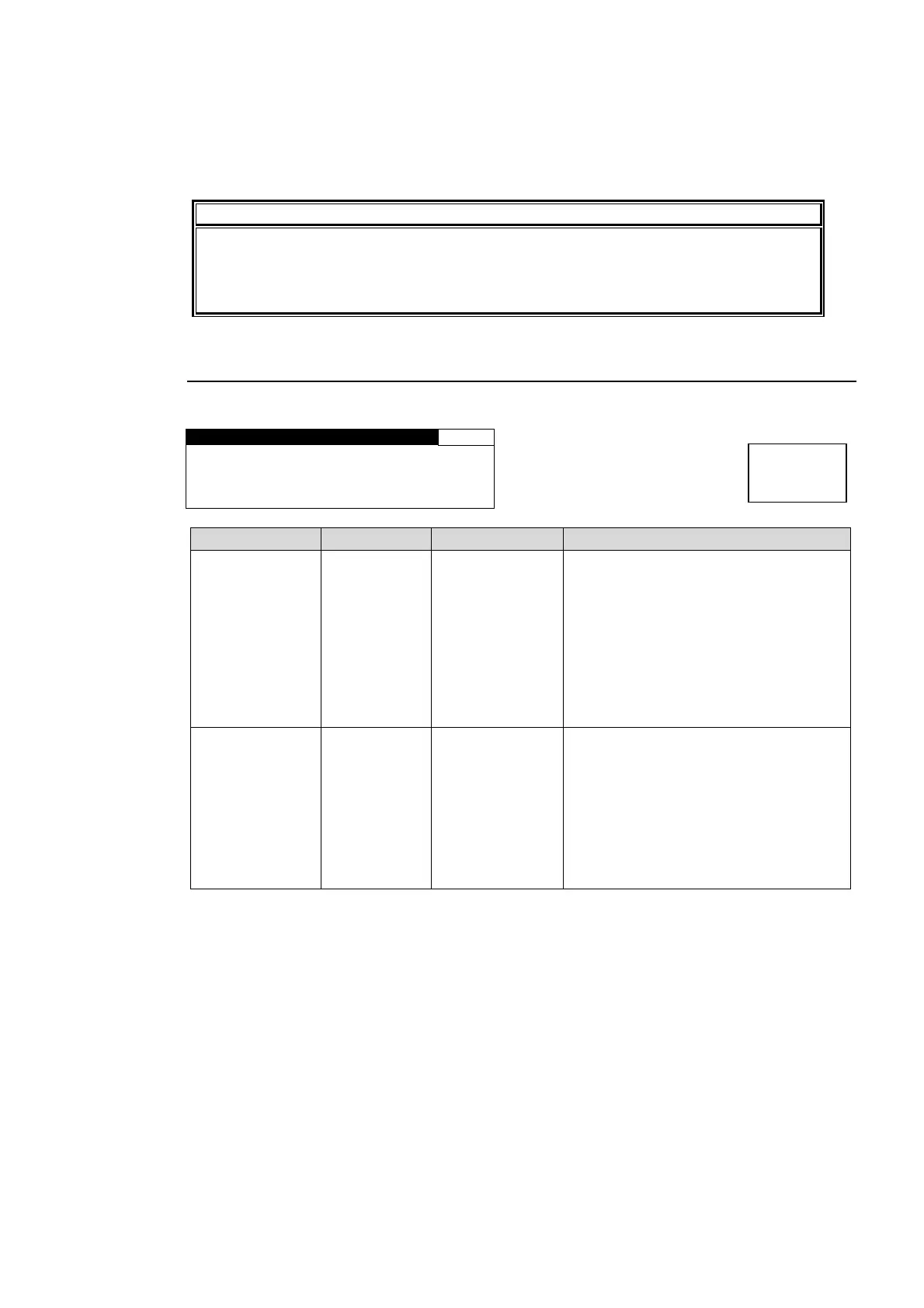
5-7-4. CHGOV (CHANGEOVER) MODE SET
This menu is accessible only if the FA-95CO software option is installed.
CHGOV MODE SET 55
VIDEO TRG:DISABLE
AUDIO TRG:DISABLE
CHGOV DISABLED
Parameter Default Setting range Description
VIDEO TRG DISABLE
DISABLE
ENABLE
Selects changeover trigger mode for
below 4 video triggers:
5-7-5 SDI ERROR TRG,
5-7-6 FORMAT ERROR TRG,
5-7-7 CRC ERROR TRG,
5-7-8 BLACK VIDEO TRG
DISABLE: Disables auto changeover
by the video trigger.
ENABLE: Performs a changeover if
any video trigger is activated.
AUDIO TRG DISABLE
DISABLE
ENABLE
Selects changeover trigger mode for
below 3 audio triggers:
5-7-9 AUDIO LOSS TRG,
5-7-10 AUDIO ERR TRG,
5-7-11 SILENCE TRG
DISABLE: Disables auto changeover
by the audio trigger.
ENABLE: Performs a changeover if any
audio trigger is activated.
* The “CHGOV DISABLED” message is displayed if CHANGEOVER is set to DISABLE in
the VIDEO INPUT SET menu (Sec. 5-7-1). If this message is displayed, a changeover will
not be performed even though VIDEO TRG/AUDIO TRG is enabled.
Menu button
IN SEL
DOWNMIX



 To Next Page