147
16-4. Macro Execution Buttons
16-4-1. Changing KEY/AUX Bus Buttons to Macro EXE Buttons
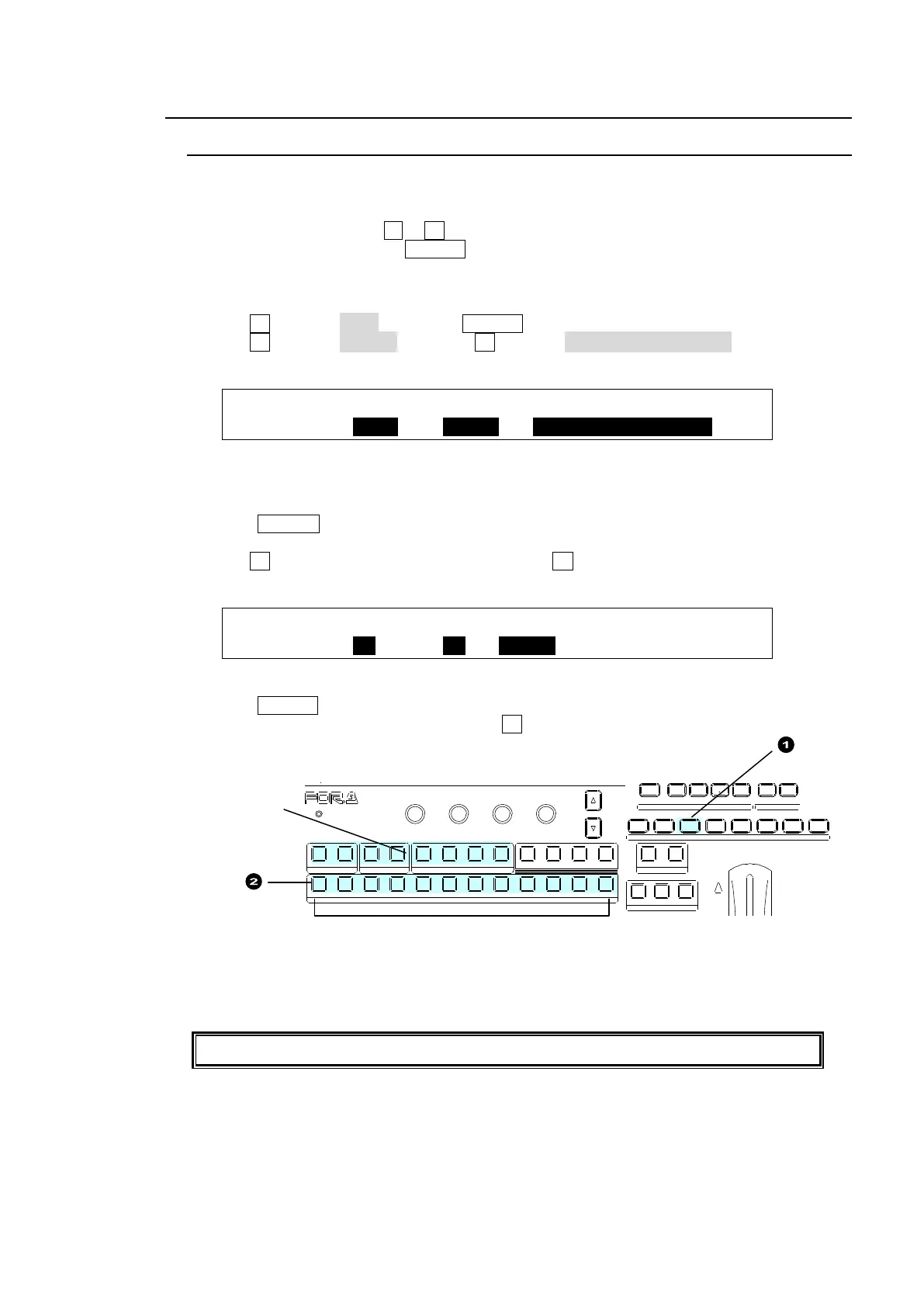
Stored macros can be executed using the KEY/AUX bus buttons and a USER button, to
which the MACRO BUS SELECT function is applied.
Once the USER button, to which MACRO BUS SELECT is assigned, is pressed to turn on.
The KEY/AUX bus buttons 1 to 12 change to the Macro EXE Buttons. This chapter shows
how to execute macros using USER 3 and the KEY /AUX bus buttons.
1. Assigning MACRO BUS SELECT to USER 3
(1) Open the [SETUP - PANEL - USER BTN] (1/2) menu.
(2) Turn F1 to select OU-3 (USER 3). USER 3 will blink.
(3) Turn F2 to select OTHER, then turn F3 to select MACRO BUS SELECT.
See section 14. "USER Buttons." for details.
USER :SELECT : TYPE : FUNC(F3) : 1/2
BUTTON : =OU-3 : =OTHER: =MACRO BUS SELECT
2. To Assign Macros to the KEY/AUX Bus Buttons
Any macros can also be assigned to the KEY/AUX bus buttons as shown below.
(1) Press MACRO in the SELECT/KEYPAD block.
(2) The [MACRO MEMORY] menu will appear. Go to PAGE 3.
(3) Turn F1 to select a KEU/AUX bus button. Turn F3 to select a macro to be assigned.
(Macro 00 is assigned to KEY/AUX button 1 in this example.)
MACRO :BUTTON : MACRO/NAME : : 3/3
BUS ASGN: =01 : =00 =MCR00 : :
3. Executing Macro 00
(1) Press USER 3. (The KEY/AUX bus changes to Macro mode.)
(2) To execute Macro 00, press Bus Button 1 .
To disable Macro mode in the KEY/AUX bus, press a bus selection button (KEY1-2, DSK1-2,
or AUX1 to 4.)
Note that the KEY/AUX bus cannot be used for signal selections in Macro mode.
Pressing a button
disables Macro
mode.
1 2 3 4 5 6 7 8
USER BUTTON
REV NOR/REV
DIRECTION
BKGD KEY1 KEY2
NEXT TRANSITION
ALARM
F1 F2 F3 F4
PAGE
1 1 1
1
2 2 2 3 4
2 3 4 5 6 7 8 9 10 11 12
KEYER DSK AUX
KEY/AUX
PGM PREV CLEAN MV
WIPE
POS
MENU
JOYSTICK
MACRO
0
CLEA R
RECALL ST ORE
ENTER
TRANS RATE WIPE
SELECT/KEYPAD



 To Next Page