Intel® Server D50DNP Family Integration and Service Guide
124
7.3.2.1 Processor Heat Sink Module (PHM) Removal
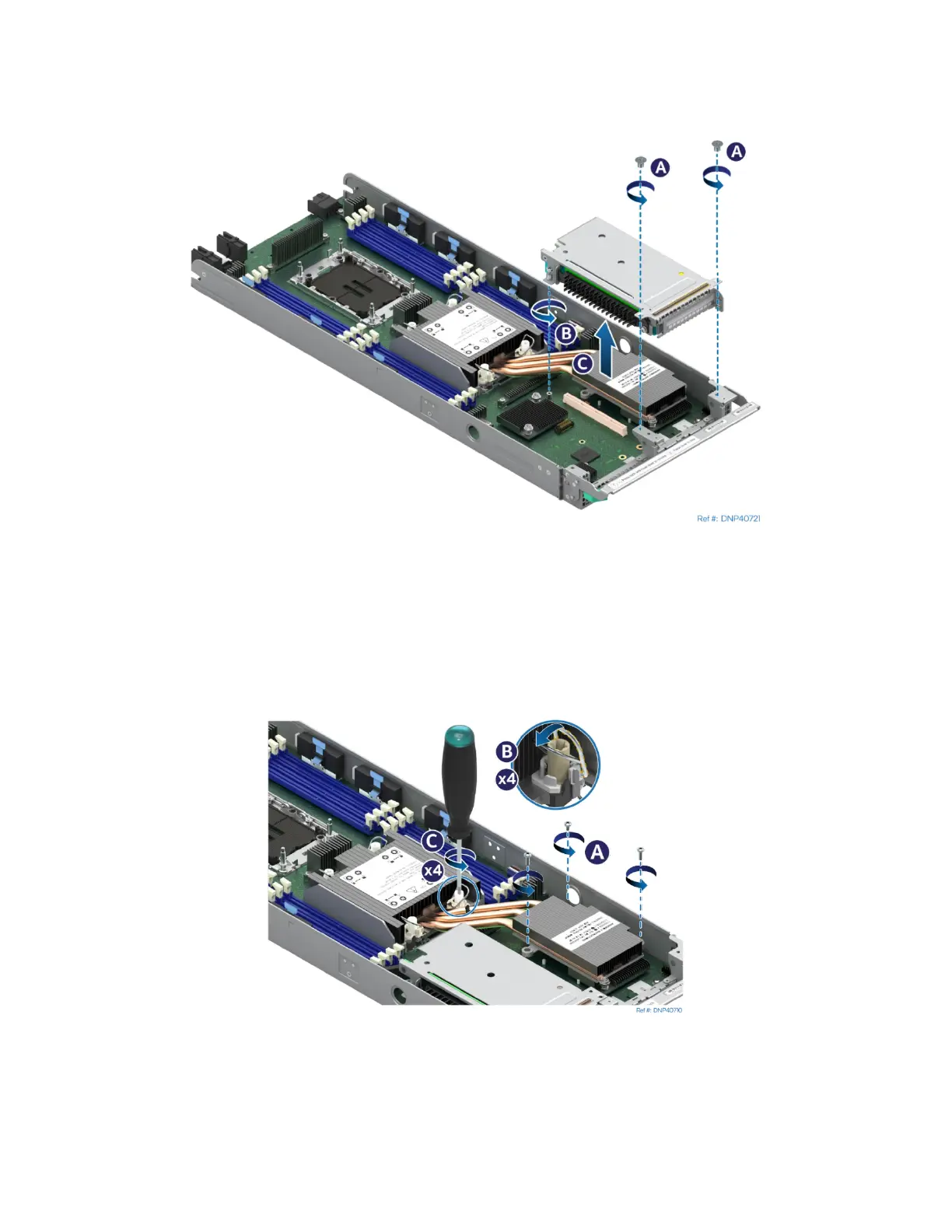
1. Remove the riser assembly on the right side of the module.
Figure 146. Removing a Riser Assembly
• Using Phillips screwdriver #1 remove two screws that secure the riser assembly to the front of the
module (see Letter A).
• Using Phillips screwdriver #2 loosen the captive screw at the back of the riser assembly. (see
Letter B)
• Carefully remove the riser assembly by lifting it up and away from the module (see Letter C).
Figure 147. Loosen EVAC Heat Sink Fasteners
2. Using a Phillips* screwdriver, fully loosen the heat sink extension screws (see Letter A).
3. Set all four anti-tilt wires on the heat sink to the outward position (see Letter B)
4. Using T30 Torx* screwdriver, fully loosen all four heat sink fasteners on the PHM in any order
(see Letter C). General bolt loosening order, such as diagonal sequence, can be used.



 To Next Page