Intel® Server D50DNP Family Integration and Service Guide
143
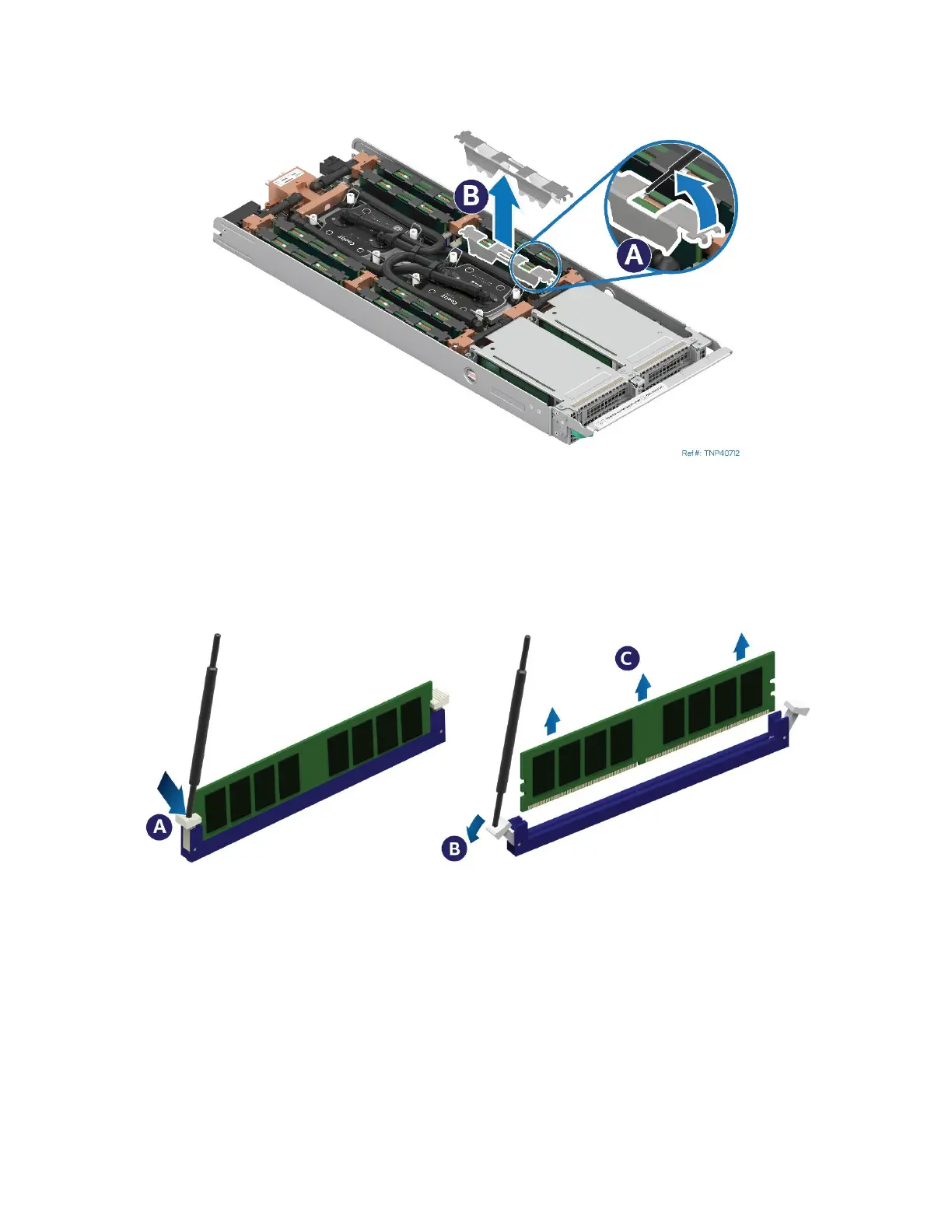
1. Detach the DIMM latch tool from the cooling loop
2. Identify and locate the memory module to be replaced.
Figure 182. Removing the DIMM Clips
3. Position one end of the DIMM latch tool between the DIMM clip and the memory heat spreader line (see
Letter A).
4. Using the DIMM latch tool as a lever, lift the DIMM clip from the DIMMs (see Letter B).
5. Remove the Mylar pad wrapped around two adjacent DIMMs.
Figure 183. Removing the Memory Module from a Liquid-Cooled System
6. Using the DIMM latch tool, open the ejection tabs at both ends of the memory slot
(see Letters A and B). The memory module will slightly lift from the slot.
7. Hold the memory module by its edges and lift it away from the slot (see Letter C).
8. Ensure that the thermal interface material from the memory heat spreaders line does not interfere with
the DIMM slot.
9. Carefully remove the replacement memory module from its packaging, taking care to handle it only by its
outer edges.



 To Next Page