Intel® Server D50DNP Family Integration and Service Guide
161
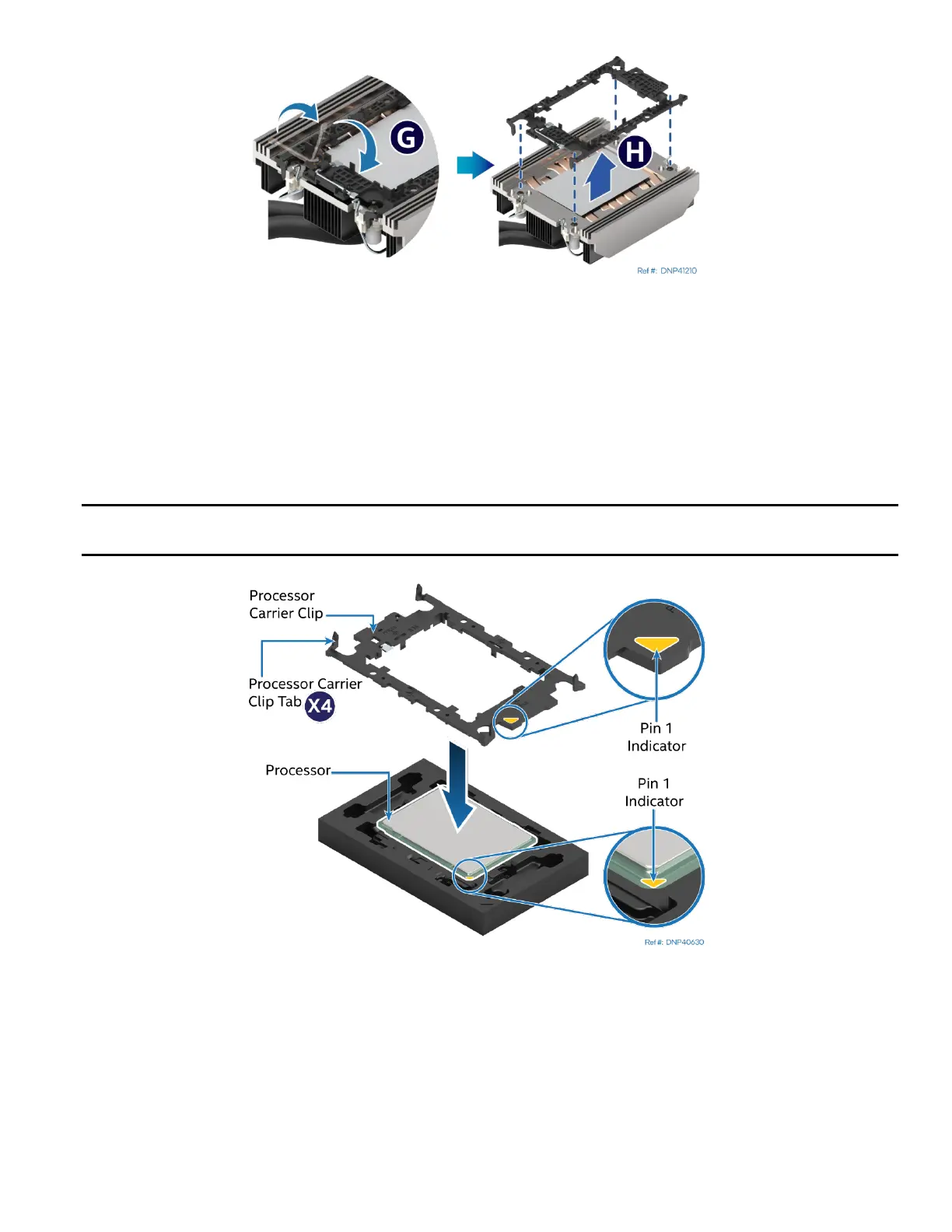
Figure 213. Processor Carrier Clip Removal from Processor Cold Plate
11. Return the lever to the original position (see Letter G).
12. Unlatch the hook on each corner of the processor carrier clip and lift it from the processor cold plate (see
Letter H).
13. Carefully clean the processor heat spreader, processor carrier clip and the cold plate from the remaining
TIM.
14. Ensure that each socket is free of damage or contamination before reinstalling the processor and
processor carrier clip.
Caution: If debris is observed, blow it away gently with an air blower. Do not remove it manually, such as
with tweezers.
Figure 214. Installing Processor Carrier clip onto Processor – Part 1
15. Align the Pin 1 indicator on the processor carrier clip with the Pin 1 indicator of the processor.
16. With the processor still in its tray, place the processor carrier clip over the processor.



 To Next Page