Intel® Server D50DNP Family Integration and Service Guide
78
3.7 2.5” U.2 Front Drive Installation
The D50DNP2MHSVAC and D50DNP2MFALAC modules support up to two hot-swap 2.5” form factor U.2
Solid State Drives (SSDs). Each drive is installed into a tool-less drive carrier. This section provides
instructions for drive extraction from and installation into the chassis drive assembly.
Required Tools and Supplies
• Up to two 2.5” U.2 Solid State Drives (SSDs)
• Anti-static wrist strap and conductive workbench pad (recommended)
3.7.1 Drive Carrier Extraction
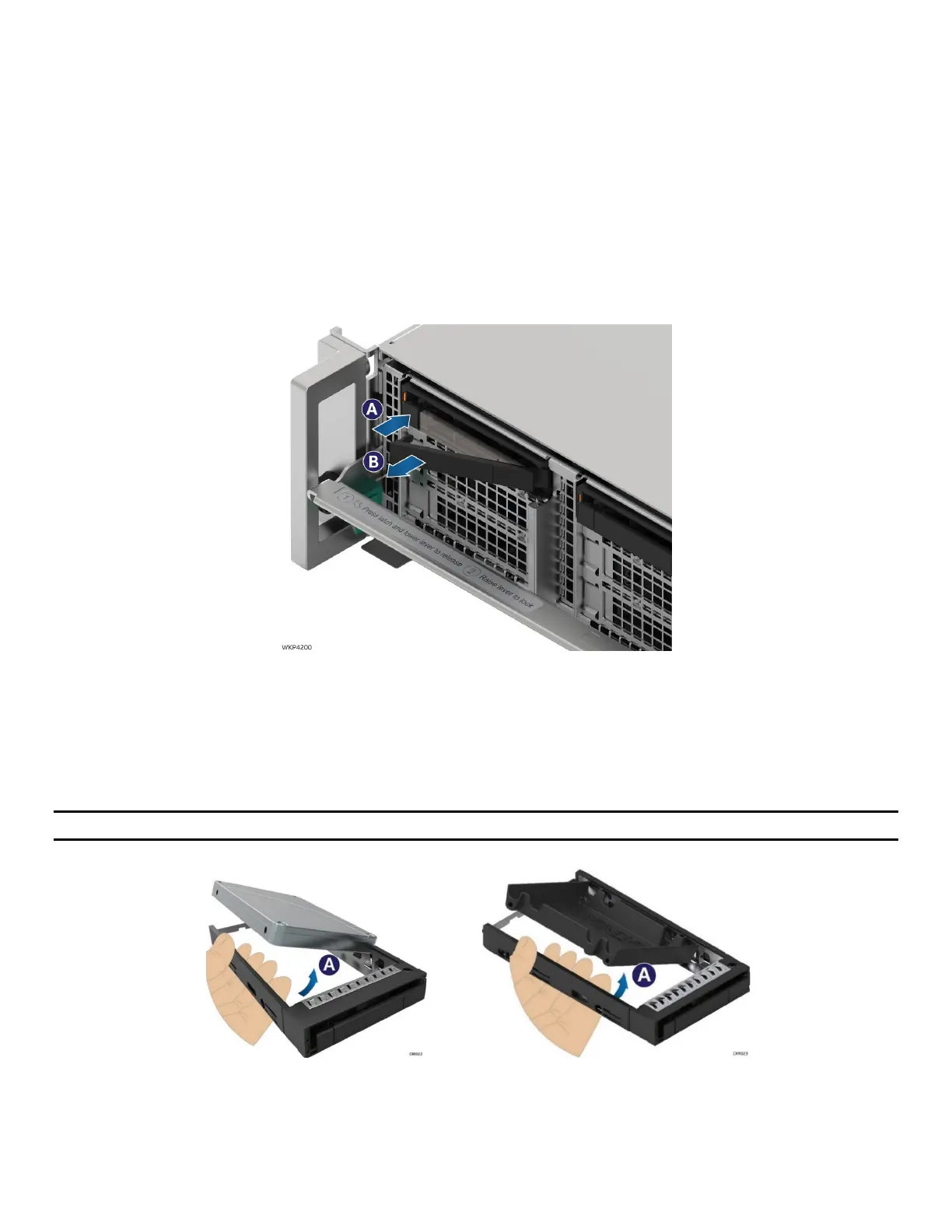
Figure 88. Drive Carrier Extraction from the Chassis
1. Press the button on the carrier face plate to release the lever (see Letter A).
2. Using the lever, pull the carrier from the drive bay (see Letter B).
3.7.2 Drive Carrier Assembly
Important: The Intel® Server System D50DNP is designed and tested to support 2.5” U.2 NVMe* SSDs only.
Figure 89. 2.5” Drive / Blank Removal
1. Remove the drive (or drive blank) from the carrier by gently rotating the top edge of a carrier rail
outwards while simultaneously pushing the drive up from the bottom as shown in the picture.



 To Next Page