Intel® Server D50DNP Family Integration and Service Guide
170
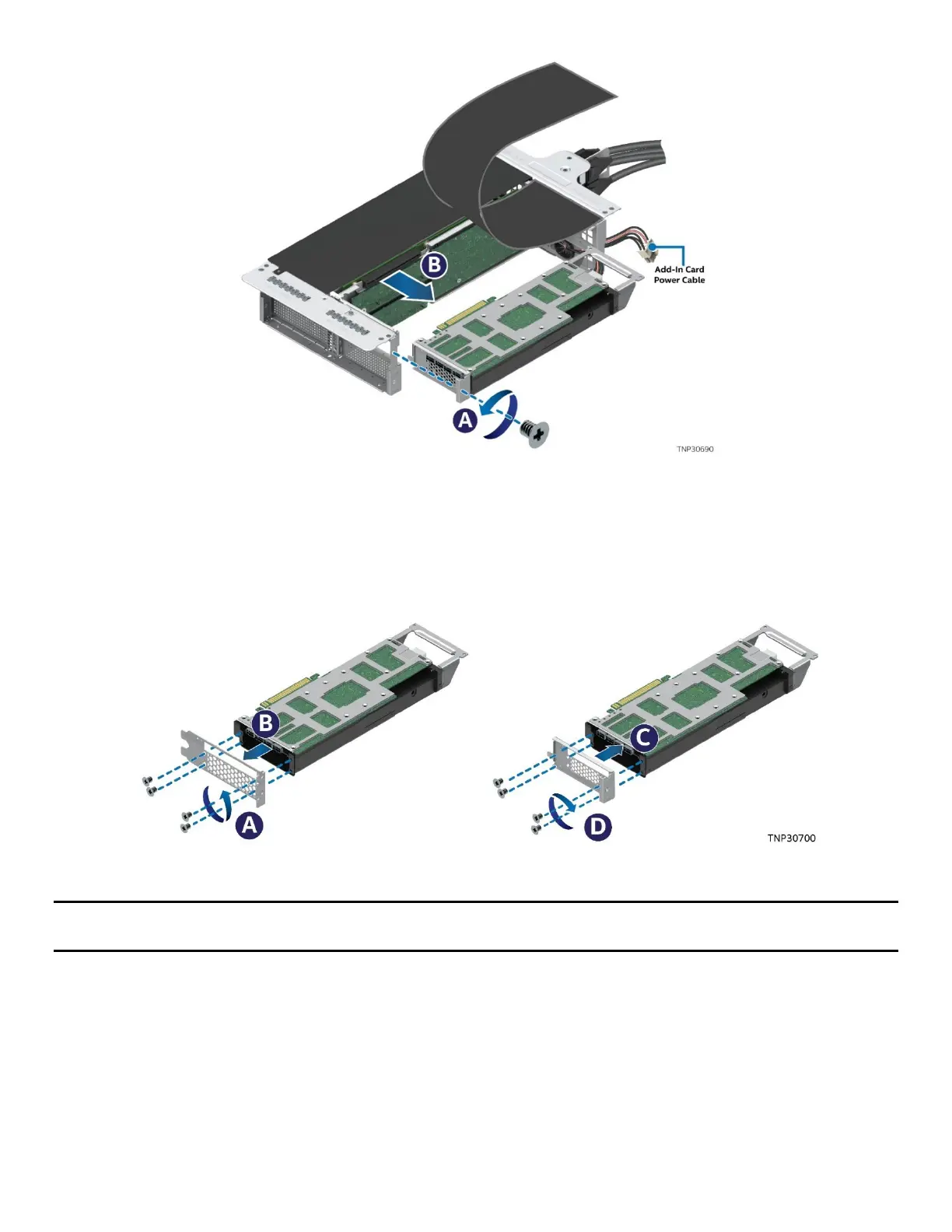
Figure 227. Removing Accelerator Add-In Card from Riser Assembly
6. Remove the screw on the metal bracket of the existing accelerator add-in card (see Letter A).
7. Carefully disengage the add-in card from the PCIe* slot and pull it away from the riser assembly
(see Letter B).
8. Disconnect add-in card power cable (if present).
Figure 228. Replacing Add-In Card Metal Bracket
Note: The following steps to replace the accelerator add-in card metal bracket should be performed along
with the instructions in the add-in card documentation.
9. Remove the screws that hold the original metal bracket on the new accelerator add-in card
(see Letter A).
10. Uninstall the original metal bracket (see Letter B) from the new accelerator add-in card and replace it
with the metal bracket from the existing add-in card (see Letter C).
11. Fasten the screws to secure the metal bracket to the new add-in card (see Letter D).
12. If the existing accelerator add-in card has the extension bracket, remove it, and install it on the new
accelerator add-in card.



 To Next Page