Intel® Server D50DNP Family Integration and Service Guide
56
2.5 Module Installation
For installation procedures associated with all other system options and accessories, refer to Chapter 3. If no
other installations are required, the module must be installed in the chassis using the following steps.
Required Tools and Supplies
• Intel® D50DNP Module
• Anti-static wrist strap and conductive workbench pad (recommended)
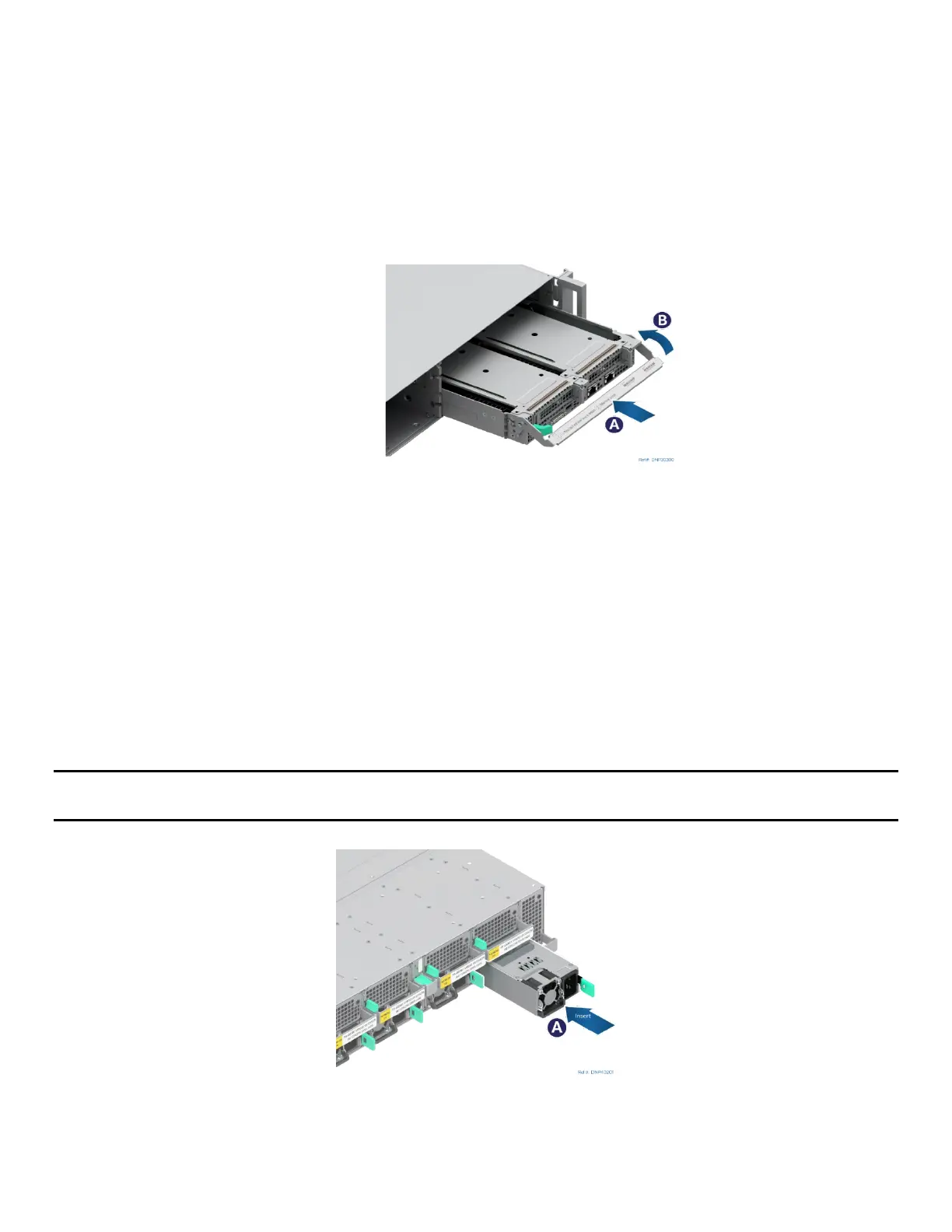
Figure 53. Installing a Module
1. Ensure that the lever in front of the module is lowered. If not, press the green latch inward and lower
the lever (see Letter A).
2. Align the module to its corresponding bay and slide it into the chassis until the key pins in the lever
are inside the chassis inner wall key holes.
3. Raise the lever to secure the module (see Letter B).
2.6 Power Supply Installation
Required Tools and Supplies
• Intel power supply modules
• Anti-static wrist strap and conductive workbench pad (recommended)
Note: The installation figure in this section only displays air-cooled chassis. However, the power supply
installation is the same, regardless of chassis type.
Figure 54. Installing the Power Supply
1. Insert the power supply module into the system fan assembly (see Letter A).
2. Push the power supply module into the system fan assembly until it locks into place.



 To Next Page