Intel® Server D50DNP Family Integration and Service Guide
155
7.6.2 M.2 SSD and Cold Plate Replacement for Liquid-Cooled Configurations
Required Tools and Supplies
• Replacement PCIe* / SATA M.2 SSD
• M.2 cold plate kit (iPC DNPM2LCHS) for each replacement M.2 SSD (recommended)
• Anti-static wrist strap and conductive workbench pad (recommended)
• Phillips* head screwdriver #1
Liquid-cooled configurations use the M.2 SSD cold plate to absorb the heat generated by the SSD. A thermal
pad made from a thermal interface material Laird Tflex HD7100* should be installed on the rear side of the
M.2 SSD.
Before following steps in this section, remove the riser assembly that the M.2 SSD is attached to (see Section
7.5).
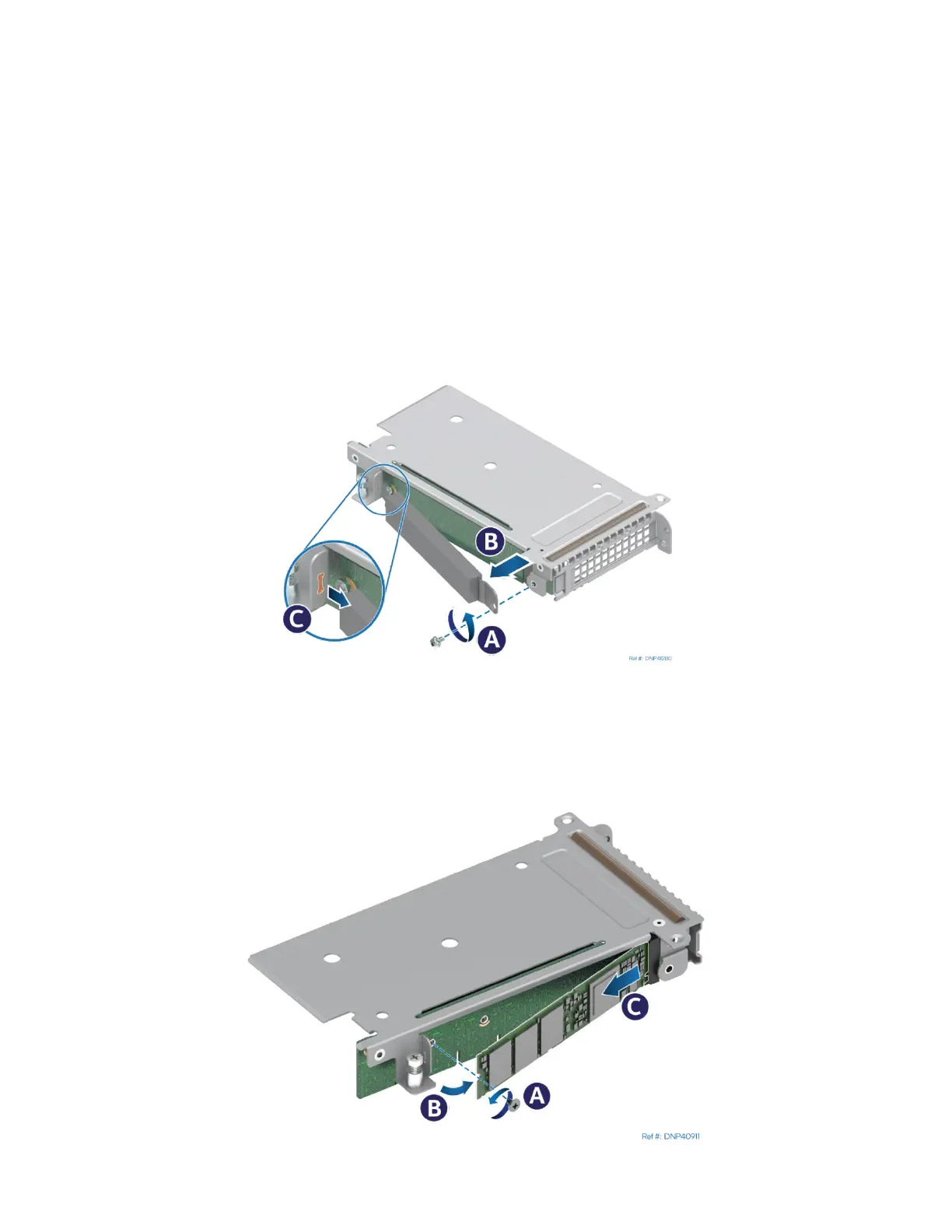
Figure 202. Removing M.2 Cold Plate
1. Locate the cold plate on the left side of the riser assembly and remove the screw (see Letter A).
2. Slowly pull the free end of the cold plate outward to detach the TIM from the SSD (see Letter B).
3. To remove the cold plate, slide it in the direction shown (see Letter C).
Figure 203. Removing Liquid-Cooled M.2 SSD



 To Next Page