Intel® Server D50DNP Family Integration and Service Guide
159
1. Remove all screws used to secure the liquid-cooling loop to the server board (see Letter A and Letter B).
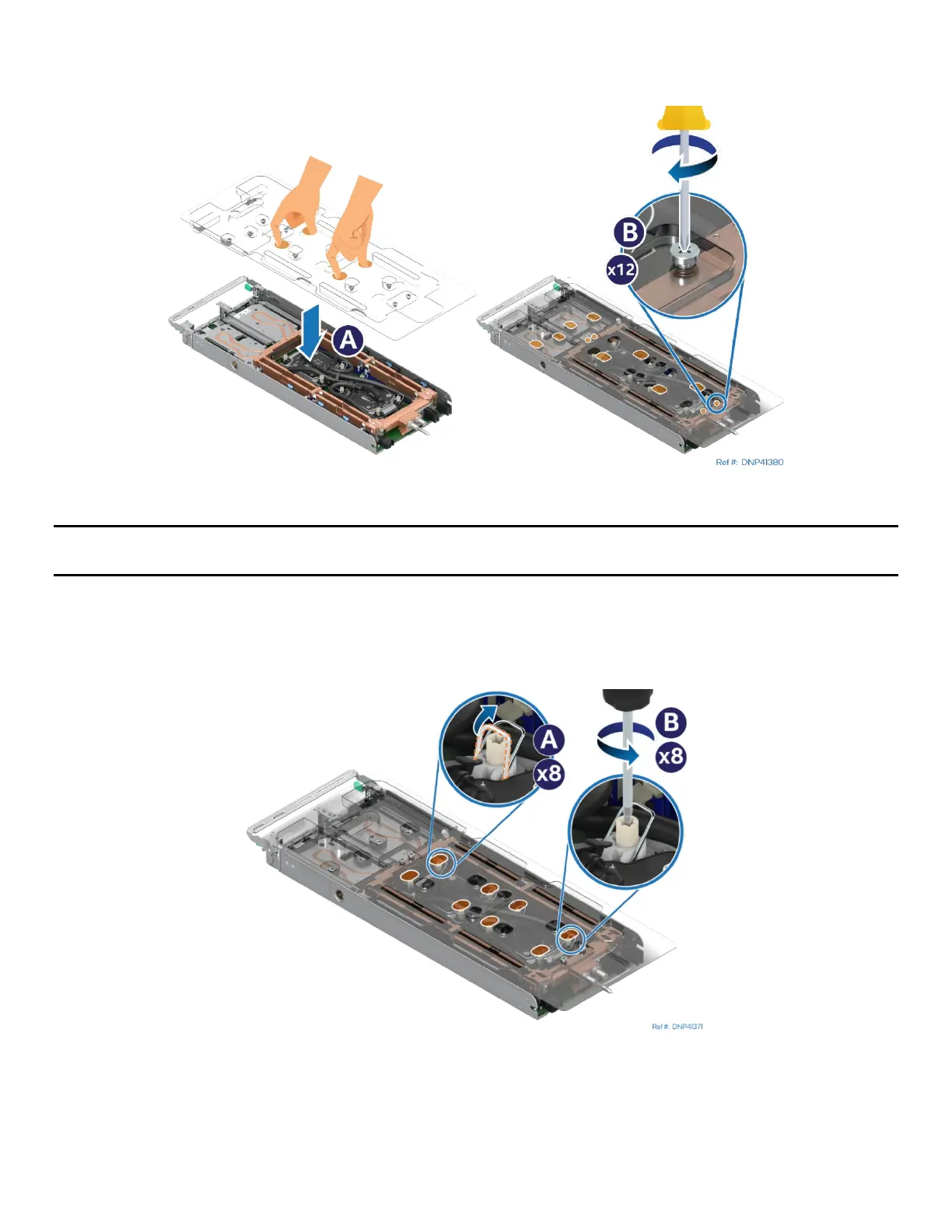
Figure 209. Installing the Liquid-Cooling Loop Carrier
Note: The liquid-cooling loop comes from the factory with a plastic carrier attached. The carrier is used
during the installation and removal of the liquid-cooling loop in the module.
2. Place the plastic carrier onto the cooling loop aligning the captive screws on the plastic carrier with the
screw holes on the liquid-cooling loop (see Letter A).
3. Fasten all the screws (see Letter B).
Figure 210. Loosening Processor Cold Plates
4. Ensure that all the anti-tilt wires on the cold plates are in the outward position (see Letter A).
5. Fully loosen all four fasteners on each cold plate in any order (see Letter B). General bolt loosening order,
such as diagonal sequence, can be used.



 To Next Page