Intel® Server D50DNP Family Integration and Service Guide
153
7.6 M.2 SSD Replacement
7.6.1 M.2 SSD and Heat Sink Replacement for Air-Cooled Configurations
Required Tools and Supplies
• Replacement PCIe* / SATA M.2 SSD
• M.2 heat sink kit (iPC DNPM2HS) for each replacement M.2 SSD (recommended)
• Anti-static wrist strap and conductive workbench pad (recommended)
• Phillips* head screwdriver #1
This procedure applies to M.2 storage replacement for both 1U and 2U riser assemblies with illustrations
showing differences where applicable. Remove the riser assembly that the M.2 SSD is attached to (see
Section 7.5).
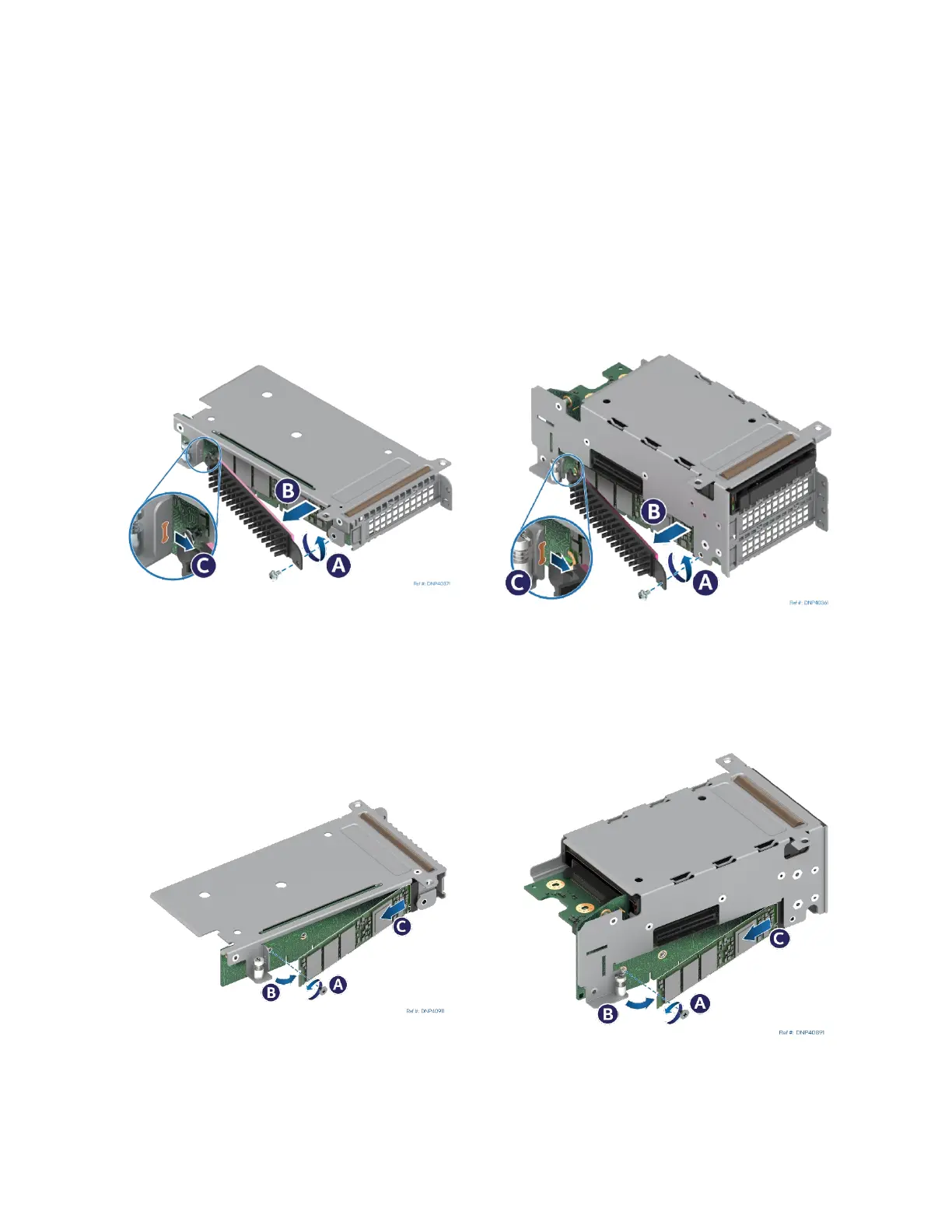
Figure 198. Removing Air-Cooled M.2 Heat Sink
1. Locate the heat sink on the left side of the riser assembly and remove the screw (see Letter A).
2. Slowly pull the free end of the heat sink outwards to detach the TIM from the SSD (see Letter B).
3. Slide the heat sink out in the direction shown (see Letter C).
Figure 199. Removing Air-Cooled M.2 SSD
4. Remove the screw securing M.2 SSD to the mounting standoff on the left side of the riser assembly (see
Letter A).
5. Carefully rotate outward the free end of the M.2 SSD (see Letter B).



 To Next Page