Intel® Server D50DNP Family Integration and Service Guide
106
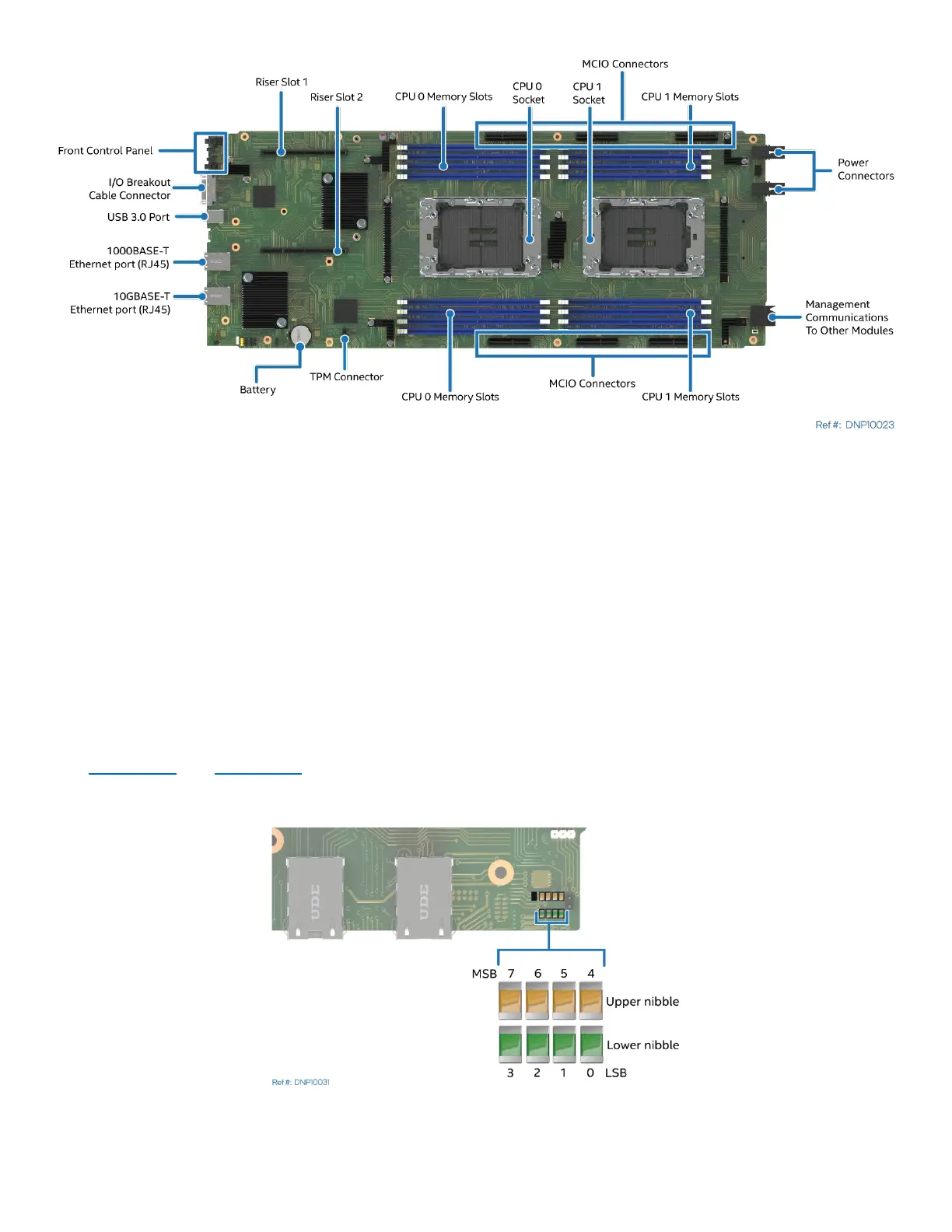
Figure 123. Intel® Server Board D50DNP1SB Feature Identification
The Intel® Server Board D50DNP1SB includes several jumper blocks to configure, protect, or recover specific
features of the server board. Refer to Appendix D for details.
To help troubleshooting system hang conditions that occur during a system POST process, the server board
includes a bank of eight diagnostic LEDs on the front edge of the board. These diagnostic LEDs are used
during POST to represent POST progress codes or halt error codes.
During the system boot process, memory reference code (MRC) and system BIOS execute several memory
initialization and platform configuration routines, each of which is assigned a hexadecimal POST progress
code number. As each routine is started, the given POST progress code number is displayed on the
diagnostic LEDs. If a system hangs during POST execution, the displayed POST progress code can be used to
identify the last POST routine that was run before the error occurred. This helps to isolate the possible cause
of the hang condition even when video is not available.
See Appendix E and Appendix F
for a complete description of how these LEDs are read, and for a list of all
supported POST codes.
Figure 124. Onboard LED Location



 To Next Page