Intel® Server D50DNP Family Integration and Service Guide
58
3.1.1 Installing the Fixed Rail Kit
The Intel® Server D50DNP Family includes a fixed rail kit that serves as a shelf for the system installed into a
rack. When a system is installed onto the fixed rails, it can be secured to both the rail and the rack via a pair
of thumbscrews on the front of the server system.
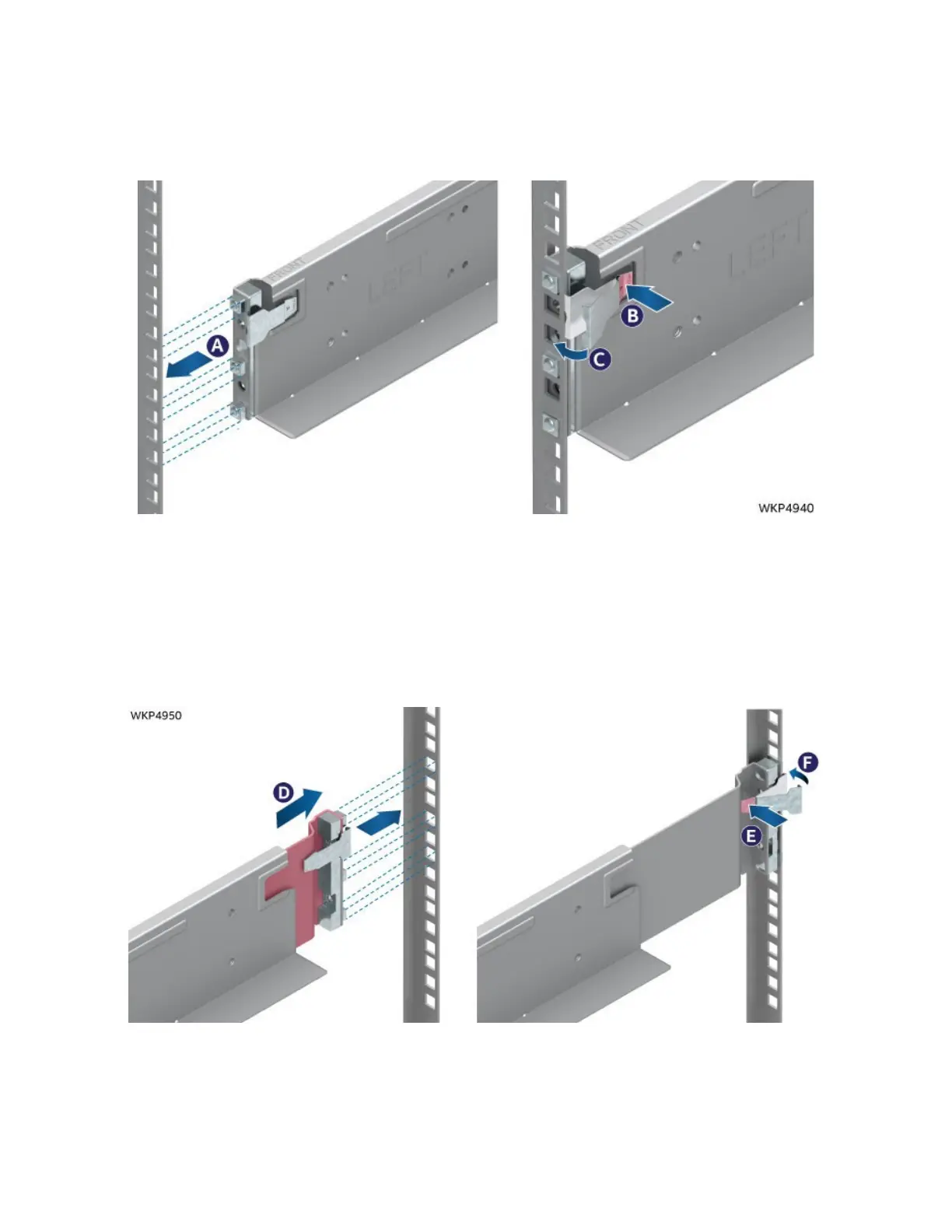
Figure 56. Securing the Front of the Rail
1. Remove the chassis rail kit from the packaging.
2. Locate the rail, either left or right, and align the rail guides with the slots in the front of the rack
(see Letter A).
3. Insert the rail guides into their respective rack slots while pressing the clip (see Letter B).
4. Release the clip once the guides are fully inserted into the rack (see Letter C).
Figure 57. Securing the Back of the Rail
5. Extend and align the rear guides with their slots in the back of the rack (see Letter D).
6. Insert the rail guides into their respective rack slots while pressing the clip (see Letter E).
7. Release the clip once the guides are fully inserted into the rack (see Letter F).
8. Repeat this process with the opposite rail.



 To Next Page