Intel® Server D50DNP Family Integration and Service Guide
138
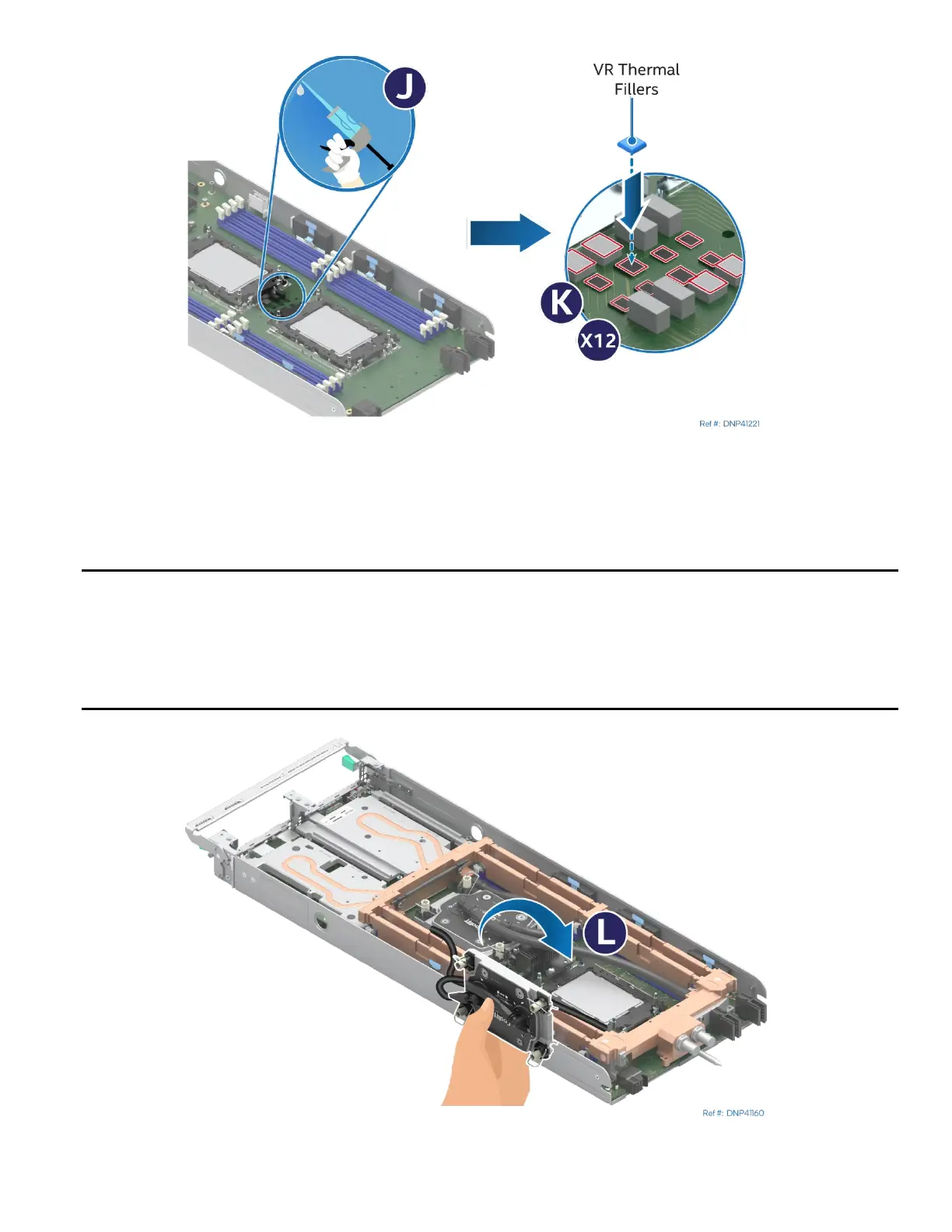
Figure 174. Applying Center VR Thermal Gap Filler
20. Using the assembled applicator (see Letter J), apply the thermal gap filler on top of the center processor
voltage regulator (VR) components (see Letter K). Apply the filler only on the VR associated with the
processor currently being replaced.
Notes:
• For 4
th
Gen Intel® Xeon® Scalable processors Family XCC models and Intel® Xeon® CPU Max Series
processor models, apply 248 cubic millimeters of thermal gap filler to cover the VR components with
a minimum thickness of 1 mm.
• For 4
th
Gen Intel® Xeon® Scalable processors Family MCC models, apply 423 cubic millimeters of
thermal gap filler to cover the VR components with a minimum thickness of 1.64 mm.
Figure 175. Reinstalling Processor Cold Plate



 To Next Page