Intel® Server D50DNP Family Integration and Service Guide
163
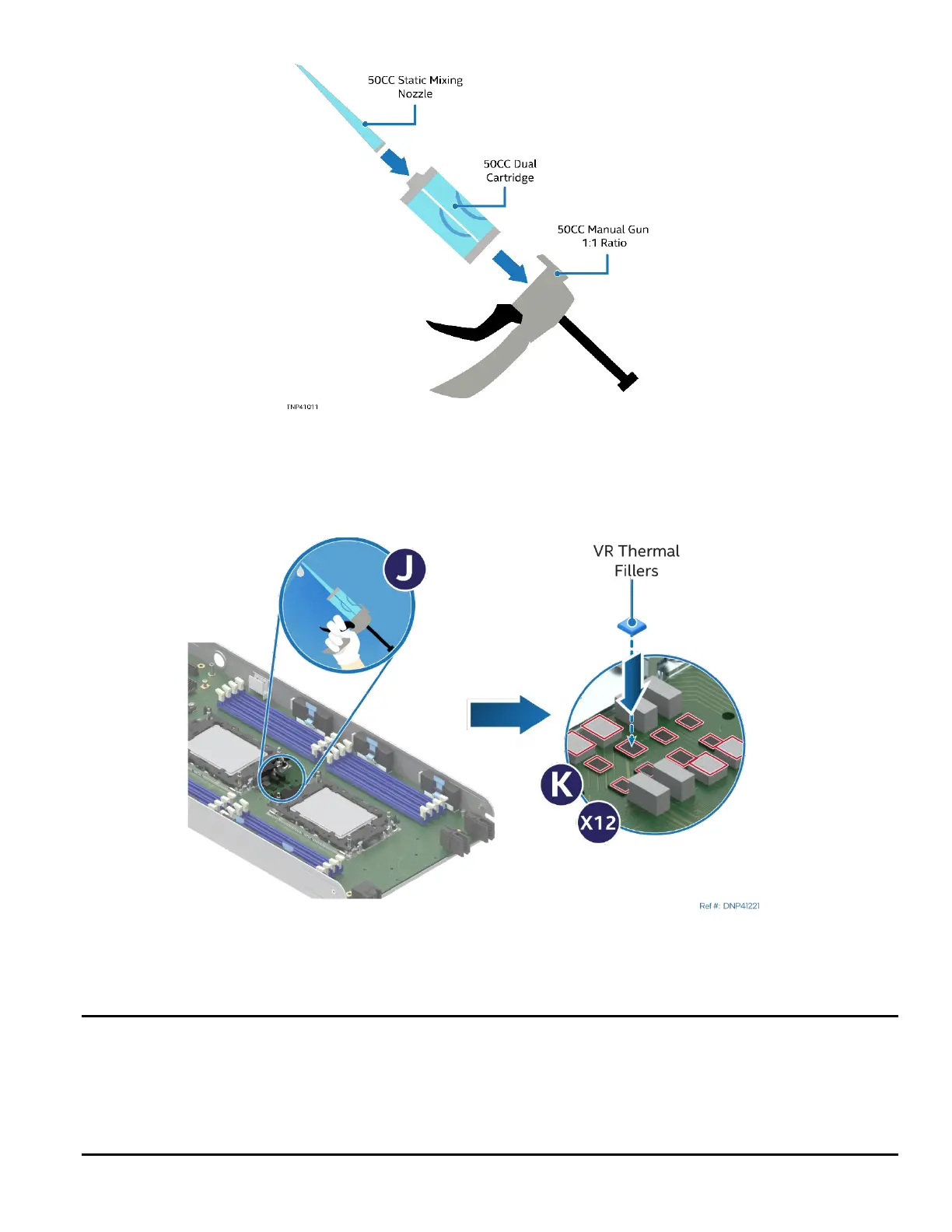
Figure 217. Assembling the Manual Applicator
20. Assemble the Bergquist SS95407 applicator, Bergquist GF3500S35 thermal gap filler cartridge, and
Bergquist SS95437 nozzle as shown in the previous figure.
Figure 218. Applying Center VR Thermal Gap Filler
21. Using the assembled applicator (see Letter J), apply the thermal gap filler on top of the twelve center
CPU VR components (see Letter K).
Notes:
• For 4th Gen Intel® Xeon® Scalable XCC and for Intel® Xeon® CPU Max Series processor models, apply
248 cubic millimeters of thermal gap filler to fully cover the VR components with a minimum
thickness of 1 mm.
• For 4th Gen Intel® Xeon® Scalable MCC processor models, apply 423 cubic millimeters of thermal gap
filler to fully cover the VR components with a minimum thickness of 1.64 mm.



 To Next Page