Intel® Server D50DNP Family Integration and Service Guide
192
7.17 System Battery Replacement
Required Tools and Supplies
• Compatible CR2032 lithium battery
• Anti-static wrist strap and conductive workbench pad (recommended)
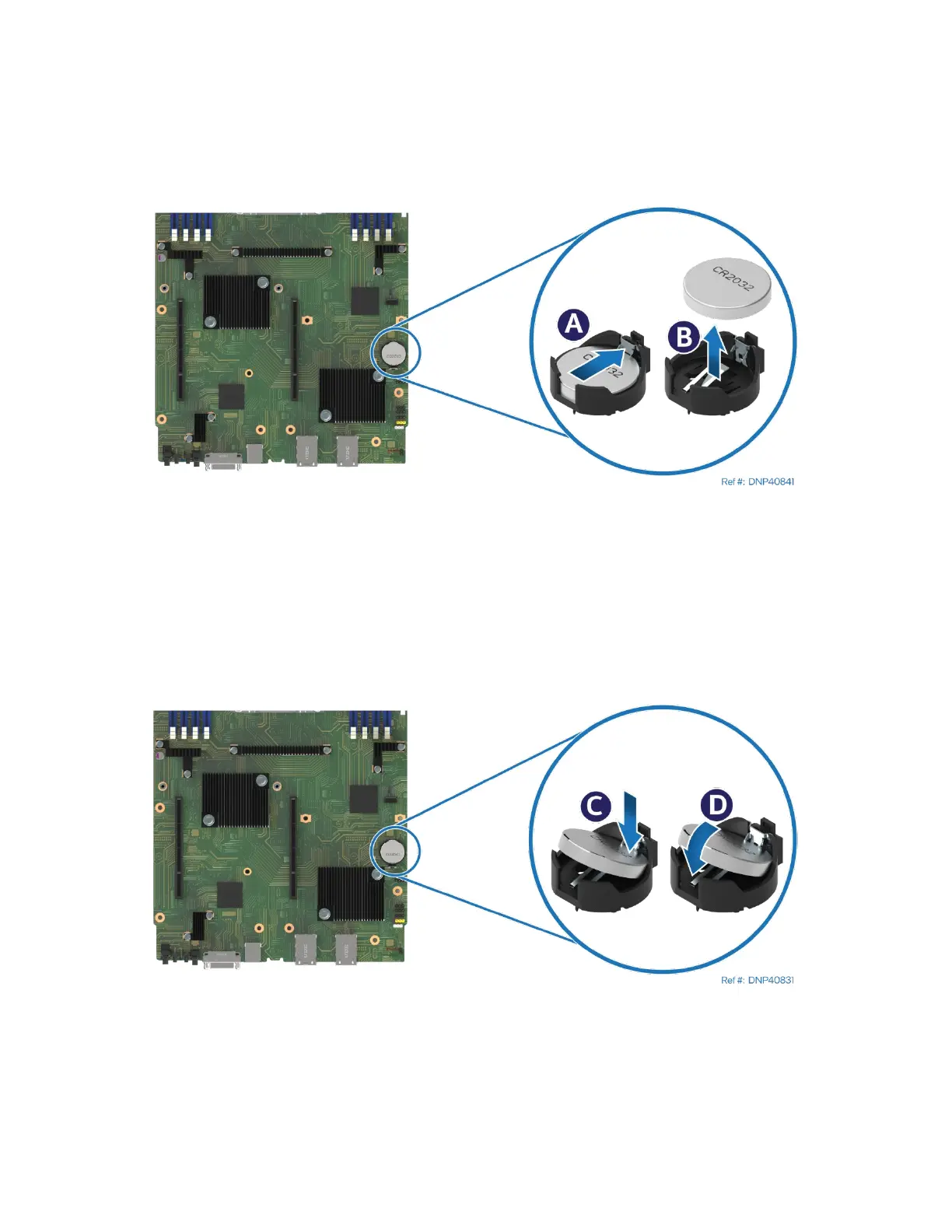
Figure 262. Removing System Battery
1. Remove the selected module from the server chassis (see Section 7.1.1).
2. Remove the right riser assembly from the module (see Section 7.5).
3. Locate the battery on the server board.
4. Gently press the metal clip as shown to release the battery (see Letter A).
5. Remove the battery from the plastic socket (see Letter B).
6. Dispose of the battery according to local laws.
Figure 263. Installing System Battery
7. Remove the new lithium battery from its package.
8. Observing the correct polarity, insert the battery into the battery socket (see Letters C and D).
9. Reinstall the riser assembly (see Section 7.5).
10. Reinstall the module in the chassis (see Section 7.1.2).
11. Use the BIOS Setup Utility to restore BIOS settings and reset the system time and date.



 To Next Page