Intel® Server D50DNP Family Integration and Service Guide
144
Figure 184. Attaching Thermal Pad to DIMM PMIC
10. Carefully detach one PMIC thermal pad from the paper and attach it to the replacement DIMM power
management integrated circuit (PMIC) as shown on the picture.
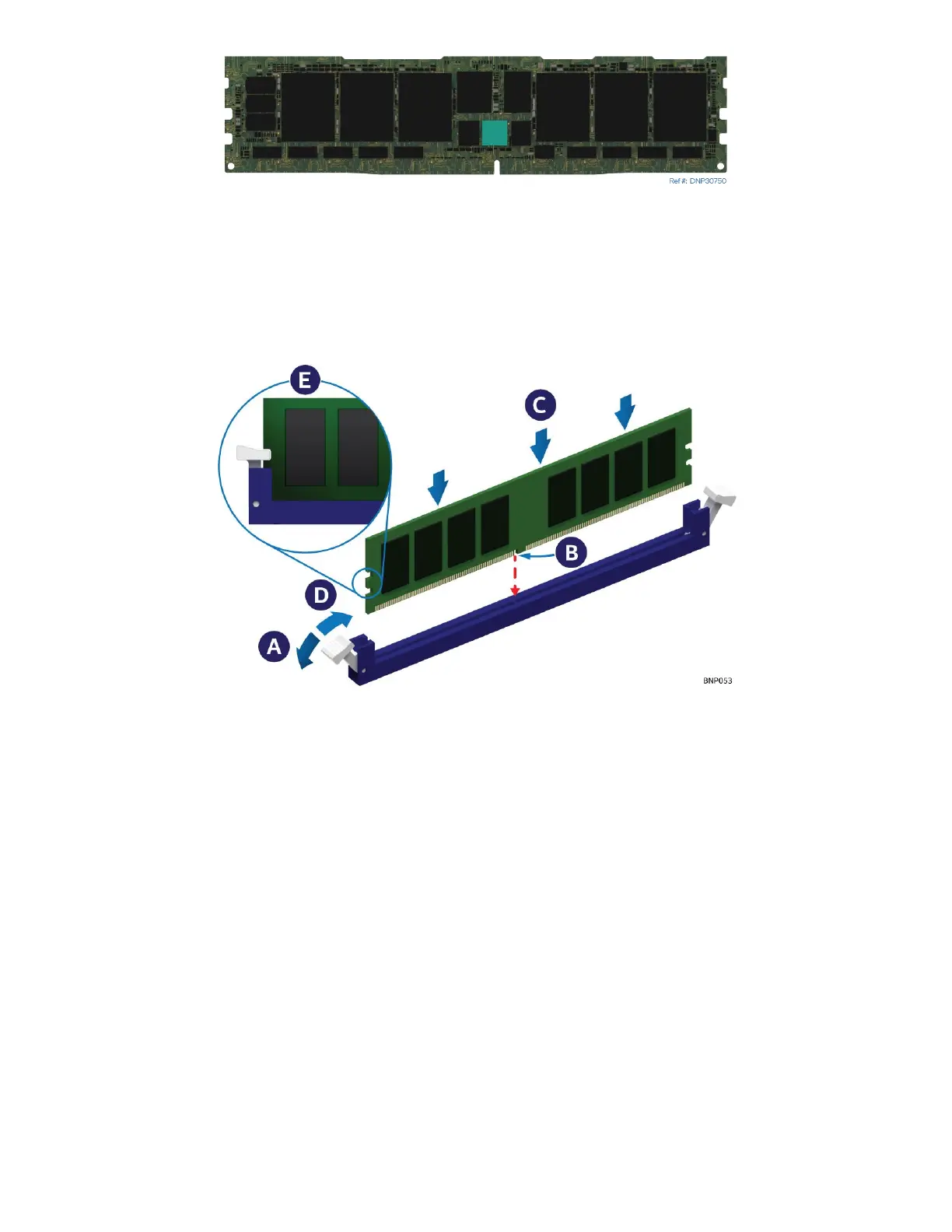
Figure 185. Installing DIMM for Liquid-Cooled Module
11. Ensure that the ejection tabs at both ends of the memory slot are in the open position (see Letter A). Use
the memory replacement tool if the memory ejection tabs are in the closed position.
12. Align the notch at the bottom edge of the memory module with the key in the memory slot
(see Letter B).
13. Insert the memory module into the memory slot. Using even pressure along the top edge, push down on
the memory module (see Letter C) until the ejection tabs of the memory slot snap into place (see Letter
D).
14. Ensure that the ejection tabs are firmly in place (see Letter E).
15. Attach the DIMM latch tool to the cooling loop



 To Next Page