Points
P/N 7010-0628
3-75
information on the tabs.
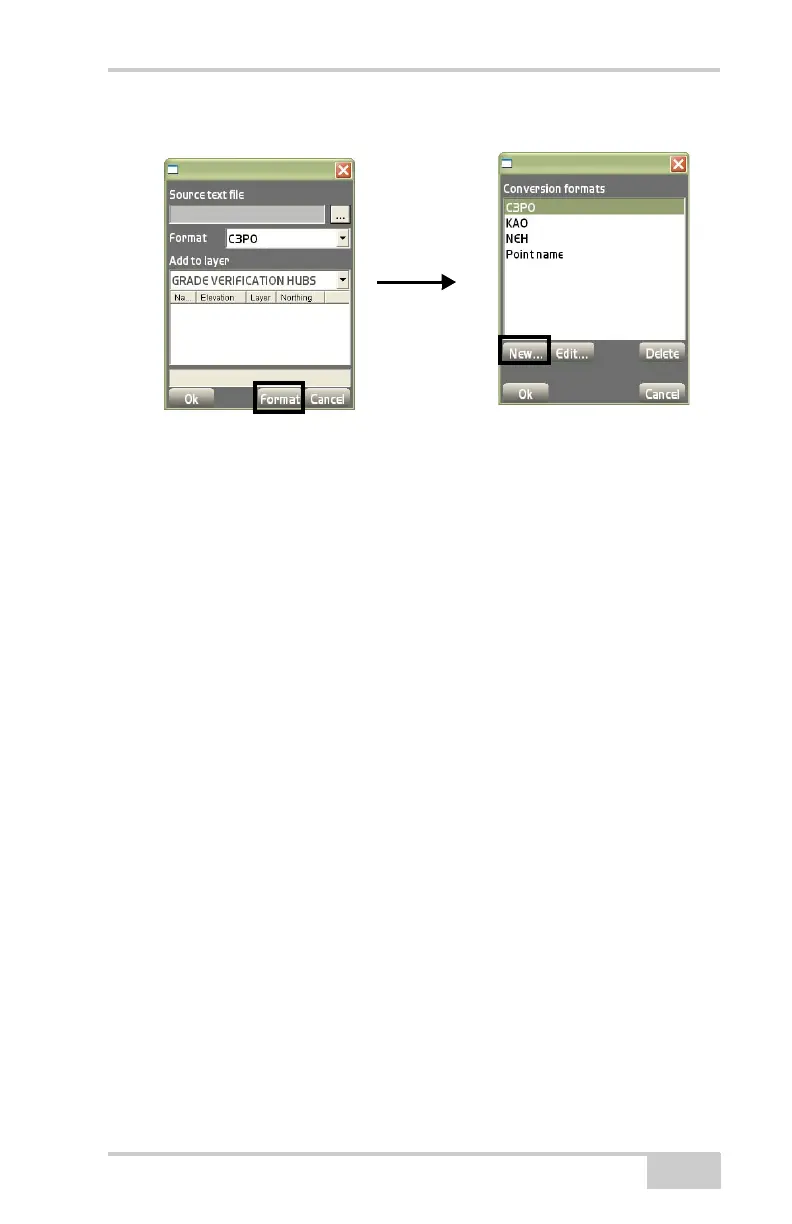
Figure 3-111. Conversion Formats/Conversion Format Parameters Dialog Boxes
• Edit – on the Conversion formats dialog box (Figure 3-111 on
page 3-75), press to edit the selected format. The conversion
formats parameters dialog box displays (Figure 3-112 on
page 3-76).
• Delete – on the Conversion formats dialog box, press to delete
the highlighted (selected) format.
On the conversion formats parameters dialog box, select parameters
on the Line Items and Import rules tabs.
The Line items tab on the conversion formats parameters dialog
box adds, edits, or deletes line items for the selected conversion for
-
mat (Figure 3-112 on page 3-76).
• Add – on the Line items tab, press to add a line item and it’s
respective information, then press Ok to save (
Figure 3-112 on
page 3-76). Repeat this process for each line item.
– Type: select either Point name, Point description, Point
northing, Point easting, Point elevation, Point layer name,
Literal text string, Point WGS84 latitude, Point WGS84
longitude, or Date/Time.
– Append: select either Trailing comma, Trailing space,
Trailing tab, or Nothing.
– Fixed width field: enable to select a fixed width for each field.
– Justified: select either Left, Right, or None.



 To Next Page