Data Menu
Pocket-3D Reference Guide
3-96
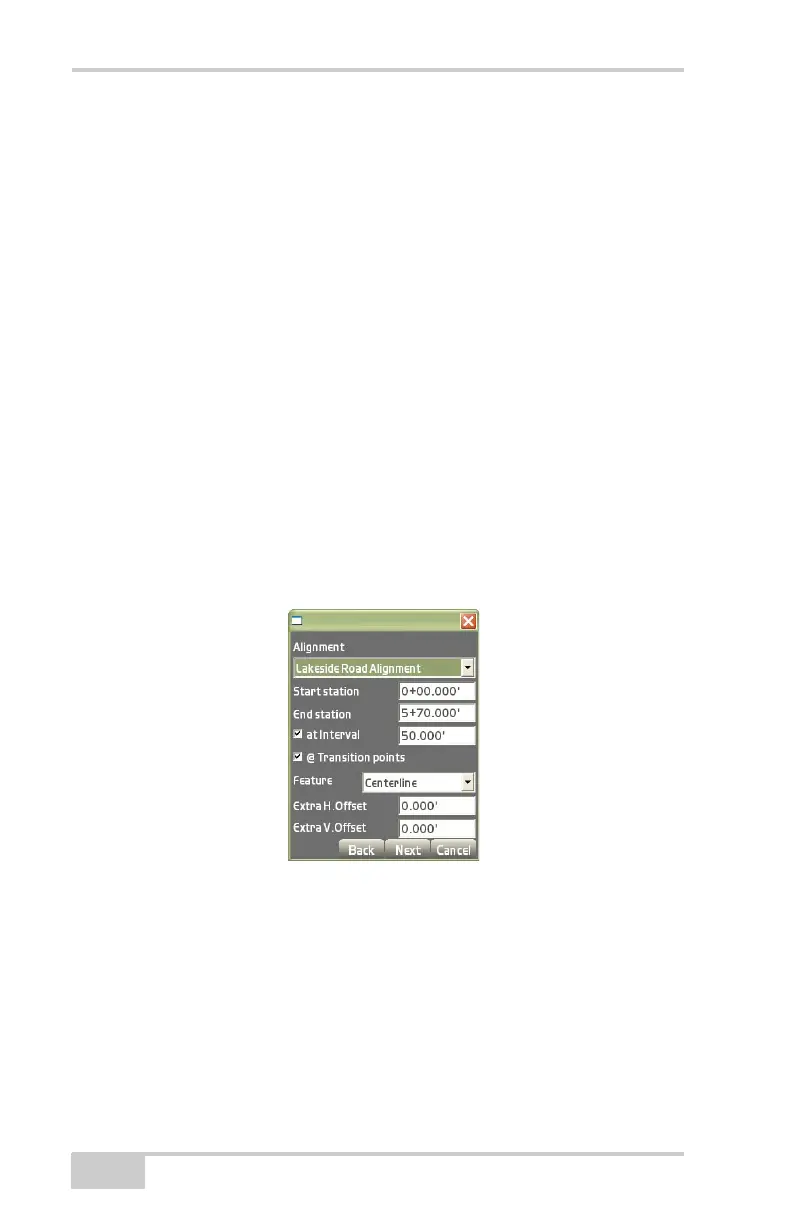
• Start station – the start station of the selected alignment (created
using Data
Alignment). To select a different start station, enter
the desired start station.
• End station – the end station of the selected alignment (created
using Data
Alignment). To select a different end station, enter
the desired end station.
• at Interval – the station interval of the selected alignment (created
using Data
Alignment). Enable to select a different station
interval.
• @ Transition points – known transitions in the alignment.
• Feature – select the feature to be converted from the drop-down
list.
• Extra H.Offset – enter a horizontal offset for the alignment (if
preferred).
• Extra V.Offset – enter a vertical offset for the alignment (if
preferred).
Figure 3-144. Create Points Dialog Box
The view screen will display the coordinate points created from
the selected alignment (
Figure 3-145 on page 3-97).
1. Press the +/- buttons to zoom in or out on the image, or press
down on the screen and drag the image around.
2. Press Next to continue.



 To Next Page