Selecting the
interval time
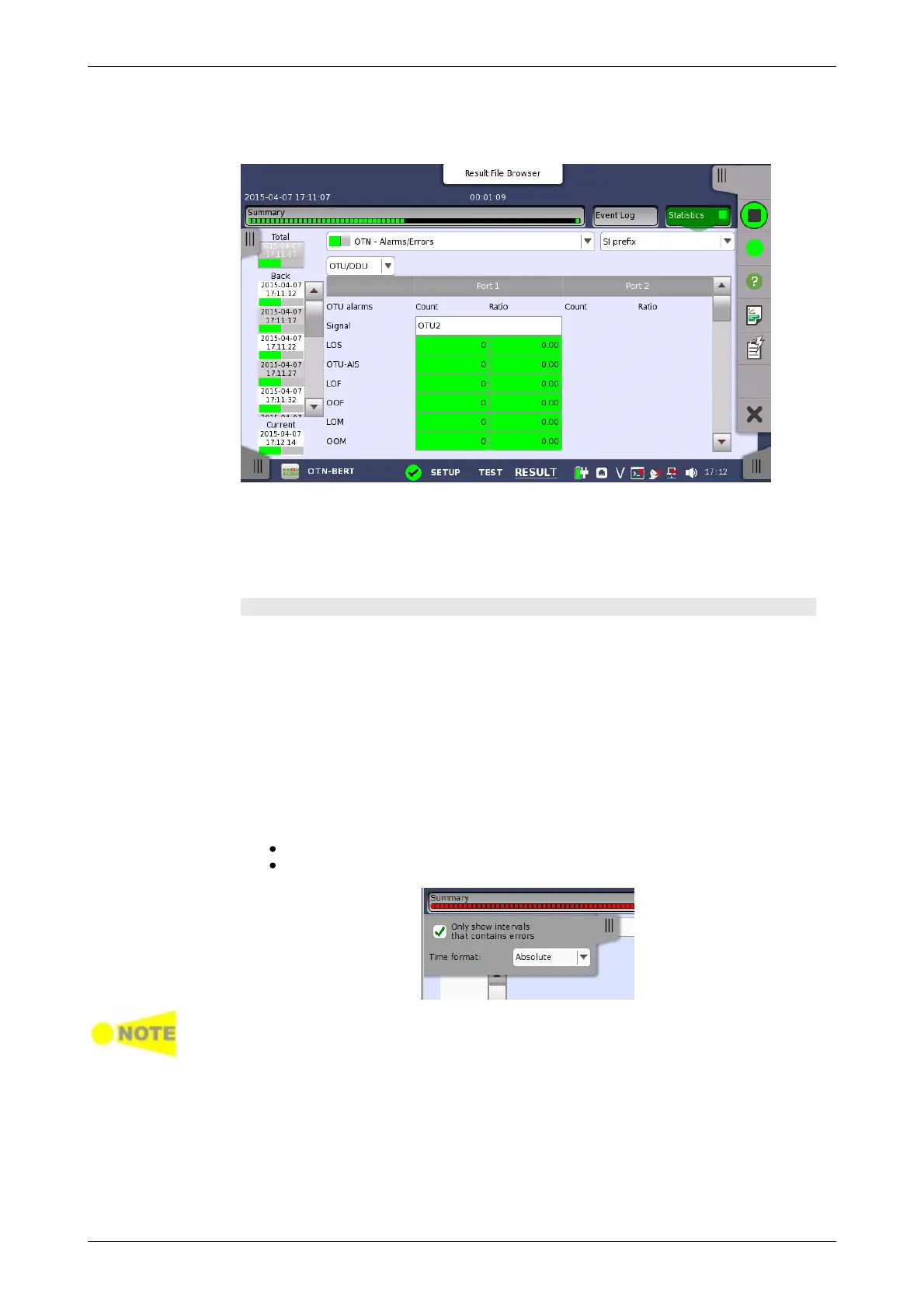
Touching the Statistics button in the navigation area displays the screen
shown below.
This screen presents a detailed analysis of the test results. You can choose
to view either the current results (i.e. results measured during one second)
or the total results from measurement start. You can also zoom in on a
specific result item. The results can be displayed either in table (list) form or
as a graph.
Selecting which results to view
Touch the Total button to switch the total values measured in all interval
times. The start time of measurement is displayed on the button.
Touching the button in left side Back field shows the measured values in the
interval time. The end time of the interval is displayed on the button.
Current button is displayed at left bottom when the measurement is
running. Touching the Current button shows the measured values in the
current interval time. The start time of the current interval is displayed on the
button.
The slide-out panel on the left-hand side of the screen contains the following
functions:
Only show intervals that contains errors
Time format
If you have stopped measurement during the interval time, the measurement
results of the current interval are discarded. The log of the current interval is not
displayed in Back field.
In this case, result data are re-calculated excluding the data of the current
interval when the measurement is stopped. This causes that "Count" and "Ratio"
displayed after the measurement will be different from that of during
measurement.
The sum of interval time (multiplied interval time by the number of back logs)
may not match the differential time between displayed time at left top and right
top after the measurement.














 To Next Page