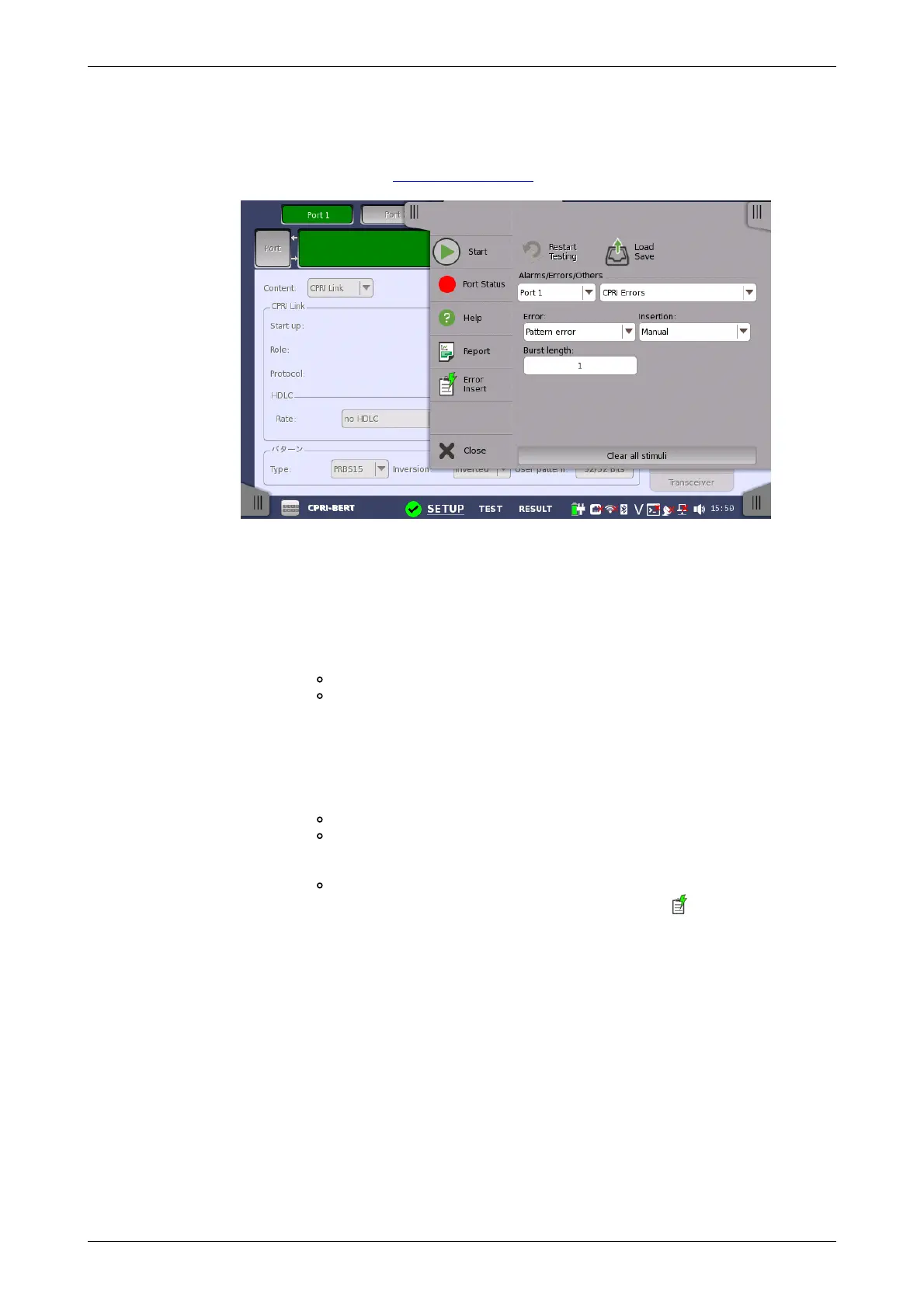
Alarms/Errors/
Others
8.1.4 Error/Alarm Insertion
This section describes how to configure settings for inserting errors or
alarms by using the Application toolbar of CPRI/OBSAI.
Select the port to insert errors, and the stimuli type. The settings items vary
depending on the selected stimulus type.
8.1.4.1 CPRI/OBSAI Alarms
1. Select the CPRI Alarms.
2. Select the Alarm item.
3. Select the Insertion.
Off: Does not insert alarms.
Permanently: Inserts alarms permanently.
8.1.4.2 CPRI/OBSAI Errors
1. Select the CPRI Errors.
2. Select the Error item.
3. Select the Insertion.
Off: Turns off inserting errors.
Manual: Inserts the specified number of errors if you touch the
Error Insert icon.
Touch the Burst length field to set the number of errors to insert.
1E-04 to 1E-10: Inserts errors at the specified rate continuously.
4. When selecting Manual, touch the Error Insert icon ( ) to insert an
error.
8.1.4.3 CPRI/OBSAI Frequency
1. Select the CPRI Frequencies.
2. Touch the Frequency Offset field to set an offset in ppm. If setting a
positive value, the frequency will shift higher side.
8.2 BERT














 To Next Page