AP Servo Installation, Configuration, and Calibration
10-10 SkyView System Installation Guide - Revision AA
Immobilize the autopilot servo arm. This can be accomplished by manually restraining
the autopilot arm/capstan, or by engaging the autopilot on the ground in servo test
mode SETUP MENU > HARDWARE CALIBRATION > AP SERVO CALIBRATION > TEST (you
can start this test, proceed to the step where it first activates and immobilizes the
servos, and then cancel the test mode once you’ve performed this free play test).
Gently attempt to move the aircraft control surface by manipulating it manually by
hand. If there is any significant movement possible - more than 1 degree of free play of
the control surface is considered excessive - examine the servo, its mounts, and the
linkages and/or cables that connect it to the control surface to discover where the play
is being introduced.
Autopilot System Electrical Installation
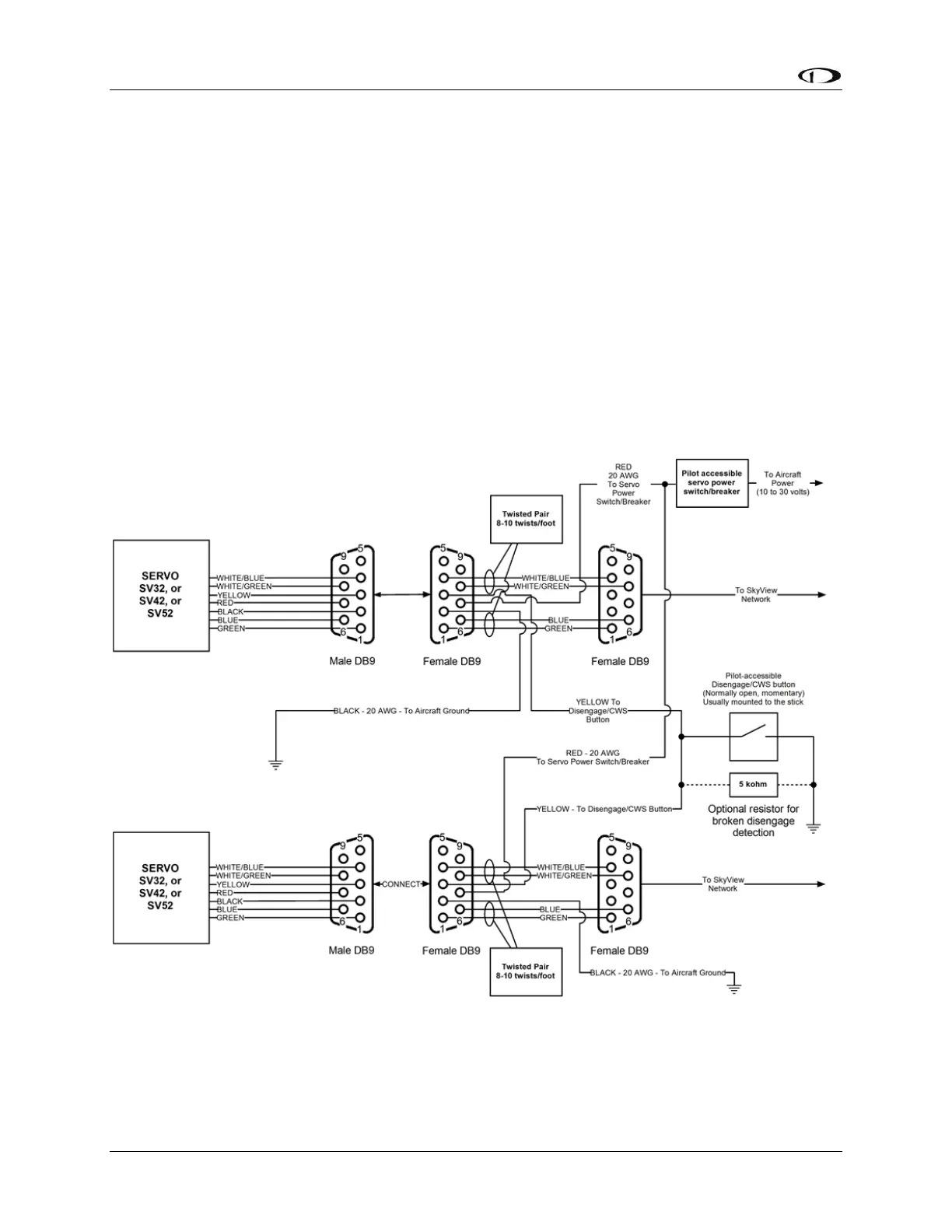
Figure 114 provides an overview of the autopilot electrical system. Note that SkyView supports
up to two servos.
Figure 114 – SkyView Autopilot System Electrical Installation Overview (All Connectors Rear View)
The following sections describe the electrical installation of each subsystem in detail.










 To Next Page