EasyManua.ls Logo

Dynon Avionics SkyView Classic - Page 285

Default Icon
573 pages
Print Icon
To Next Page IconTo Next Page
To Previous Page IconTo Previous Page
Loading...
SV-XPNDR-261/262 Installation and Configuration
SkyView System Installation Guide - Revision AA 11-7
Pin
Function
SV-HARNESS-
XPNDR Color
Notes
20
Ident Switch In
Green
Optional: Not Commonly Connected
21
No Connection
No wire installed
-
22
No Connection
No wire installed
-
23
No Connection
No wire installed
-
24
No Connection
No wire installed
-
25
No Connection
No wire installed
-
Table 75 SV-HARNESS-XPNDR Pinout
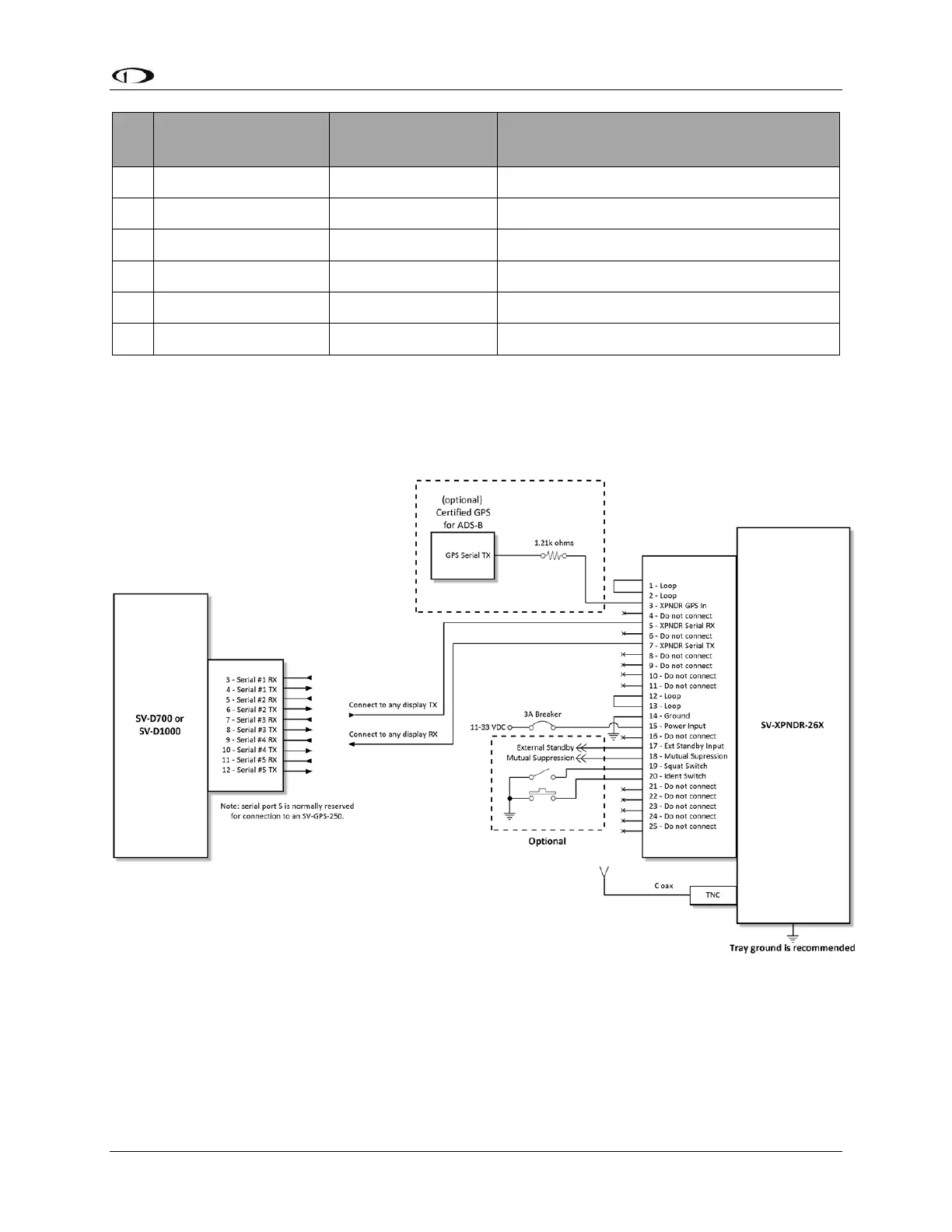
Figure 131 below depicts how the SV-XPNDR-261/262 connects with other SkyView and aircraft
components. Note that many of the connections shown are optional and are not be used in
most installations.
Figure 131 SV-XPNDR-261/262 Wiring Diagram
Table 76 below shows the connections for each of SkyView’s nominally available serial ports.
Serial Port 5 is usually used for connection to the SV-GPS-250/2020 GPS receiver. Only ONE of
the following serial ports will be used to connect the SV-XPNDR-261/262.

Table of Contents

Related product manuals