•
Ethernet switch—Provides 1-Gbps link speeds between the Routing Engine and the
DPCs, FPCs, and MPCs
•
Circuits for chassis management and control
•
Power circuits for the Routing Engine and SCB
•
LEDs—Provide status
Related
Documentation
MX480 Host Subsystem Description on page 25•
• MX480 Routing Engine Description on page 27
• SCB-MX LEDs on page 109
SCB-MX LEDs
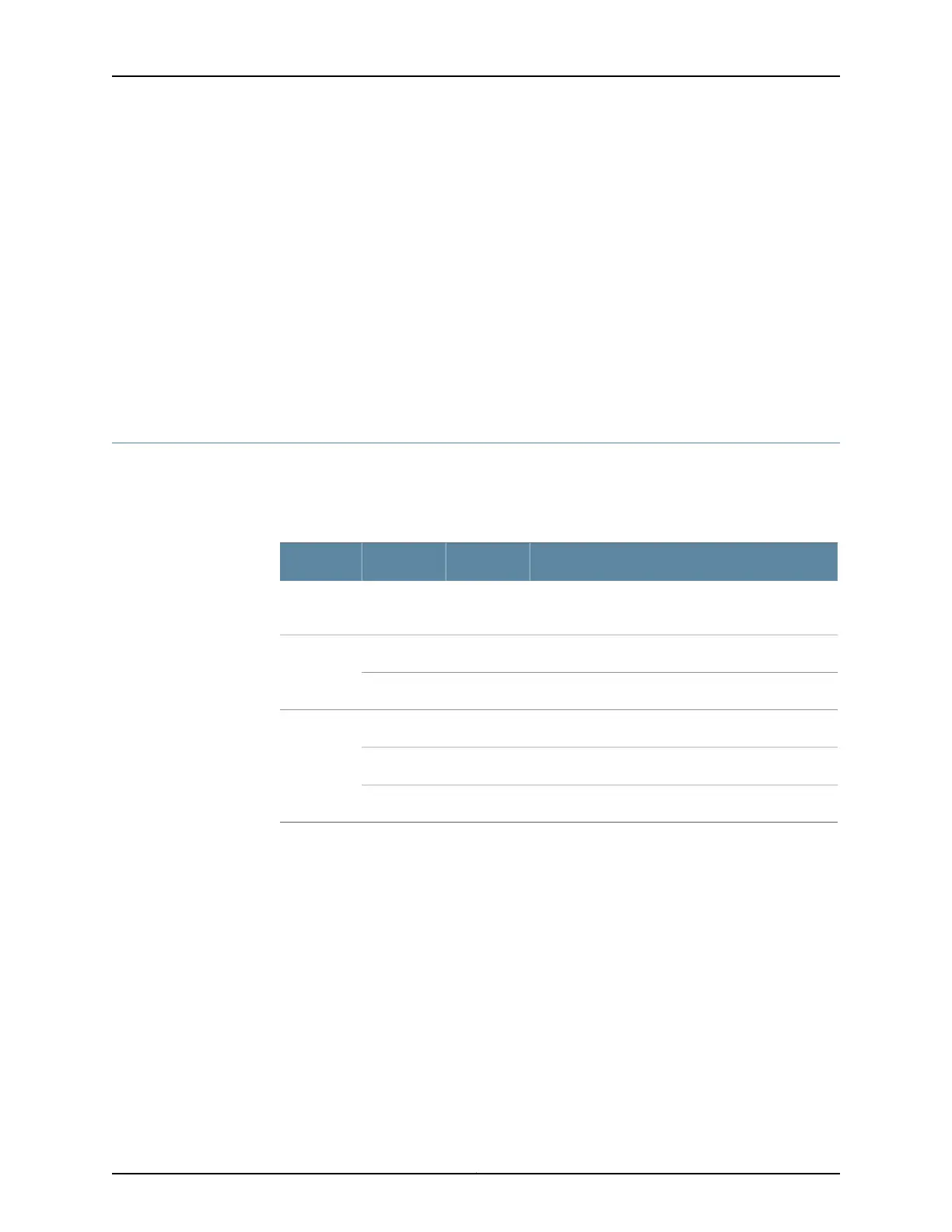
FABRIC ACTIVE, FABRIC ONLY, and OK/FAIL LEDs indicate the status of the SCB-MX.
Refer to Table 65 on page 109.
Table 65: SCB-MX LEDs
DescriptionStateColorLabel
Fabric is in active mode.On steadilyGreenFABRIC
ACTIVE
SCB-MX operates in fabric-only mode.On steadilyGreenFABRIC
ONLY
SCB-MX operates in fabric/control board mode.Off–
SCB-MX is online.On steadilyGreenOK/FAIL
SCB-MX has failed.On steadilyRed
SCB-MX is offline.Off–
Each SCB-MX also has two LEDs on the craft interface that indicate its status. The
SCB-MX LEDs, labeled 0 and 1, are located along the bottom of the craft interface. For
more information about the SCB-MX LEDs on the craft interface, see “SCB LEDs on the
MX480 Craft Interface” on page 18.
Related
Documentation
MX-Series Switch Control Board (SBC) Overview•
• SCBE2-MX Description
• SCBE2-MX LEDs
109Copyright © 2017, Juniper Networks, Inc.
Chapter 8: Switch Fabric Components and Descriptions



 To Next Page