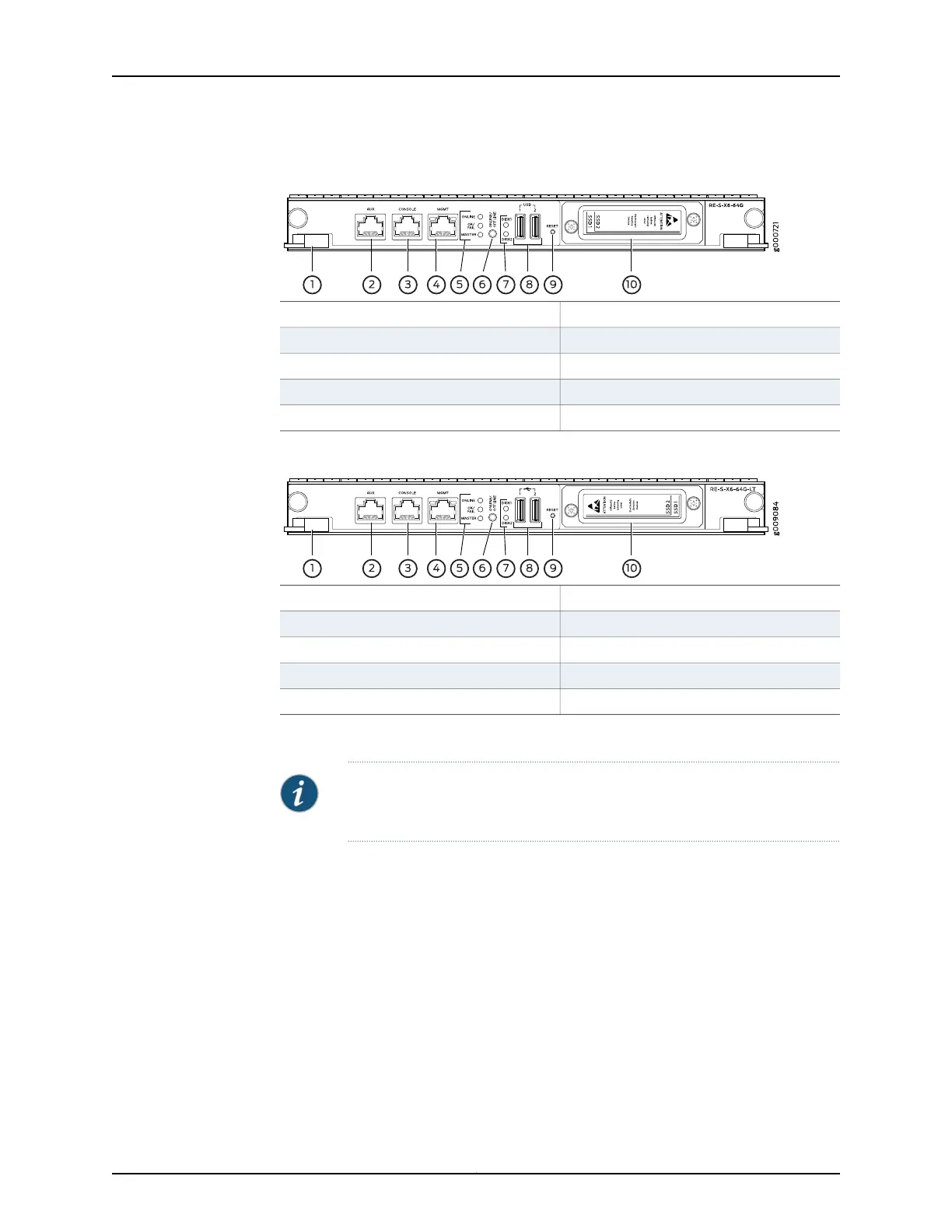
Figure 13: RE-S-X6-64G Routing Engine Front View
6—1—
ONLINE/OFFLINE Button
Extractor clips
7—2—
SSD LEDs—DISK1 and DISK2Auxiliary port (AUX)
8—3—
Ports—USB1 and USB2Console port (Con)
9—4—
RESET ButtonManagement port (MGMT)
10—5— SSD card slot cover
LEDs—ONLINE, OK/FAIL, and MASTER
Figure 14: RE-S-X6-64G-LT Routing Engine Front View
6—1—
ONLINE/OFFLINE Button
Extractor clips
7—2—
SSD LEDs—DISK1 and DISK2Auxiliary port (AUX)
8—3—
Ports—USB1 and USB2Console port (Con)
9—4—
RESET ButtonManagement port (MGMT)
10—5— SSD card slot cover
LEDs—ONLINE, OK/FAIL, and MASTER
Routing Engine Components
NOTE: For specific information about Routing Engine components (for
example, the amount of DRAM), issue the show vmhost hardware command.
Routing Engine Interface Ports
Three ports, located on the right side of the Routing Engine, connect the Routing Engine
to one or more external devices on which system administrators can issue Junos OS
command-line interface (CLI) commands to manage the router.
The ports with the indicated labels function as follows:
•
AUX—Connects the Routing Engine to a laptop, modem, or other auxiliary device
through a serial cable with an RJ-45 connector.
•
CONSOLE—Connects the Routing Engine to a system console through a serial cable
with an RJ-45 connector.
Copyright © 2017, Juniper Networks, Inc.28
MX480 3D Universal Edge Router Hardware Guide



 To Next Page