For more information on specific DPCs, see “DPCs Supported on MX240, MX480, and
MX960 Routers” on page 60 in the MX Series Interface Module Reference.
•
port—Port number.
The MX480 router supports up to six DPCs that install horizontally and are numbered 0
through 5 from bottom to top.
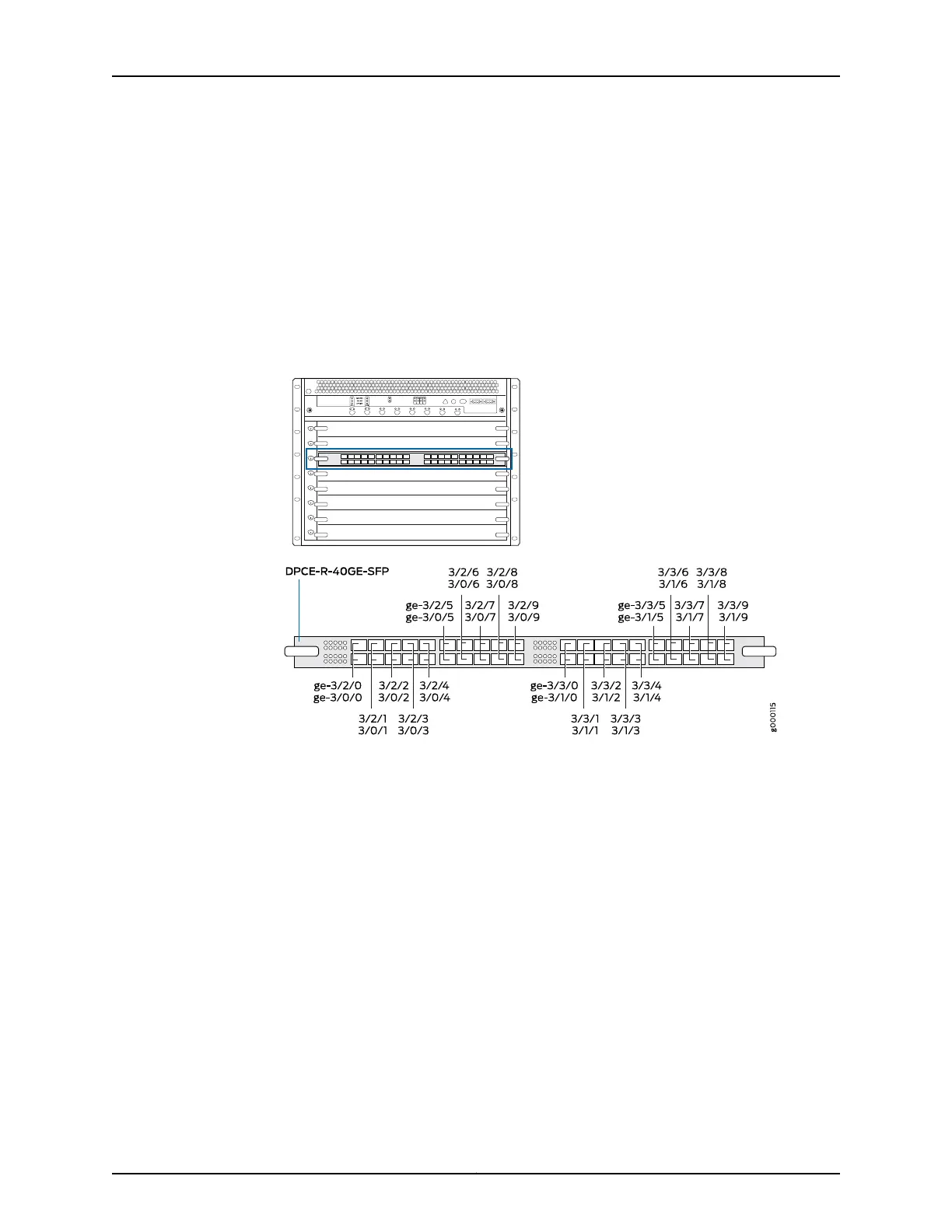
Figure 23 on page 58 shows a 40-port Gigabit Ethernet DPC with SFP installed in slot 3
on the MX480 router.
Figure 23: MX480 DPC Interface Port Mapping
The DPC contains four logical PICs, numbered PIC 0 through PIC 3 in the CLI. Each logical
PIC contains 10 ports numbered 0 through 9.
The show chassis hardware command output displays a 40-port Gigabit Ethernet DPC
with SFP (DPCE-R-40GE-SFP) installed in DPC slot 3. The DPC (DPCE 40x 1GE R) is shown
as FPC 3 in the CLI. The DPC’s four logical PICs — 10x 1GE(LAN) — are shown as PIC 0
through PIC 3.
user@host> show chassis hardware
...
FPC 3 REV 07 750-018122 KB8222 DPCE 40x 1GE R
CPU REV 06 710-013713 KA9010 DPC PMB
PIC 0 BUILTIN BUILTIN 10x 1GE(LAN)
Xcvr 0 REV 01 740-011782 PCH2NU4 SFP-SX
Xcvr 1 REV 01 740-011782 PCH2P4R SFP-SX
Xcvr 2 REV 01 740-011782 PCH2NYL SFP-SX
Xcvr 3 REV 01 740-011782 PCH2UW6 SFP-SX
Xcvr 4 REV 01 740-011782 PCH2P4N SFP-SX
Xcvr 5 REV 01 740-011782 PCH2UME SFP-SX
Xcvr 6 REV 01 740-011613 PCE1H5P SFP-SX
Copyright © 2017, Juniper Networks, Inc.58
MX480 3D Universal Edge Router Hardware Guide



 To Next Page