Related
Documentation
Replacing Connections to MX480 Routing Engine Interface Ports on page 311•
• Effect of Taking the MX480 Host Subsystem Offline
• Preventing Electrostatic Discharge Damage to an MX480 Router on page 484
• Replacing Connections to MX480 Routing Engine Interface Ports on page 311
• Synchronizing Routing Engines
Replacing an SSD Drive on an RE-S-1800
Each RE-S-1800 Routing Engine supports two solid-state drives (SSD) specified by
Juniper Networks. The RE-S-1800 ships with one SSD installed in the slot labeled SATA
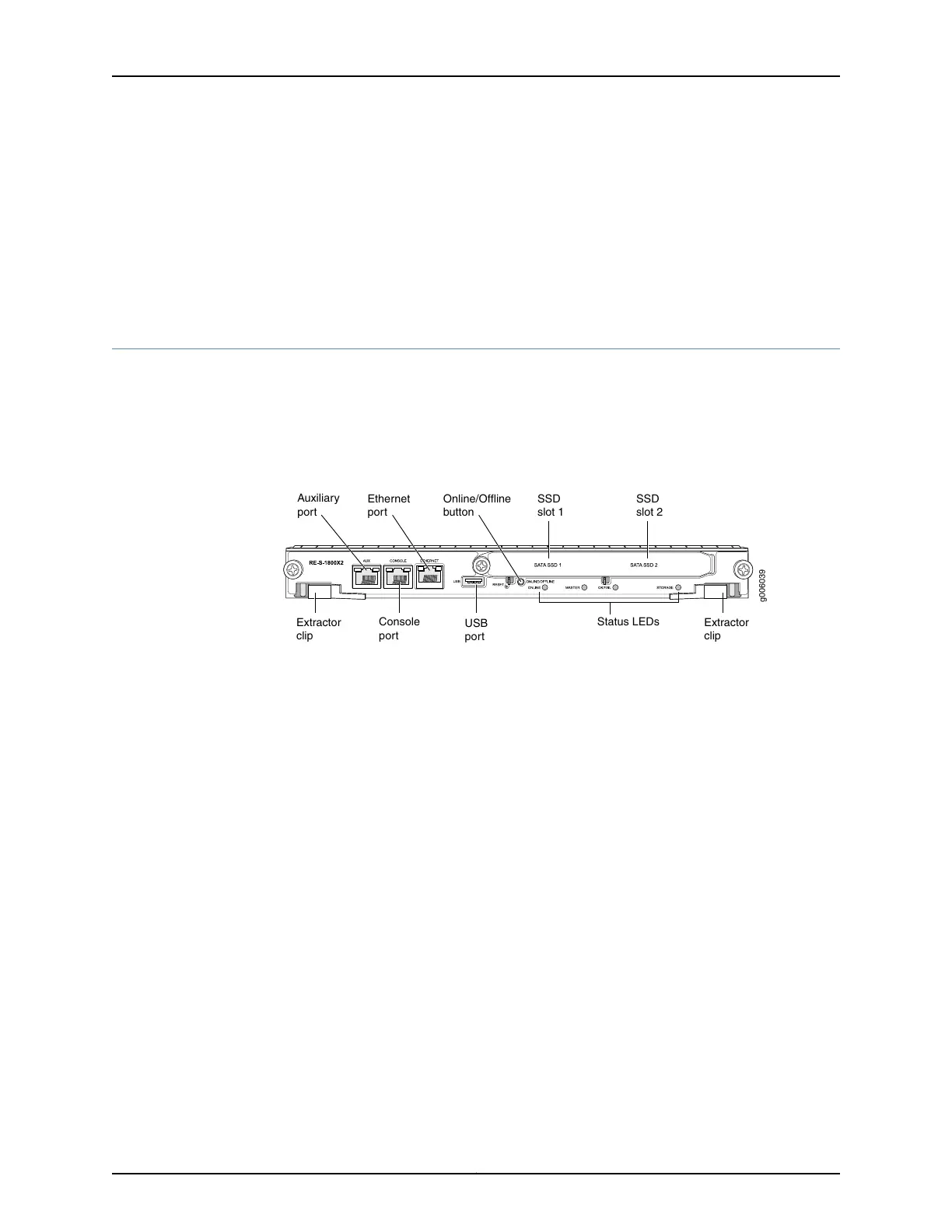
SSD 1. The spare SSD is Juniper part number SSD-32G-RE-S. Figure 125 on page 305 shows
the arrangement of storage drive slots on a RE-S-1800 Routing Engine.
Figure 125: RE-S-1800 Storage Drive Slots
USB
port
Status LEDs
SSD
slot 2
SSD
slot 1
Online/Offline
button
Extractor
clip
Extractor
clip
g006039
Console
port
Auxiliary
port
Ethernet
port
The following drive has been verified to work in the RE-S-1800 Routing Engine:
•
SSD-32G-RE-S
To replace a storage drive:
1. Disable and deactivate the storage drive.
305Copyright © 2017, Juniper Networks, Inc.
Chapter 24: Replacing Host Subsystem Components



 To Next Page