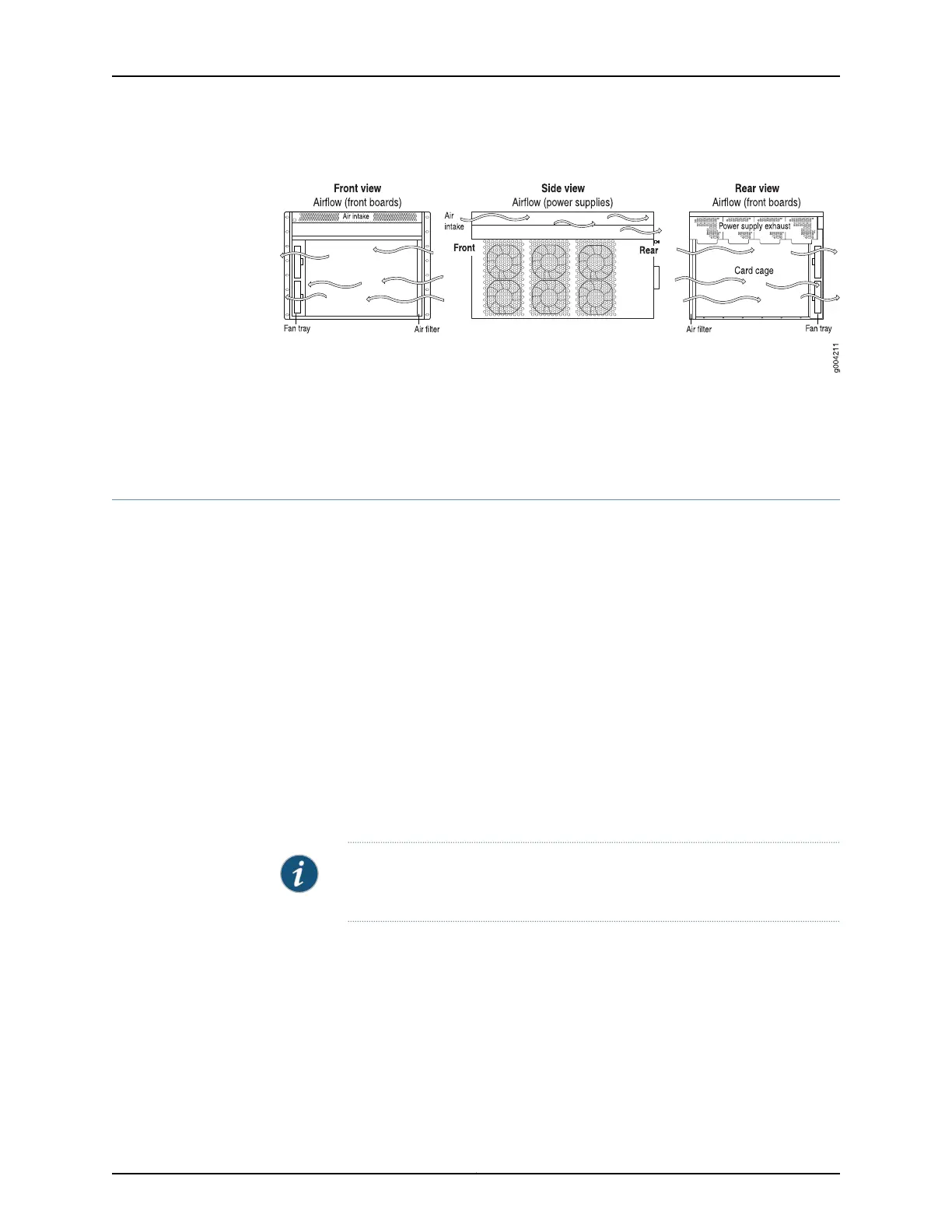
Figure 42: Airflow Through the Chassis
Related
Documentation
MX480 Site Preparation Checklist on page 121•
• Installation Safety Warnings for Juniper Networks Devices
MX480 Chassis Grounding Specifications
•
MX480 Chassis Grounding Points Specifications on page 127
•
MX480 Router Grounding Cable Lug Specifications on page 128
•
MX480 Router Grounding Cable Specifications on page 129
MX480 Chassis Grounding Points Specifications
To meet safety and electromagnetic interference (EMI) requirements and to ensure
proper operation, the router must be adequately grounded before power is connected.
To ground AC-powered and DC-powered routers, you must connect a grounding cable
to earth ground and then attach it to the chassis grounding points using the two screws
provided.
Two threaded inserts (PEM nuts) are provided on the upper rear of the chassis for
connecting the router to earth ground. The grounding points fit UNC 1/4–20 screws
(American). The grounding points are spaced at 0.625-in. (15.86-mm) centers (see
Figure 43 on page 128 or Figure 44 on page 128).
NOTE: Additional grounding is provided to an AC-powered router when you
plug its power supplies into grounded AC power receptacles.
127Copyright © 2017, Juniper Networks, Inc.
Chapter 9: Preparation Overview



 To Next Page