•
4-port 10-Gigabit Ethernet MIC has two logical PICs numbered 0 and 1 when installed
in slot 0, or 2 and 3 when installed in slot 1.
•
100-Gigabit Ethernet MIC with CFP has one logical PIC numbered 0 when installed
in slot 0, or 2 when installed in slot 1.
For more information on specific MICs, see “MICs Supported by MX Series Routers” on
page 80 in the MX Series Interface Module Reference.
•
port—Port number.
NOTE: The MIC number is not included in the interface name.
The MX480 router supports up to six MPCs that install horizontally and are numbered
from bottom to top. Each MPC accepts up to two MICs.
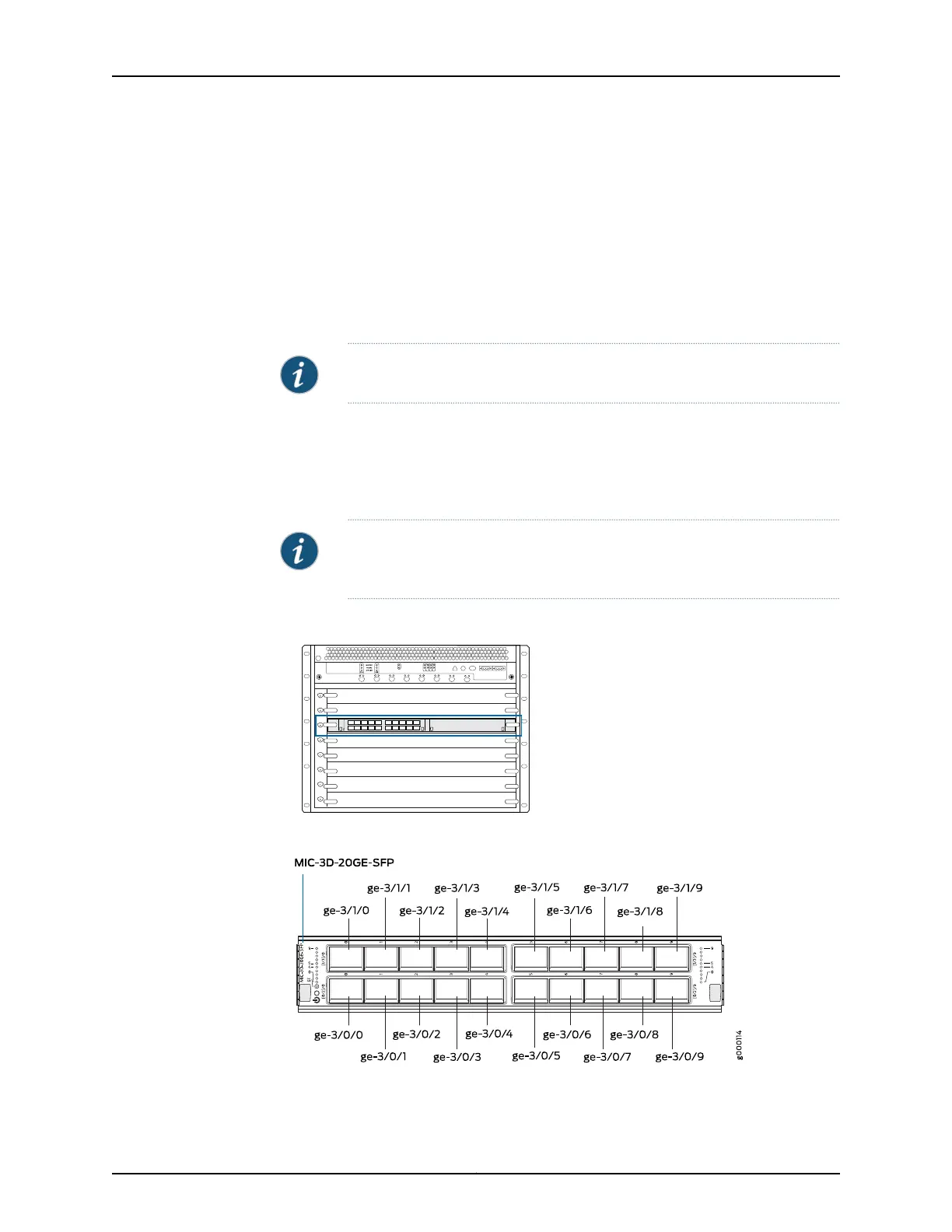
Figure 27 on page 78 shows a 20-port Gigabit Ethernet MIC with SFP installed in slot 0of
an MPC in slot 3.
NOTE: The 20-port Gigabit Ethernet MIC with SFP-E has a different port
numbering. See Gigabit Ethernet MIC with SFP (E)
Figure 27: MX480 MIC Interface Port Mapping
Copyright © 2017, Juniper Networks, Inc.78
MX480 3D Universal Edge Router Hardware Guide



 To Next Page