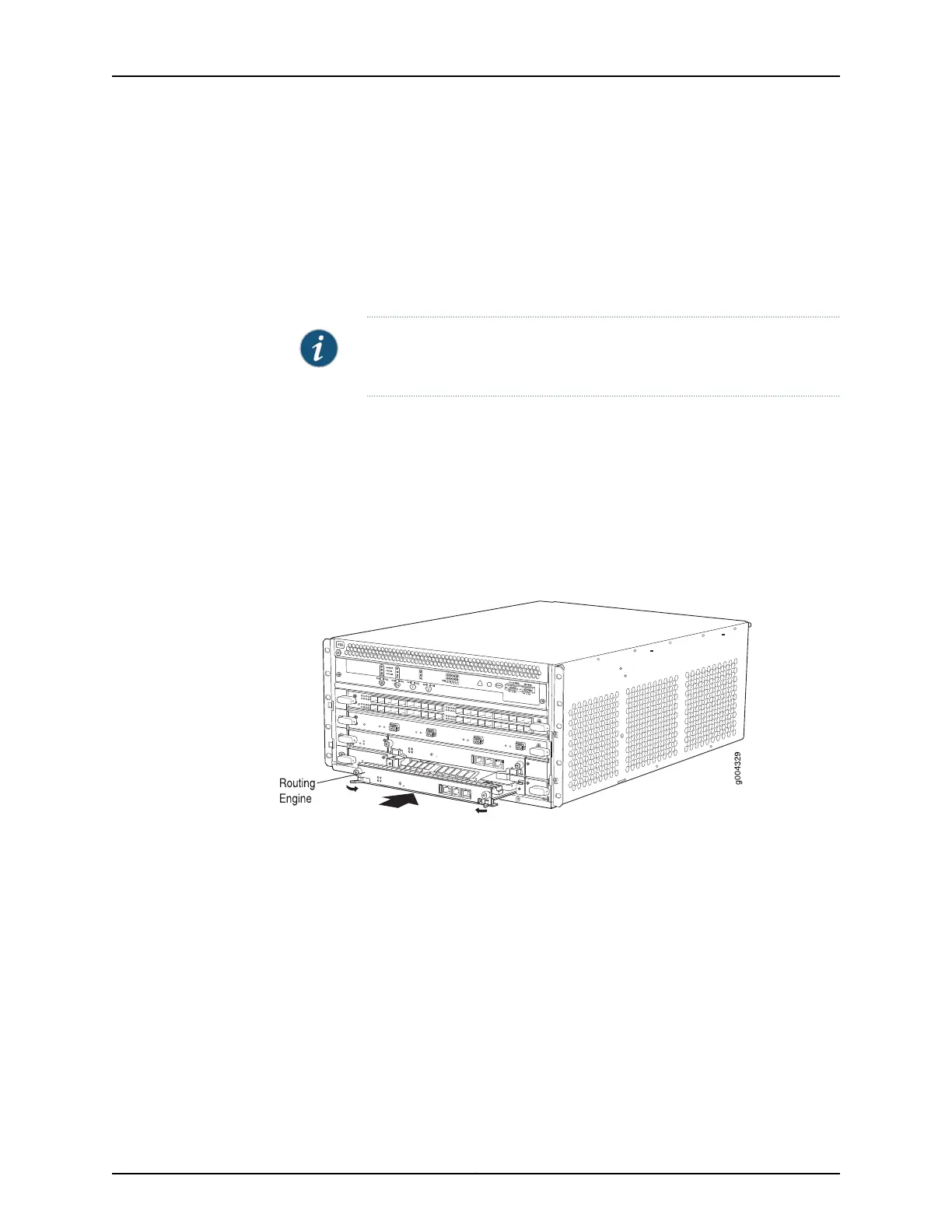
5. Press both of the ejector handles inward to seat the Routing Engine. Tighten the
captive screws on the top and bottom of the Routing Engine.
6. Connect the management device cables to the Routing Engine. After the Routing
Engine is installed, the ONLINE LED starts blinking green slowly.
7. Replace the former master RoutingEngine, RE0, with the RoutingEngine RE-S-X6-64G.
NOTE: The RoutingEngine RE-S-X6-64G is supportedonlyon the SCBE2.
RE-S-X6-64G is not compatible with the SCB or the SCBE.
The Routing Engine might require several minutes to boot. After the Routing Engine boots,
verify that it is installed correctly by checking the FAIL, RE0, and RE1 LEDs on the craft
interface. If the router is operational and the Routing Engine is functioning properly, the
green ONLINE LED on the Routing Engine lights steadily. If the red FAIL LED on the Routing
Engine lights steadily instead, remove and install the Routing Engine again. If the red FAIL
LED still lights steadily, the Routing Engine is not functioning properly. Contact your
customer support representative.
Figure 135: Installing a Routing Engine in an MX240 Router
317Copyright © 2017, Juniper Networks, Inc.
Chapter 24: Replacing Host Subsystem Components



 To Next Page