BLOWER ENHANCEMENTS
Access Blower Motor Belt
16-322 Aquastorm™ Series Options Guide Rev. 1
16
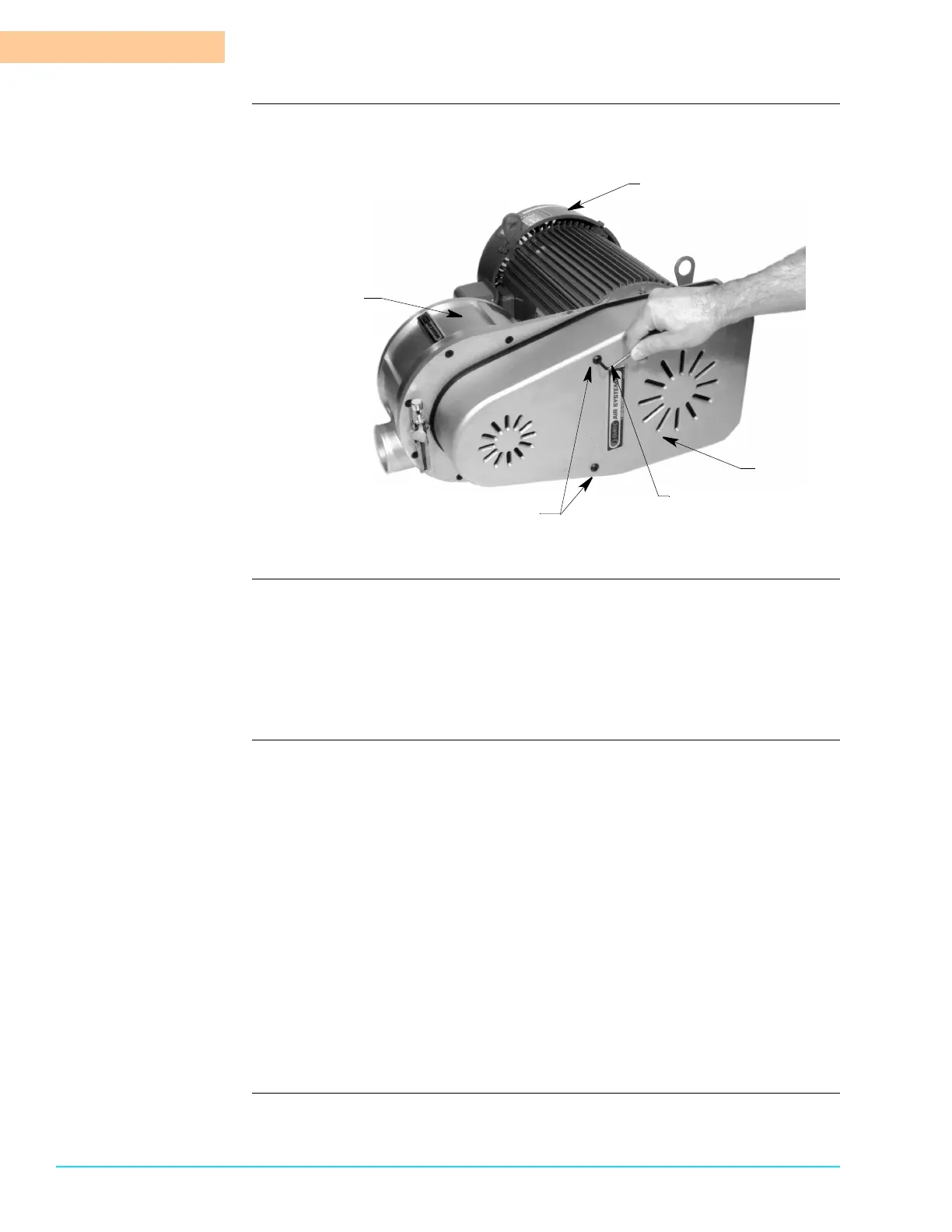
Photograph Figure 16–13 identifies the parts of the blower motor and shows how to remove
the blower belt guard cover to access the belt.
Figure 16–13
Tools required The following tools are required to complete blower motor rotation checks.
• Allen Wrench
•Pry Bar
• 5/16 in. Socket
• 1/4 in. Socket or Standard Screwdriver
Procedure Use the following steps to access the blower motor and remove the belt guard
cover.
1. Shut down Aquastorm™ system operation and ensure there is no product in
the system.
2. Ensure system power is Off.
3. Perform Lock Out/Tag Out steps. See Lock-Out Tag-Out on page 10.
4. Remove the system rear panels to access the rear blower section.
5. Remove the air filter housing and tube to the blower motor.
6. Use a 3/16 in. Allen wrench to loosen and remove the two (2) ¼-20 x ¾in.
socket head cap screws securing the turbine blower belt guard.
7. Remove the screws and the belt guard.
8. Set aside in a safe place.
9. Check and replace the blower motor belt, if necessary. See Remove/Replace
the Blower Belt on page 323.
Head Assembly
Motor
Blower Belt
1/4-20 x 3/4 in. Socket Head Screws
3/16 in. Allen Wrench
Guard Cover



 To Next Page