. . . . .
CONVEYOR ENHANCEMENTS
Lubricate CheckMate™ Drive Chain
2-9317-600-00-0 Aquastorm™ Series Options Guide 6-121
Lubricate CheckMate™ Drive Chain
Introduction The CheckMate™ drive motor is located in the rear prewash section of all
Aquastorm™ systems. The chain connects the motor to the CheckMate™ drive
shaft. This chain requires annual inspection and greasing.
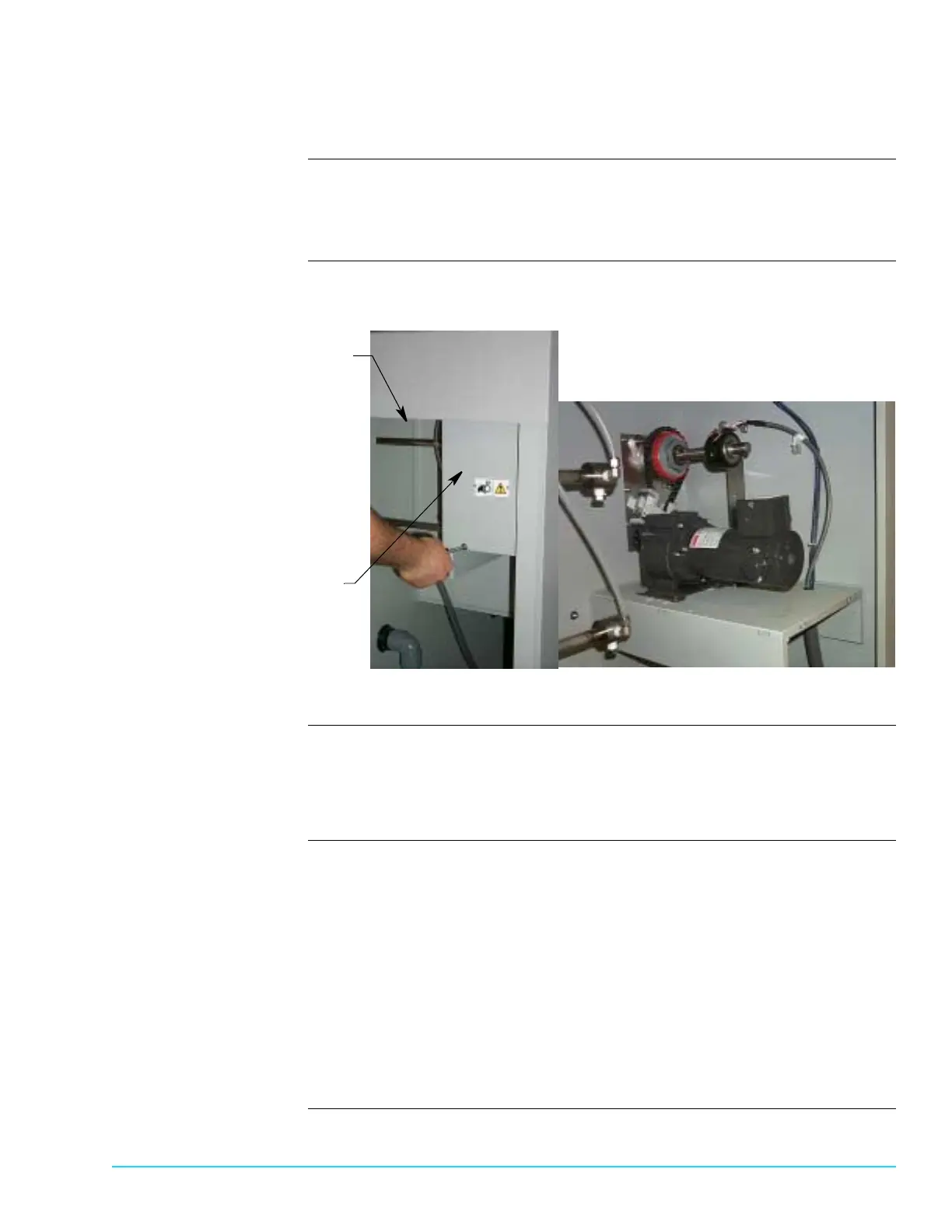
Photographs Figure 6–24 shows the rear prewash section and CheckMate™ motor cover
location.
Figure 6–30
Tools and Materials
Required
Use the following tools and materials:
• Magna-Lube™ G high temperature lubricant
• Phillips screwdriver
Procedure Use the following steps to access the lower motor chain:
1. Shut down Aquastorm™ system operation.
2. Ensure system power is Off.
3. Remove the rear system panel to access the rear prewash section.
4. Use a phillips screwdriver to remove the CheckMate™ motor cover.
5. Use the high temperature lubricant and rub a light layer of grease on the drive
chain.
6. Replace the CheckMate™ motor cover and secure it in place with a phillips
screwdriver.
7. Replace the rear system panel.
Rear Prewash
Section
CheckMate™
Motor Cover
CheckMate™ Motor
with Cover Removed


 To Next Page