DRYER ADD-ON MODULES
Install Sound Enclosure
14-264 Aquastorm™ Series Options Guide Rev. 1
14
Install Sound Enclosure
Introduction After installing a single or dual add-on dryer module the field service
representative must perform the following tasks:
• Replace the sound enclosure and utility sink unit on the exit end of Aquas-
torm™ system
• Modify stainless steel inlet plumbing connections and lines
• Modify CPVC drain plumbing connections and lines
Safety To ensure personal safety and avoid equipment damage observe the following:
CAUTION
Heavy Objects — The exit end sound enclosure is heavy. Arrange for three (3) or
four (4) people to lift the sound enclosure into position, or use the appropriate
rigging equipment to position the sound enclosure for installation.
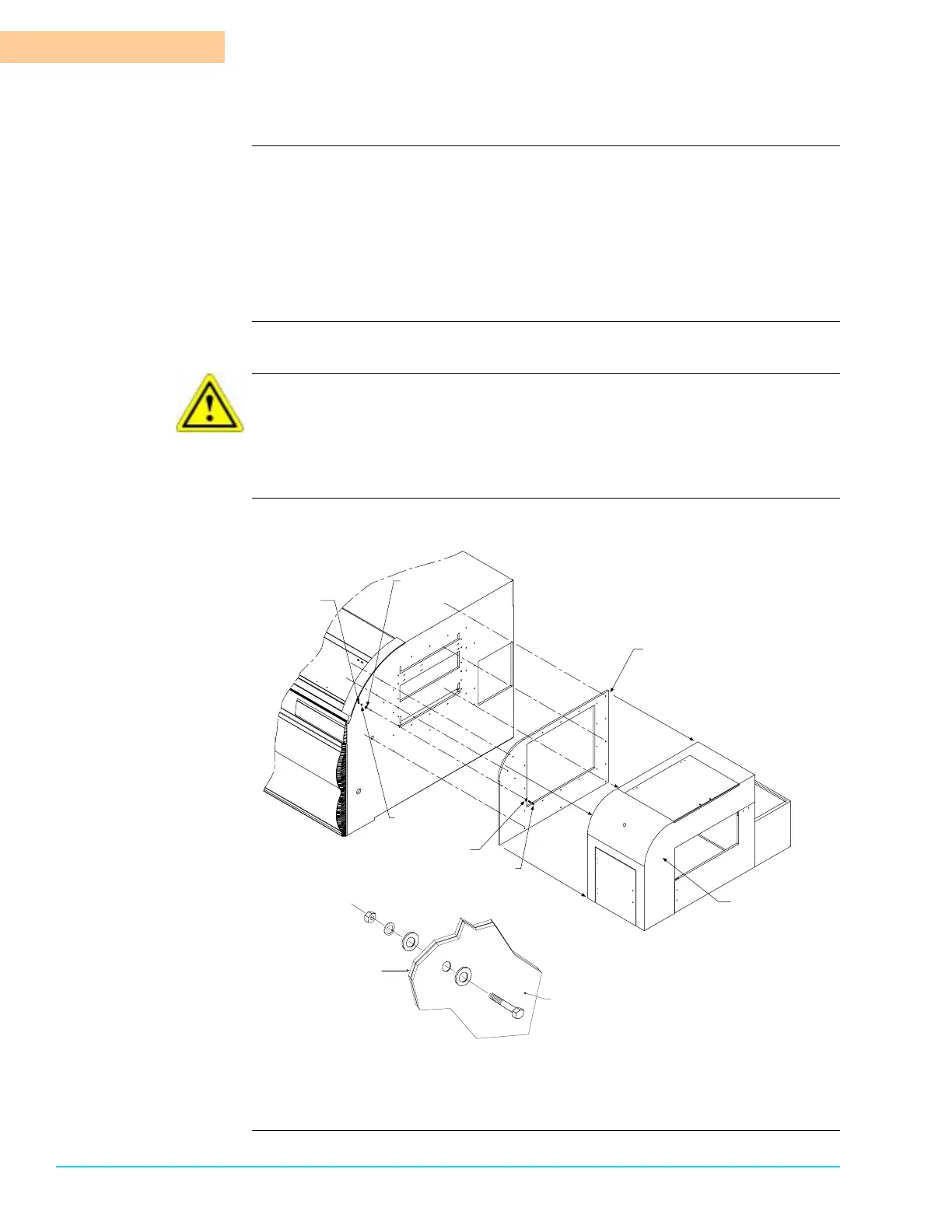
Diagram Figure 14–6 shows the sound enclosure installation drawing.
Figure 14–6
Close-Up Cut-Away View of
Mounting Hardware Configuration
Sound Enclosure
Bulkhead
Aquastorm 200™
Exit End Bulkhead
M6 Flat Washer
M6 x 40 Hex Head Bolt
Bolt Thru Exit Bulkhead and
Exit Enclosure (24 sets of hardware)
M6 Flat Washer
M6 Hex Nut
M6 Lockwasher
Sound Enclosure Bulkhead
shown Blown out from
Assembly to show
Mounting hole Locations
Sound Enclosure



 To Next Page