Data Menu
Pocket-3D Reference Guide
3-20
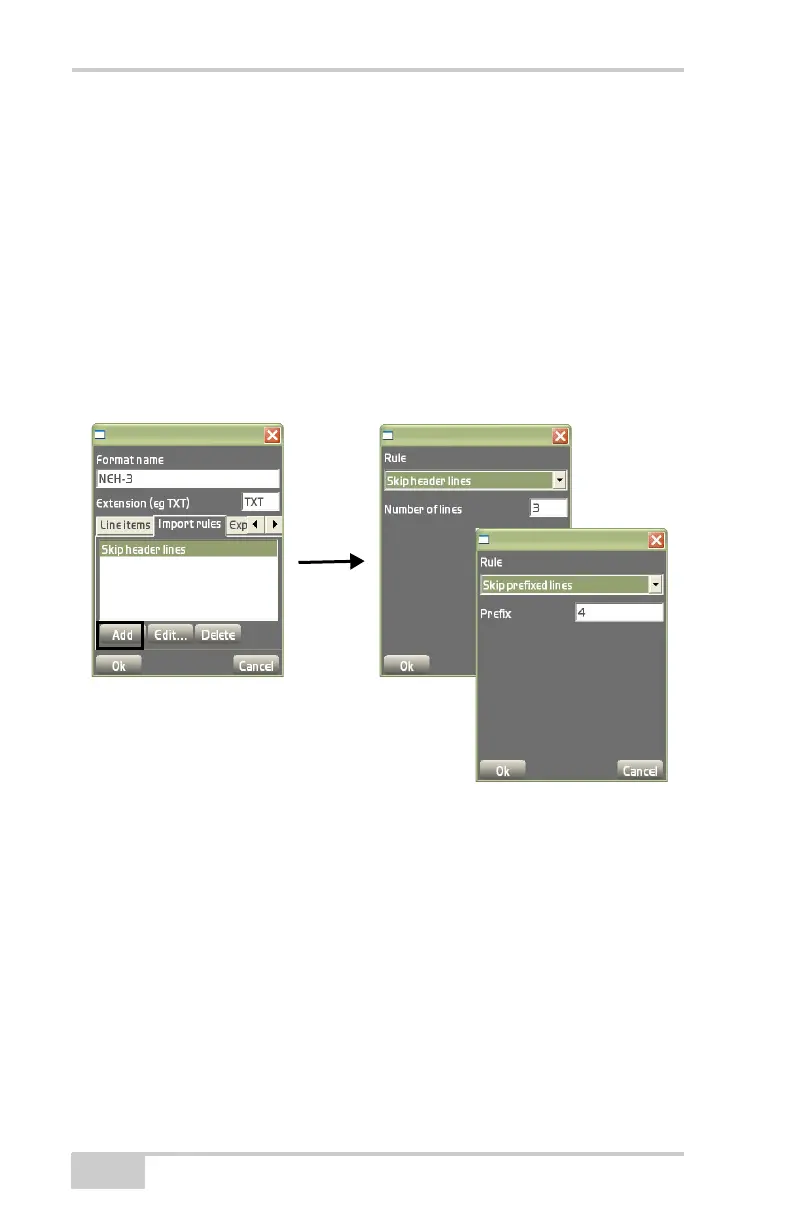
The Import Rules tab adds, edits, or deletes import rules for the
selected conversion format (
Figure 3-31).
• Add – on the Import rules tab, press Add to add an import rule
and it’s respective information (
Figure 3-31 on page 3-20). After
entering in all of the import rule’s information press Ok to save
the information.
– Rule: select either Skip header lines or Skip prefixed lines.
– Number of lines: enter the desired number of header lines to
skip during import.
– Prefix: enter the prefix of the lines to skip during import.
Figure 3-31. Add Import Rules
• Edit – on the Import rules tab, press Edit to edit the selected
import rule. See the “Add” bullet above and
Figure 3-31 for
details on editing the import rule.
• Delete – on the Import rules tab, press Delete to remove the
selected import rule (
Figure 3-31).
The Export rules tab adds, edits, or deletes export rules for the
selected conversion format (
Figure 3-32 on page 3-21).
• Add – on the Export rules tab, press Add to add an export rule
and it’s respective information, then press Ok to save the



 To Next Page