Stake-out
P/N 7010-0628
4-57
NOTE: A logging format must be defined prior to selecting a
target file.
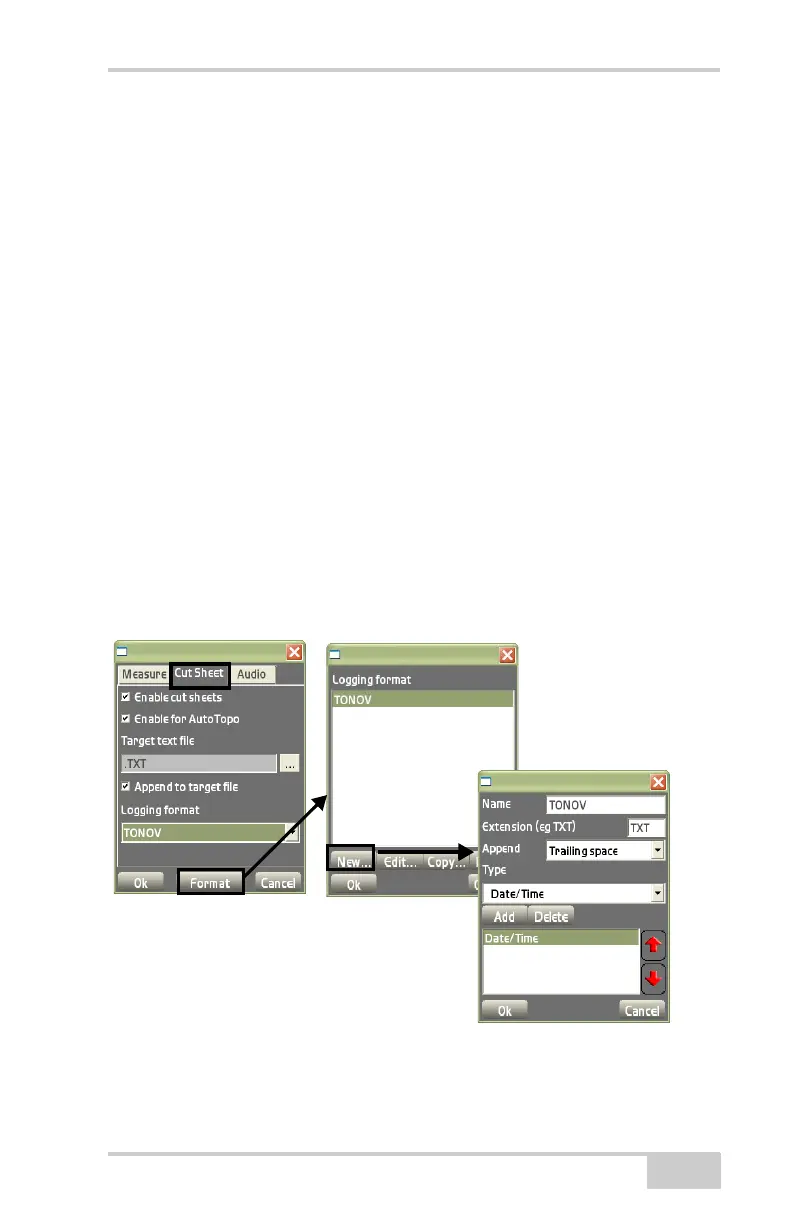
• Format – press to display the Logging format dialog box.
On the Logging format dialog box, do the following:
• New – press to create a new logging format. The logging
parameters dialog box displays (
Figure 4-85).
– Name: enter a name for the logging format from the pop-up
keyboard.
– Extension: select a file extension type.
– Append: select a parameter (spaces, comas, tabs) from the
drop-down box to add to your target file.
– Type: select the type of information to be stored from the
drop-down list to add the preferred information to be stored
for the previously defined format.
Your selection displays in the field below.
• Add/Delete – the selection from the Type selection displays here.
Press Delete to remove that selection.
Figure 4-85. Creating Cut Sheets
Logging
Parameters
Dialog Box
Logging
Format
Dialog Box



 To Next Page