24-Port 10/100Mbps Layer 2 Switch w/ 4 Gigabit Ports and 2 Shared Mini-GBIC Slots
6-4
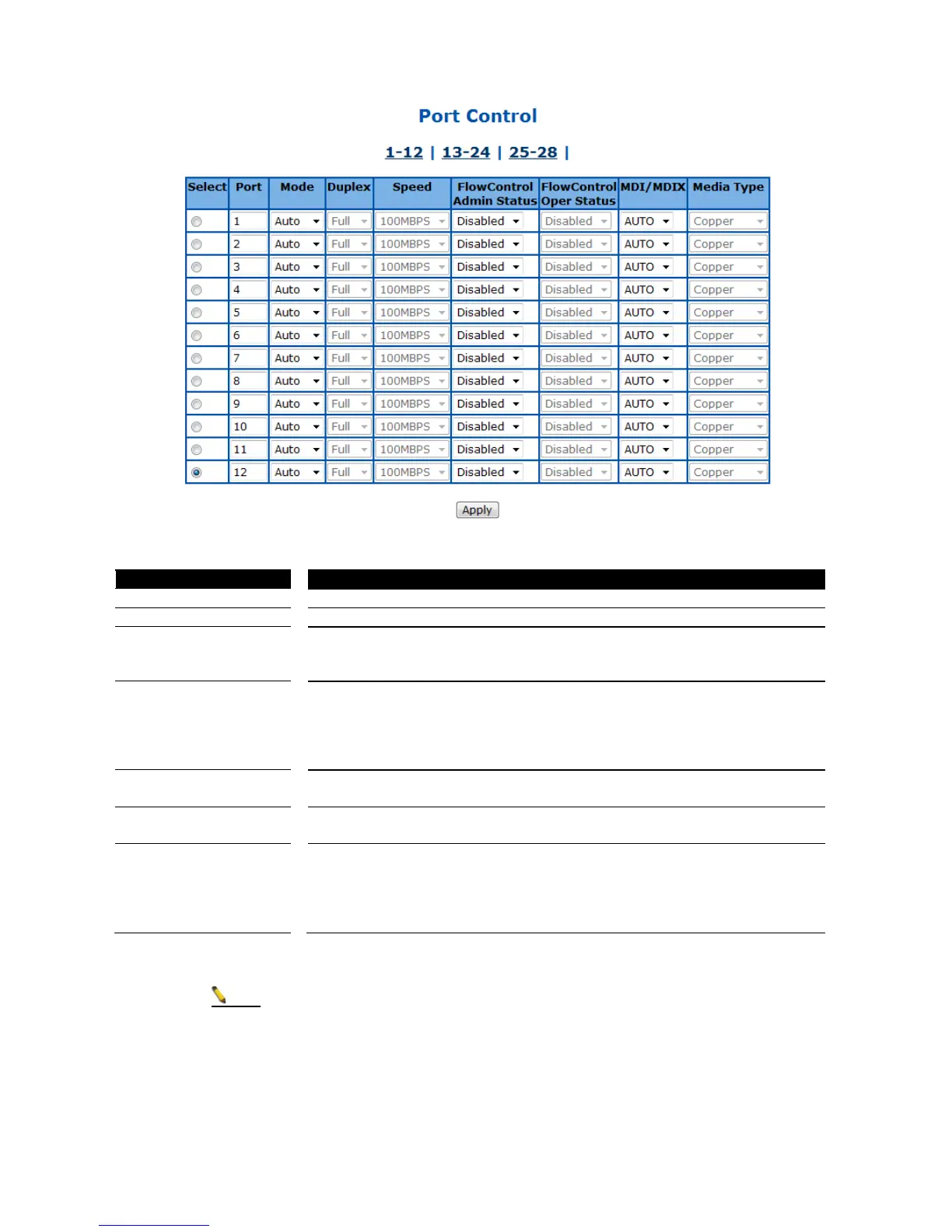
Figure 31 – Layer2 Management > Port Manager > Port Control
Specify the switch port to be configured.
To enable/disable auto-negotiation function on ports. Default is Auto.
To set the port duplex mode. Possible values are:
Full: Port runs at full duplex mode.
Half: Port runs at half duplex mode.
To set the port speed. Possible values are:
10MBPS: Port runs at 10Mbps.
100MBPS: Port runs at 100Mbps.
1GB: Port runs at 1000Mbps.
Only port 25-28 can run at 1000Mbps.
To enable/disable 802.3x flow control on ports. Default is Disabled.
To display the flow control operation status.
To set MDI or MDIX mode for ports. Possible values are:
Auto: Port performs the auto MDI/MDIX function.
MDI: Port fixed at MDI mode.
MDIXB: Port fixed at MDIX mode.
Default is Auto.
Click Apply to submit the changes.
The port speed and duplex settings can only be configured when auto-negotiation
disabled.



 To Next Page